

Zapier made the wiring easy. A trigger, a condition, an action, and an app on the other end. The trouble starts when the workflow lives inside email and involves several people, several outside parties, and commitments that can't slip. That's where operations teams start looking for something else.
The best Zapier alternative for email workflows depends on who owns the work.
This guide covers why that happens, what to look for in a replacement, the main options, and how to move live workflows over without breaking anything.
Why Operations Teams Look for a Zapier Alternative
Operations teams outgrow Zapier when their email workflows involve several owners, outside parties, and deadlines. The connector library is still excellent. The problem is that a general automation platform treats every email as a generic event, while ops work happens in threads that carry history, commitments, and people on both sides.
Email is where B2B operations actually happen
Contracts, vendor quotes, partner updates, RFP questions, and freight confirmations live in email by necessity. A supplier won't log into your project tool, and a broker won't join your Slack. So the work stays in the inbox, and any automation has to understand how that inbox is organized.
Where Zapier workflows start to struggle
Zapier is great for connecting apps and automating repetitive tasks. But as email workflows become more complex, teams can run into four challenges:
- Task-based pricing can add up. In Classic Zaps, each successful billable action consumes a task. A workflow performing four billable actions for 3,000 emails a month can use 12,000 tasks.
- Complex logic requires more maintenance. As workflows grow, managing conditional paths, dependencies, and exceptions can become increasingly difficult.
- Business context isn't built in. Zapier can recognize email threads and trigger actions based on messages, but understanding customer history, previous decisions, or missed deadlines requires additional configuration.
- Email ownership and handoffs need extra setup. Zapier provides workflow logs and audit capabilities, but tracking who's responsible for each conversation, managing approvals, and maintaining a complete history of handoffs may require additional tools and integrations.
There is also a judgement gap. Two almost identical emails about a contract renewal can mean very different things, one routine and one a sign the client is about to walk. A generic builder leaves that judgement to whoever sets it up.
Gartner expects more than 40% of agentic AI projects to be canceled by the end of 2027, citing rising costs and unclear business value. Building agents from a blank page is a big part of why. For more numbers like this, see our roundup of agentic AI statistics.
What to Look For in a Zapier Alternative for Email Workflows
A good Zapier alternative for ops teams should know what a thread, an owner, and a deadline are before you configure anything. Use these criteria when comparing tools:
- Native email triggers. New message, new reply, label applied, no reply after a set window, and a deadline approaching.
- Cross-app actions. Updating a CRM record, creating a calendar event, posting to a chat channel, or writing to a spreadsheet.
- Built-in inbox architecture. Ownership, assignment, handoffs, and SLAs that work across the team without custom code.
- Operational context. Knowledge of past threads, contracts, and counterparties, so an agent can tell a routine message from a risky one.
- Permission levels and an audit trail. Clear rules for which actions need human approval, and a log of every action taken.
- Predictable pricing. Per-seat pricing is easier to forecast than per-task pricing once volume grows.
If you're still getting familiar with the concepts, our guide on what are AI agents covers the basics.
The Best Zapier Alternatives for Email Workflows
Zapier alternatives for email fall into three groups: other general automation platforms, the native AI built into Gmail and Outlook, and email-native agent builders. Each one fits a different team.
Make and n8n: general automation platforms
Make offers a visual canvas that handles branching logic more clearly than a long Zapier flow. n8n is open source, can be self-hosted, and charges by workflow execution instead of by step, which helps at higher volume. Both connect a mail trigger to an LLM and then to almost any other app.
The limits are the same as Zapier's. Neither was built for email, so inbox architecture, thread context, and ownership rules still have to be built by hand.
Gmelius: an email-native agent builder
Gmelius applies if-this-then-that logic directly to the inbox. A visual builder connects an email trigger to actions in a CRM, a calendar, or a chat tool, with no code. Inbox architecture, permissions, ownership, and the audit log are already built in.
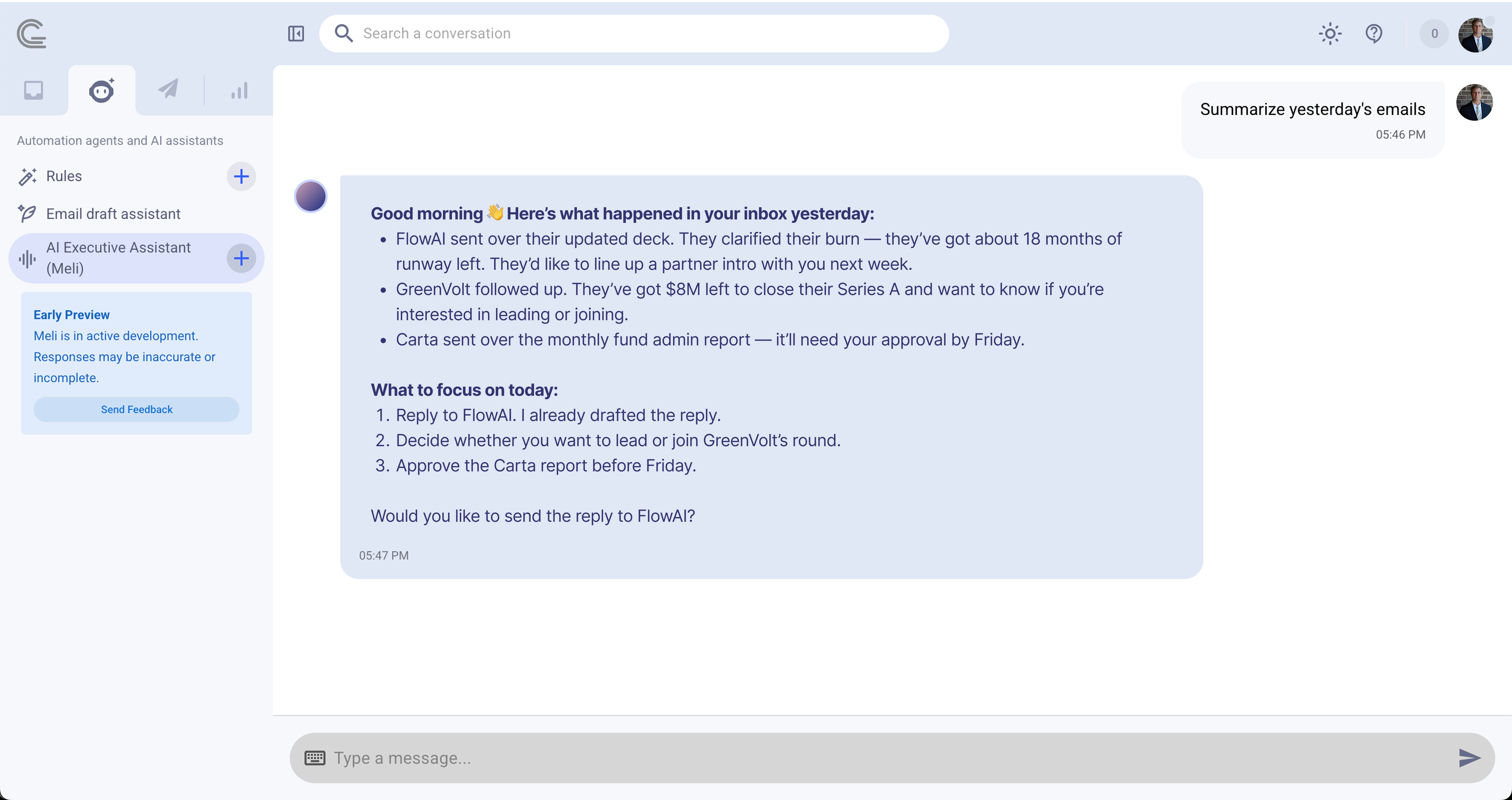
The bigger difference is Meli, the knowledge graph underneath. Meli has learned from years of team email operations: how work gets assigned, what usually comes right before an escalation, and which response times keep an account healthy. That means your automation agents start from tested defaults instead of a blank page.
Gemini in Gmail and Copilot in Outlook: native AI
The AI built into Gmail and Outlook summarizes threads, suggests replies, and needs no setup. Customization stays shallow, though, and actions rarely reach beyond the vendor's own suite. This works for one person. It doesn't hold up when five people and three outside parties share responsibility for a workflow. For a closer look at single-user tools, see our AI email assistants comparison.
How Agent Orchestration Replaces Long Automation Flows
Instead of one long flow with dozens of branches, an email-native platform splits the work across four automation agents that pass context to each other. Each agent has one job, which keeps the setup easy to read and easy to fix.
- Triage reads the inbound message, classifies it, and pulls the relevant context: past threads, contract terms, owners, and downstream impact.
- Routing assigns the work and loops in the right people, internal or external, including brokers, partners, and suppliers.
- Drafting proposes the next action, such as a reply, a quote, a scope change, or an escalation, already loaded with the context Triage found.
- Tracking watches threads, SLAs, and deadlines, nudges when something stalls, and rolls up patterns over time like vendor scorecards or RFP win and loss history.
The agents themselves aren't the hard part. Any team can wire up a classifier. What a solo AI tool can't reconstruct is the operational memory behind each decision, and that's the layer Meli supplies. Our list of the best AI agents shows how other tools approach this.
Example: A Freight Coordination Workflow
The foundation of an effective freight email workflow is an inbox that understands context, keeps conversations organized, and helps teams coordinate their next steps.
Here's how the same request might play out in Zapier and Gmelius.
A carrier emails to say a container will arrive two days late.
In a basic Zapier flow, the incoming message triggers an AI classification step, creates a record in a spreadsheet, and sends a Slack alert. The team receives the information, but checking previous commitments, identifying the account owner, and preparing a customer update may require additional automation steps or manual work.
In Gmelius, Triage identifies the email as a delivery delay and categorizes it accordingly. Meli, the AI chief of staff, draws on available conversation history, including previous interactions with the carrier. Routing assigns the conversation to the appropriate account owner, while Drafting prepares a customer update using the available shipment details and revised ETA. Tracking helps the team monitor the conversation and identify follow-ups that still need attention.
The difference is how the work is coordinated. Instead of building separate automations for every step, Gmelius brings classification, context, ownership, drafting, and follow-up tracking together in the inbox.
The same approach applies to vendor coordination, deal desks, RFP responses, and agency account management.
How to Switch From Zapier Without Breaking Live Workflows
The safest migration moves one workflow at a time and gives each new agent more authority only after it proves itself on real threads.
- Pick one narrow workflow. Choose a single label with high volume and a clear right answer, such as supplier confirmations or RFP intake.
- Run in shadow mode. Let the agent process live mail and record what it would have done while the Zapier flow keeps running.
- Compare against a golden set. Test 50 to 100 real threads with known outcomes, including at least ten that should escalate. Aim for classification accuracy above 90%.
- Raise permissions in stages. Move from read-only to drafts, then to internal actions like labels and assignment, then to sends with one-click approval.
- Turn off the old flow. Once the agent matches or beats it for two weeks, retire the Zap and move to the next workflow.
Keep the agent's operating instructions under version control, even in a simple shared doc. When an agent starts behaving oddly, a recent edit to its instructions is almost always the cause. Our guide on how to build an AI assistant goes deeper on writing those instructions.
Frequently Asked Questions
What is the best Zapier alternative for email workflows?
For operations teams managing vendors, deals, partners, or shipments over email, an email-native agent builder like Gmelius is the strongest option. It combines visual workflow building with inbox architecture, ownership rules, and operational context that general platforms lack.
Is there a free Zapier alternative?
Yes. n8n's community edition is free to self-host, and Make has a free tier. Gmelius also offers a free trial, so ops teams can test an agent on a real label before committing.
Can Zapier handle team email workflows?
Zapier can trigger on new emails and pass them to other apps. It doesn't natively manage thread ownership, handoffs, SLAs, or audit trails, so teams usually build those pieces by hand.
Do I need to code to replace Zapier?
No. Gmelius and Make both use visual builders. n8n is also visual but tends to suit teams with some technical capacity, especially when self-hosted.
Bottom Line: Choosing a Zapier Alternative for Email-Based Operations
The right Zapier alternative depends on how many people share the work. Native AI in Gmail or Outlook covers individuals. Make and n8n cover cross-tool workflows at modest volume. Operations teams coordinating vendors, deal desks, partners, RFPs, or freight need a platform built for email, with inbox architecture and operational context included from day one.
That's the gap Gmelius fills. Its four automation agents handle triage, routing, drafting, and tracking, and Meli gives them the memory of how your operations actually run. Your team edits proven defaults instead of inventing rules from scratch.
The fastest way to see the difference is to build one narrow agent against a single label and let Meli propose the categories and thresholds. Within a day, you'll know how much of the work the platform has already done. Try Gmelius for free and move your first email workflow off Zapier this week.