




Whether it's the price tag, the politics, or simply a better tool on the horizon, the number of users figuring out how to cancel ChatGPT subscription plans has surged in 2026. Competitors are sharper, controversies are louder, and $20 a month no longer feels like a no-brainer.
This guide walks through everything you need to know: the real reasons people leave, the exact steps for canceling ChatGPT Plus across every platform, and which alternatives are actually worth switching to, including specialized AI tools that outperform general-purpose chatbots for specific workflows.
Top Reasons for Canceling ChatGPT Subscription
The decision to cancel a ChatGPT subscription rarely comes down to a single frustration. It's usually a pile-up. Here are the most common reasons customers cite when pulling the plug.
1. The free tier caught up
OpenAI's own free plan now includes GPT-5.2, web browsing, and image generation — features that were Plus exclusives not long ago. For users who aren't hammering the tool daily, the paid plan increasingly feels like paying for headroom they never touch. The free tier caps users at 10 messages every five hours, but for casual usage, that's often enough.
2. Output quality feels inconsistent
This is perhaps the most widespread complaint in AI communities. After model updates, users frequently report that responses feel different — sometimes dumbed down, sometimes overly verbose, sometimes just off. Reddit threads are filled with users lamenting that models "felt worse after updates," and that inconsistency erodes trust over time.
3. Ethical and political concerns
In early 2026, the online discourse around how to cancel ChatGPT exploded after OpenAI signed a deal with the Pentagon to deploy its models in classified environments.
This came hours after Anthropic's negotiations with the Department of Defense collapsed — Anthropic had refused to allow its AI to be used for mass domestic surveillance or fully autonomous weapons. The optics hit hard. A website called "QuitGPT" claims over 1.5 million users joined a boycott pledge and ChatGPT uninstalls spiked 295% in a single day.
4. Sycophantic responses
Creative professionals and developers consistently flag this issue. ChatGPT has a tendency to agree with the user, validate weak ideas, and compliment mediocre drafts rather than offering honest, constructive feedback. For anyone relying on an AI as a genuine thinking partner, that behavior is a dealbreaker.
5. Memory and context limitations
Despite improvements, ChatGPT still struggles with long-running projects. Each new chat starts fresh, requiring users to re-explain project context, re-upload files, and re-establish requirements. For multi-day workflows, this creates significant friction, a problem that purpose-built tools like Gmelius's AI email assistant solve by embedding AI directly into the workflow, where context already exists.
6. The emergence of strong alternatives
Claude, Gemini, and Perplexity have all matured rapidly. The "only game in town" argument for ChatGPT no longer holds, and many users searching how to cancel ChatGPT are doing so because a competitor simply fits their workflow better.
Is ChatGPT Plus Too Expensive?
At $20 per month, ChatGPT Plus sits at the exact same price point as Claude Pro, Gemini Advanced, and Perplexity Pro.

So, more than being bothered by the fact that ChatGPT Plus may be more expensive than the competition, users ask if $20 delivers enough differentiated value to justify the recurring charge.
For power users who rely on deep research, advanced reasoning, custom GPTs, and Codex, the subscription often pays for itself in time saved. But a growing number of customers find themselves paying $240 per year for features they use sporadically — or for capabilities that the free tier now partially covers.
OpenAI's launch of ChatGPT Go at $8 per month further muddied the waters, creating a mid-tier option that handles most casual-to-moderate use cases at a lower cost.
Now, whether $20 is a lot of money is not really the problem. It's whether the gap between free-tier ChatGPT and Plus-tier ChatGPT is wide enough to matter for a given user's workflow.
For many, the answer has shifted from "yes" to "probably not," and that's exactly why cancelling ChatGPT Plus has become much more of a mainstream move recently.
Step-by-Step Process to Cancel ChatGPT Plus Subscription
The process of canceling ChatGPT Plus depends entirely on where the subscription was originally purchased. This is the single most important thing to know before you start: cancellation must happen through the same platform used to subscribe.
A subscription created through Apple's App Store cannot be canceled on chatgpt.com, and vice versa.
Here's how to cancel ChatGPT subscription plans across every platform.
On the Web (chatgpt.com)
This applies to subscriptions billed directly through OpenAI via Stripe.
- Go to chatgpt.com and sign in with the account tied to the Plus subscription.
- Click the profile icon in the bottom-left corner of the sidebar.
- Select Settings, then navigate to My Plan or Manage Subscription.
- On the billing page, click Cancel Plan.
- Confirm the cancellation when prompted.
After confirmation, Plus features remain accessible until the end of the current billing cycle. The account then reverts to the free tier. Chat history, custom GPTs, and saved data are not deleted.
On iPhone or iPad (Apple App Store)
If the subscription was created inside the ChatGPT iOS app, Apple handles the billing — not OpenAI. The chatgpt.com dashboard won't show a cancellation option for these accounts.
- Open the Settings app on the device.
- Tap the Apple ID name at the top of the screen.
- Select Subscriptions.
- Find ChatGPT in the list and tap it.
- Tap Cancel Subscription and confirm after entering credentials.
Plus access continues until the billing period ends. Critically, deleting the ChatGPT app does not cancel the subscription — Apple must process the cancellation directly.
On Android (Google Play Store)
Google Play subscriptions follow a similar pattern.
- Open the Google Play Store and verify the correct Google account is signed in.
- Tap the profile icon, then go to Payments & Subscriptions > Subscriptions.
- Select the ChatGPT subscription.
- Tap Cancel Subscription and follow the prompts.
As with iOS, uninstalling the app will not stop billing. The subscription must be formally canceled through Google Play.
Important Things to Know After Canceling
- No partial refunds: OpenAI's policy does not offer refunds for unused portions of a billing cycle. If a user cancels on day two of a monthly cycle, Plus features remain active for the rest of the month, but no money is returned. Exception: EU, UK, and Turkey residents have a 14-day withdrawal right under regional consumer protection law.
- Resubscribing is instant: Users can re-activate ChatGPT Plus at any time through the Plans page. A new billing cycle starts immediately.
- Cancel at least 24 hours early: To avoid being charged for the next period, OpenAI recommends canceling at least 24 hours before the next billing date.
- Team and Enterprise plans are different: Workspace-based plans require cancellation by the workspace owner or billing admin, and Enterprise contracts may involve notice periods.
For anyone who's been searching how to cancel ChatGPT subscription and running into dead ends, the most common issue is simply trying to cancel on the wrong platform. Check the original billing source first — that's where the cancel button lives.
For the most up-to-date official instructions, you can always refer to the OpenAI Help Center cancellation guide.
LLMs to Consider if Canceling ChatGPT Plus
Once a user knows how to cancel ChatGPT, the next step is figuring out where to go. Understanding how to cancel ChatGPT subscription is one thing; knowing where to go next is equally important. The competitive landscape in 2026 is genuinely strong, and several platforms offer features that match — or exceed — what ChatGPT Plus provides. Here are three worth evaluating.
1. Claude by Anthropic
Claude has emerged as the most talked-about ChatGPT alternative in 2026, and the momentum behind it is hard to ignore. In early March, Claude surged to the number one spot on Apple's U.S. App Store, overtaking ChatGPT for the first time.
Anthropic reported record daily signups, with free users growing over 60% since January and paid subscribers more than doubling.
The catalyst was political — Anthropic's refusal to allow Claude to be used for mass domestic surveillance or autonomous weapons, followed by OpenAI's Pentagon deal — but the product itself has earned its reputation independently.
Claude's 200,000-token context window dwarfs ChatGPT's, making it significantly better for long documents, complex codebases, and multi-step projects. Its writing is widely regarded as more natural and less formulaic.
Anthropic also launched a memory import feature that directly targets users who are cancelling ChatGPT Plus. The tool allows customers to export saved memories, preferences, and context from ChatGPT and import them into Claude, effectively letting users cancel ChatGPT and switch platforms without starting from scratch.
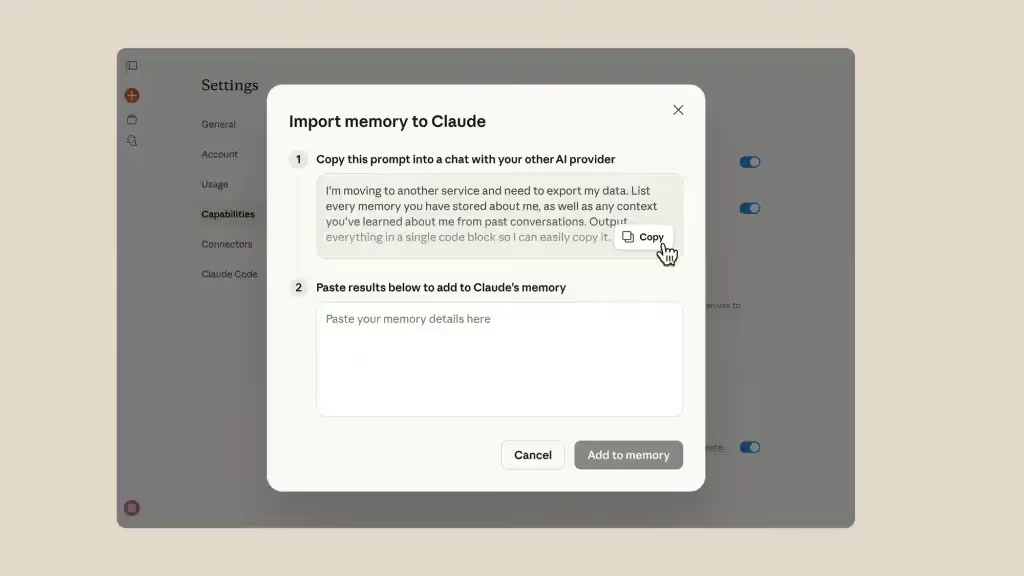
The feature was initially limited to paid subscribers but has since been made available to all users for free. Claude Pro is priced at $20 per month, identical to ChatGPT Plus.
2. Google Gemini
Gemini Advanced, also priced at $20 per month (bundled with Google One AI Premium), plays a fundamentally different card than Claude or ChatGPT: ecosystem integration. For users already embedded in Google Workspace (Gmail, Docs, Sheets, Drive) Gemini plugs directly into those tools, making it less of a standalone chatbot and more of an ambient AI layer across the productivity suite.
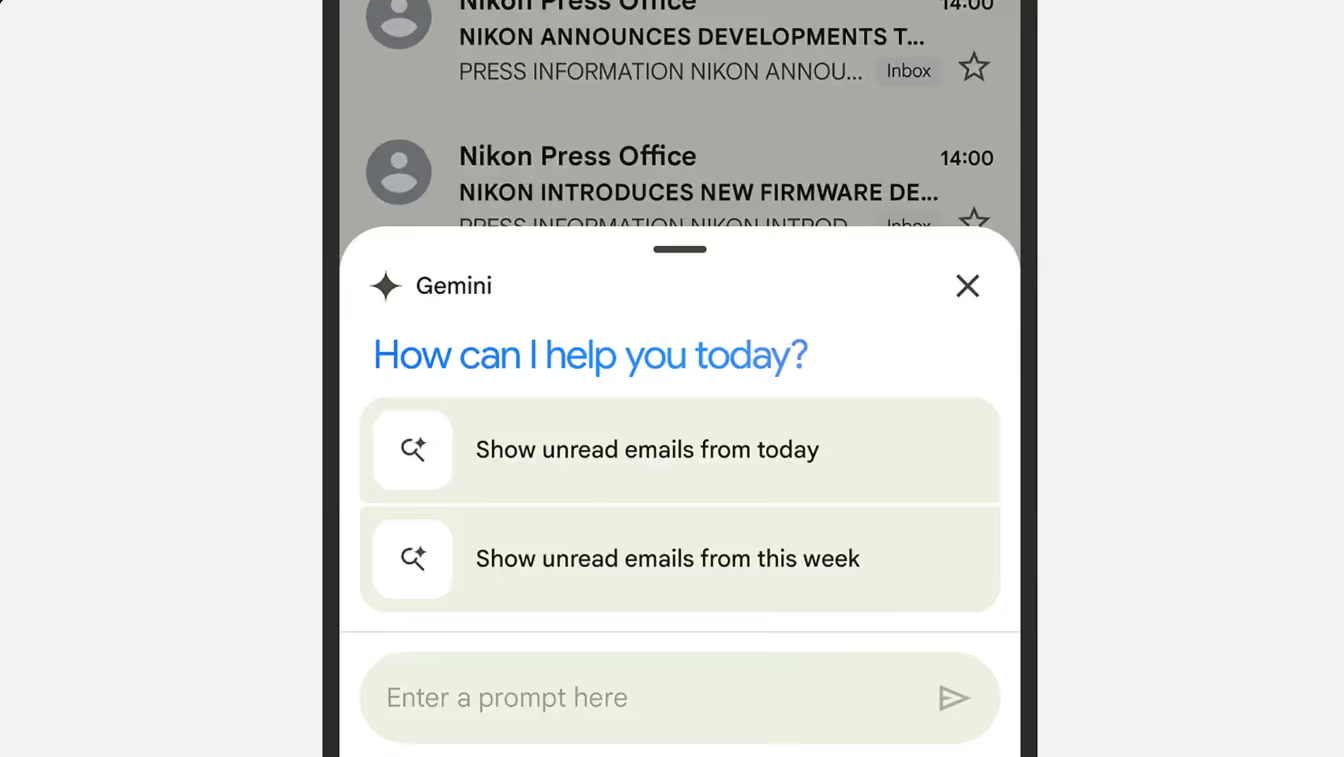
Gemini 3.1 Pro leads the pack in reasoning benchmarks (94.3% on GPQA) and supports a one-million-token context window, which is the largest among major consumer-facing LLMs. It also handles multimodal input — video, audio, images, and text — more natively than most competitors.
- Best for: Users deep in the Google ecosystem who want AI integrated into their existing tools rather than running as a separate app.
- Trade-off: Gemini's conversational experience and creative writing capabilities lag behind Claude and, in some areas, ChatGPT. It's an infrastructure play more than a "chat with an AI" play.
- Free tier: Generous. Gemini's free plan offers access to capable models with reasonable message limits.
3. Perplexity AI
Perplexity occupies a different niche entirely. Rather than competing as a general-purpose chatbot, it positions itself as an AI-powered answer engine — closer to a next-generation search tool than a creative assistant.
Every response Perplexity generates comes with numbered, clickable citations linking back to source material. For researchers, journalists, analysts, and anyone whose work depends on verifiable information, this approach solves a fundamental trust problem that ChatGPT still struggles with. ChatGPT can browse the web, but Perplexity was architecturally built around real-time retrieval and source transparency.

- Best for: Research-heavy workflows, fact-checking, market analysis, and any task where "where did this information come from?" is a critical question.
- Trade-off: Perplexity is not built for creative writing, long-form content generation, or conversational depth. It retrieves and synthesizes — it doesn't brainstorm or riff.
- Pricing: Perplexity Pro runs $20 per month and includes over 300 Pro searches per day with access to multiple underlying models, including GPT and Claude.
For users figuring out how to cancel ChatGPT, the strongest approach in 2026 may not be choosing a single replacement but adopting a portfolio strategy — one tool for creation, another for research, and free tiers filling in the gaps.
Also read: ChatGPT vs. Claude vs. Gemini vs. Perplexity
ChatGPT vs. Specialized LLM Wrappers
One underappreciated reason users grow frustrated with ChatGPT has nothing to do with model quality. It's that general-purpose chatbots are, by design, general-purpose. They try to do everything, and in doing so, they often do specific things poorly.
Take email management as a prime example. A user can ask ChatGPT to draft a reply, but the process involves copying text out of an inbox, pasting it into a chat window, providing context about tone and audience, waiting for a response, then copying the result back. It works — but the friction is real. And as Gmelius's ChatGPT email review found, critical context (like time zones, calendar availability, or existing thread tone) routinely falls through the cracks when you're working outside the inbox.
The same friction applies to coding workflows, CRM updates, customer support triage, and dozens of other tasks that happen inside specialized tools — not inside a chat interface.
This is where purpose-built LLM platforms come in. Tools like Gmelius take the underlying power of large language models and wrap them in domain-specific features designed for a single job: in Gmelius's case, email collaboration and email automation inside Gmail.
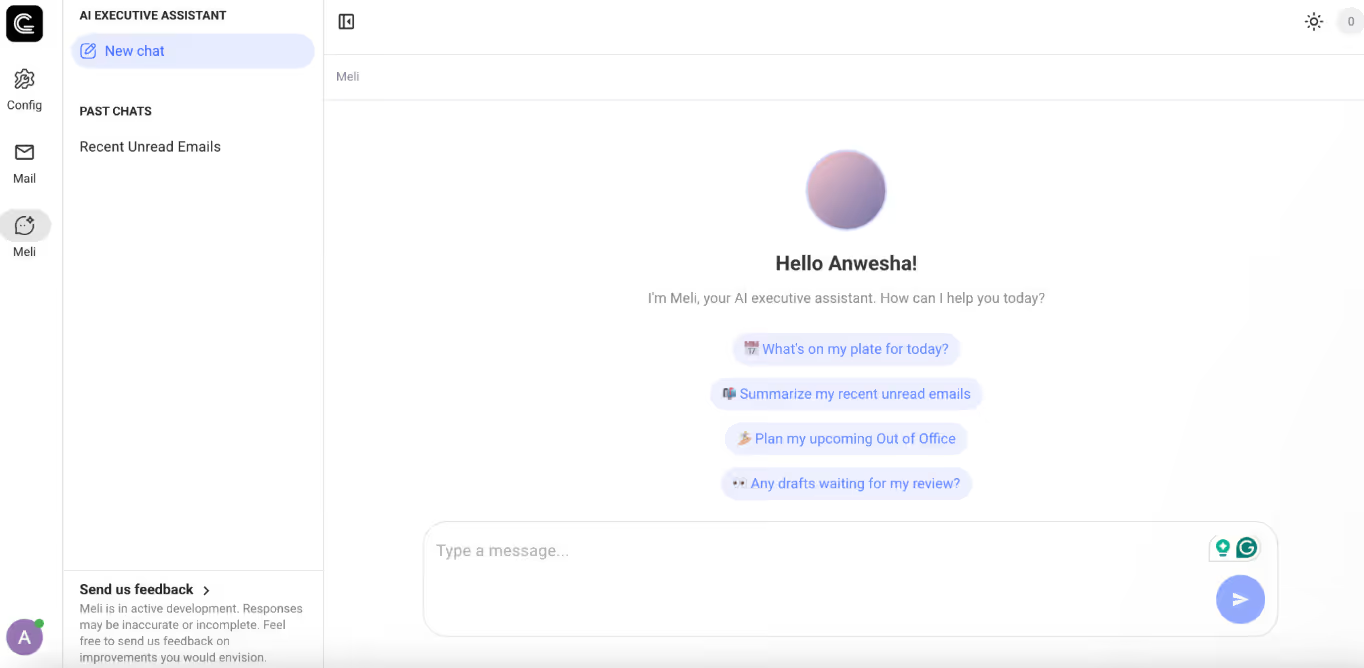
Instead of asking users to context-switch between their inbox and a chatbot, Gmelius's AI assistant operates natively within the email workflow — with access to conversation history, shared inbox threads, and custom automation rules. Its AI assistant, Meli, monitors shared folders, suggests drafts proactively, and automatically assigns emails to the right team member based on topic and workload. There's no prompt engineering required, no copy-paste loop, and far less room for the kind of generic, off-target responses that drive ChatGPT frustration in the first place.
Teams managing shared addresses like support@ or sales@ get even more out of this approach. A shared inbox in Gmail powered by Gmelius means every incoming message is visible, assignable, and trackable — with AI drafting context-aware replies without being asked.
This pattern extends beyond email. Specialized LLM wrappers exist for coding (Cursor, Windsurf), legal research, sales outreach, and customer support — each embedding AI into the tool where the work actually happens.
For users who find themselves repeatedly fighting ChatGPT to do one specific thing well, the answer might not be a better chatbot. It might be a purpose-built tool that already understands the job.
ChatGPT Domination Is Ending, and That's a Good Thing
The era of ChatGPT as the default — the one AI assistant everyone uses because nothing else came close — is winding down. And for customers, that's an unambiguously positive development.
Competition has driven every major AI lab to ship faster, price more aggressively, and differentiate more clearly. Users now have genuine choices that reflect genuine differences in philosophy, capability, and design. Knowing how to cancel a ChatGPT subscription is, therefore, becoming a mainstream decision point that reflects a maturing market where loyalty follows value, not habit.
ChatGPT remains one of the most capable AI tools available. But the lock-in is gone, the switching costs are falling, and the best tool for the job increasingly depends on what the job actually is. That's exactly how a healthy technology market is supposed to work.
If email is central to your workflow, don't replace one general-purpose tool with another. Start your free Gmelius trial and see what AI looks like when it's built specifically for your inbox — drafting replies, routing messages, and managing shared inboxes inside Gmail, automatically.
FAQs
1. Can I get a refund after canceling ChatGPT Plus?
No, OpenAI doesn't issue partial refunds for unused time in a billing cycle. Your Plus access simply continues until the period ends. Exception: EU, UK, and Turkey residents can request a full refund within 14 days of purchase.
2. Does deleting the ChatGPT app cancel my subscription?
No, and this is one of the most common mistakes users make. If you subscribed through iOS or Android, billing is managed by Apple or Google — deleting the app won't stop charges. Cancel through Apple ID > Subscriptions or Google Play > Payments & Subscriptions.
3. What happens to my chat history when I cancel ChatGPT Plus?
Nothing. Your history, custom GPTs, and saved data stay intact. You just lose access to Plus-exclusive features like higher message limits and advanced tools once the billing cycle ends.
4. Is there a free alternative to ChatGPT Plus worth using in 2026?
Several. OpenAI's free plan, Claude's free tier, Gemini, and Perplexity all offer solid capabilities at no cost. For email workflows specifically, Gmelius offers a free trial with AI drafting and shared inbox features built into Gmail.
5. Why are so many people canceling ChatGPT in 2026?
It's a combination of the free tier catching up, ethical concerns over OpenAI's Pentagon deal, inconsistent output quality, and stronger competitors. For many users, the question has shifted from "should I pay for ChatGPT?" to "is a general-purpose chatbot even the right tool for my workflow?"


.avif)
.avif)
%20(3).avif)
.avif)
.avif)
.avif)





