
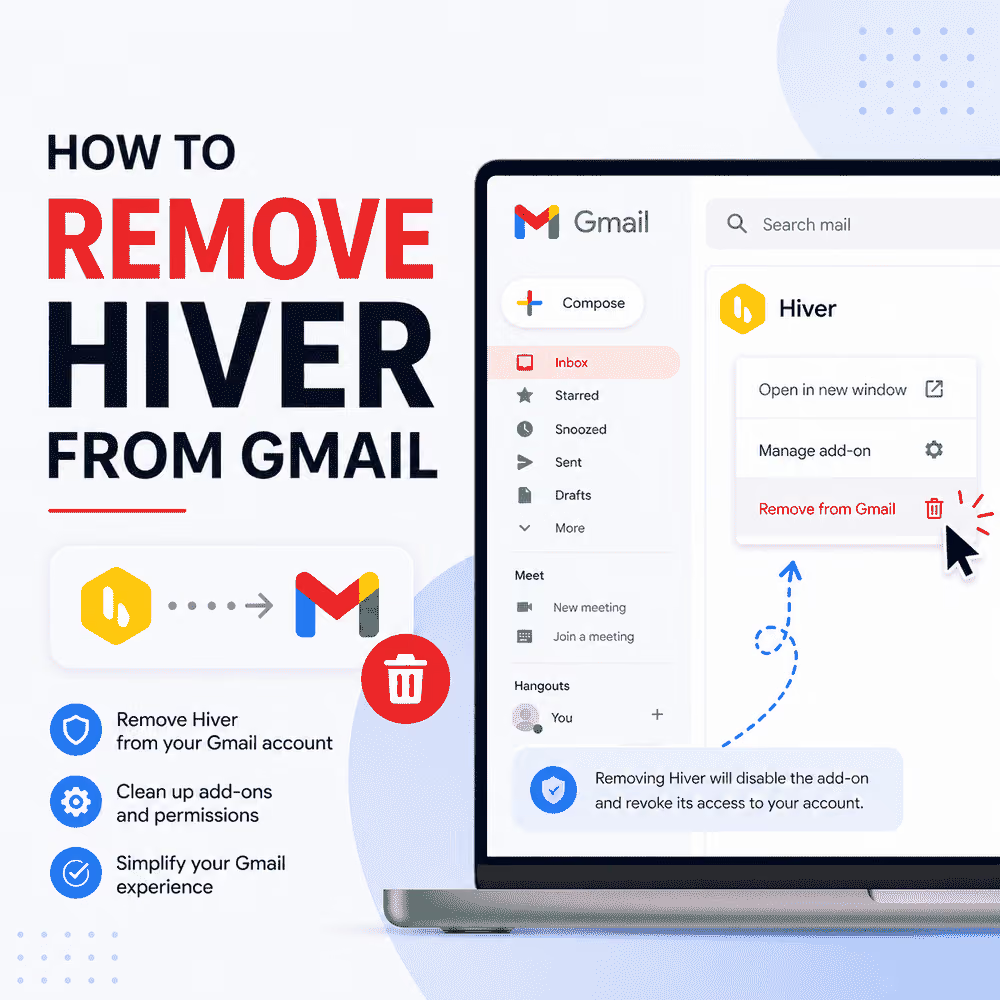



How to Remove Hiver from Gmail (And What to Do Next)
Somewhere between the third support ticket going unanswered and the billing page showing $25 per user per month for a plan that locks most AI and automation features behind a Pro upgrade (which costs a steep $55/month), a lot of teams quietly start googling how to cancel Hiver.
It's a reasonable impulse. Hiver is a Gmail-native help desk platform that converts shared inboxes into collaborative customer support workflows, with email assignment, tagging, SLA tracking, and analytics built in. The premise is smart: help desk functionality without making teams leave Gmail. The execution, for many customers, hasn't quite matched the promise. The platform's Trustpilot score sits at 2 out of 5, with recurring themes around unresponsive support, unexpected billing, and automation caps that only reveal themselves once a team is already mid-implementation.
If any of that sounds familiar, here's the full picture on getting out — and what a smarter alternative looks like once you do.
How to Remove Hiver: Step-by-Step Process for Canceling Hiver
One thing worth knowing upfront: only the account owner can initiate this process. Individual team members don't have access to the deletion option, so if the person reading this isn't the admin, the first step is getting the workspace owner involved before anything else.
With that cleared up, here's how to delete Hiver from the admin side:
- Click the Hiver settings icon in Gmail and select Admin Panel.
- Click on the Settings tab.
- Select Delete Organization.
- Review the deletion warning. All data associated with Hiver will be permanently deleted for every team member on the account.
- Check all four confirmation boxes to confirm deletion of users, Shared Inboxes, Hiver data, and the Hiver Knowledge Base.
- Provide feedback on the reasons for leaving.
- Enter a phone number. A Hiver representative will reach out to process the deletion request.
- Click "Request deletion of Hiver account."

After submission, Hiver's team will contact the account owner to complete the process, and an email notification is sent once the account is actually deleted.
Hiver states that if the account is due for renewal within a few days of submitting the request, a charge may still go through. They also state they will issue a refund if that happens — but it's worth keeping an eye on your billing regardless.
It's also worth knowing that deleting the Hiver account does not remove any labels or emails from the Gmail accounts that were associated with it. What does get permanently removed is everything created within Hiver itself: Shared Inboxes, shared notes, shared templates, and all other Hiver-specific data.
Once the account deletion is confirmed, remove the browser extension separately:
- Go to
chrome://extensionsin the browser address bar. - Press Ctrl + F and search for Hiver.
- Click Remove to uninstall Hiver from the browser.
Important: Canceling a Hiver subscription and requesting account deletion are two different things. Canceling billing may stop future charges but leave the workspace active. To fully uninstall Hiver and clear all organizational data from its servers, a formal deletion request is the step that actually closes the account.
Is it Mandatory to "Request" Account Deletion?
Unfortunately, yes. There's no instant self-serve option, no delete button that resolves in real time, and no automated confirmation timeline. The process runs through a manual review workflow, which means the account stays in a limbo state between request submission and actual closure.
For teams that need access revoked immediately, or that are switching platforms on a tight schedule, that gap is a real operational problem. If you're evaluating what comes next, it's worth mapping out exactly what features you need before committing to another platform.
How to Remove Hiver from Gmail Through Inbox Permissions
Here's where Google's own account settings become useful. Regardless of where Hiver's internal deletion process stands, users can revoke Hiver's access to Gmail directly through their Google Account — and do it instantly. This cuts off the app's connection to Gmail data without waiting for Hiver's team to action anything on their end.
To do it:
- Go to myaccount.google.com/connections.
- This page shows every third-party app that has been granted access to the Google account. Scroll through the list and click on Hiver.
- Select "Delete all connections that you have with Hiver" and confirm.
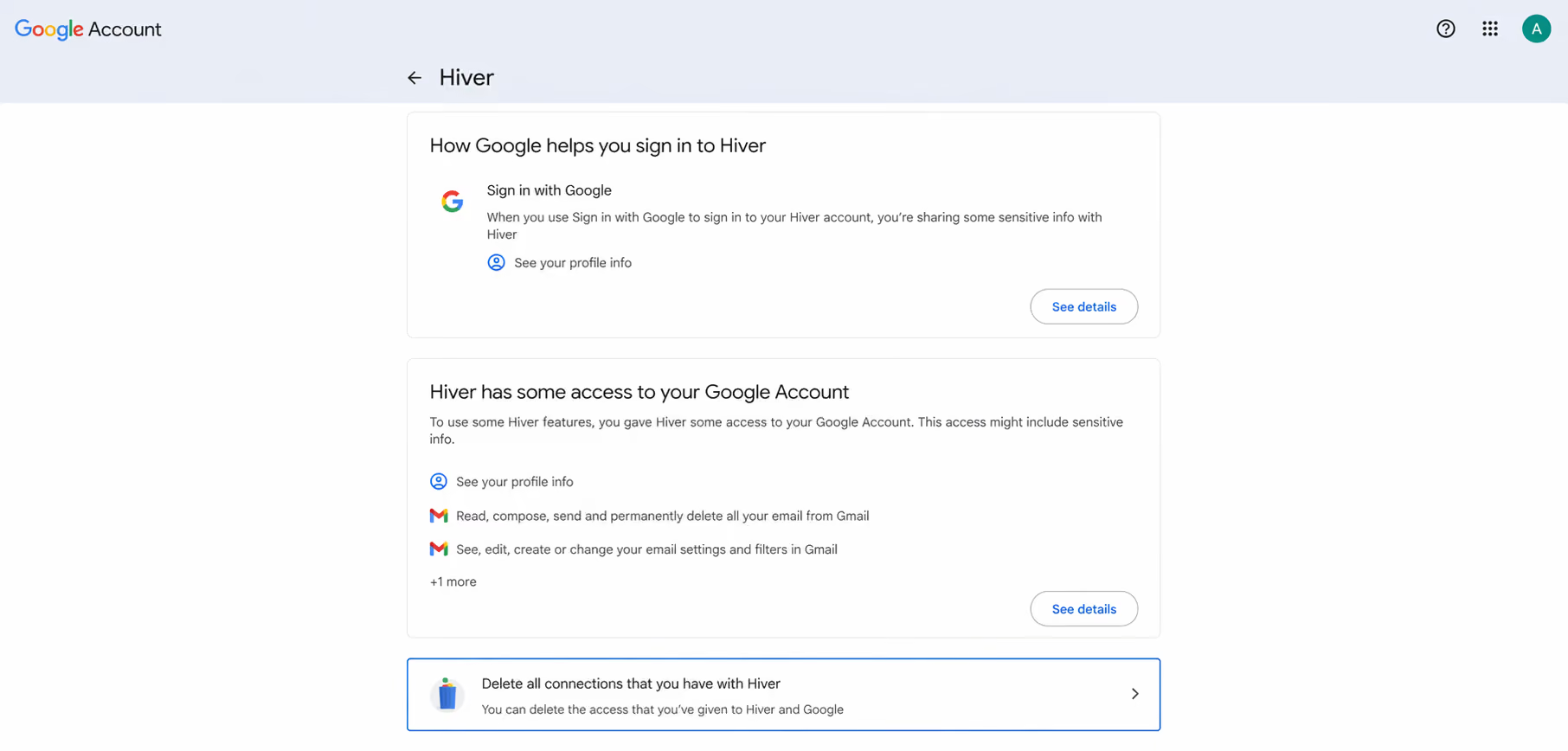
Google revokes the access immediately.
This is an important distinction to keep in mind: removing Hiver from Gmail through Google's permissions page does not close the Hiver account or stop billing. What it does is sever the app's ability to read or interact with Gmail data, which matters enormously for teams that need to act quickly or have concerns about continued data access during the deletion waiting period.
Anyone managing a workspace that spans multiple Google accounts should also make sure each team member's individual Google account connections are cleared, not just the admin's.
For teams still waiting on the formal cancellation request to process and whose billing cycle is coming up, contacting the bank or card issuer to block further charges from Hiver is a practical fallback. Most card issuers can flag a specific merchant, and it prevents billing disputes from piling up during an already drawn-out offboarding process.
Admins Can Disable Specific Features if They Aren't Ready to Remove Hiver Fully
Not every team looking to wind down Hiver is ready to pull the plug immediately. Some organizations are mid-transition, evaluating alternatives while still operating on Hiver day-to-day. Others want to simplify the workspace before a full handoff, giving the team a cleaner environment to work in rather than a sudden tool switch with no runway.
For situations like these, Hiver does offer a way to selectively disable individual features at the admin level without touching the account itself. Only admins can manage feature access, and the path to get there is:
- Go to Hiver Settings.
- Navigate to the Admin Panel.
- Open Settings.
- Go to "Features Access."
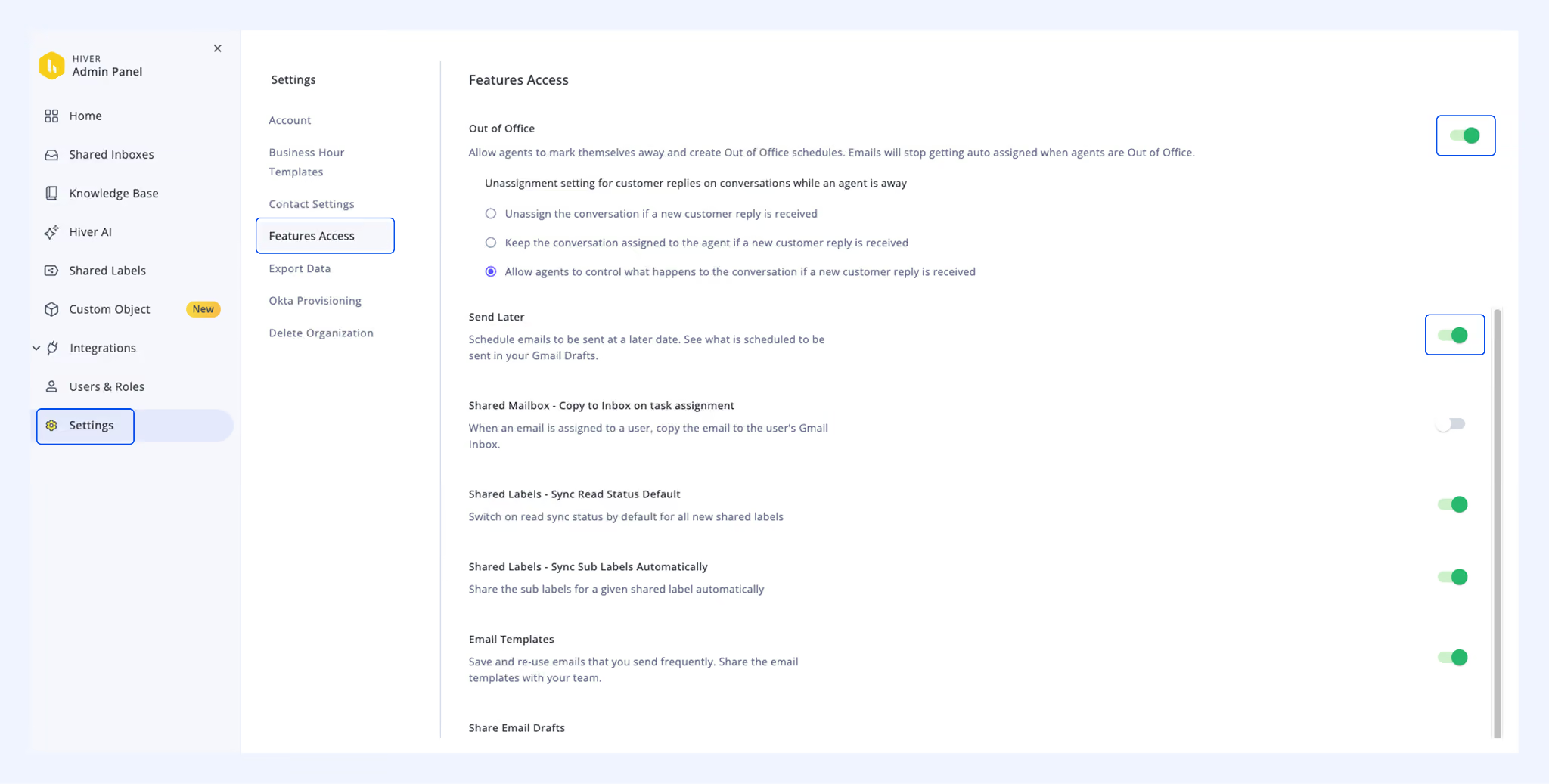
Each available feature has a toggle, and flipping it affects the entire account. The features that can be toggled include:
- Email footer customization
- Out of office scheduling
- Send later
- Copy to Inbox on task assignment
- Email templates
- Shared Drafts
- Public links for sharing conversations
- Auto-join account (which automatically adds new users to Shared Inboxes based on their email domain)
One thing to be clear about: disabling features through the admin panel does not affect billing. The plan cost stays exactly the same regardless of how many features are actively in use. The option provides operational flexibility during a transition, not a reduced invoice.
🚀 Ready for a Better Gmail Experience?
If Hiver's limitations are the reason you're reading this, it might be time to see what a purpose-built Gmail collaboration tool actually looks like. Try Gmelius free — shared inboxes, automation, AI features, and real support, all in one plan with no upgrade wall.
Export Sensitive and Business-Critical Data Before Removing Hiver
Before submitting that deletion request, there is one step that should happen first without exception: getting the data out. Once a Hiver account is deleted, access to everything stored in it is gone permanently.
Conversation history, customer contact data, shared mailbox analytics, internal notes, email templates, shared drafts, and team performance reports all disappear with the account. There is no recovery option after the fact, and Hiver has no stated grace period for retrieving data post-deletion.
Hiver's data export functionality lives in the Admin Panel. Here's how to run it:
- Go to Admin Panel → Settings → Export data.
- All data types are selected by default. Update the selections as needed.
- Click Export data.
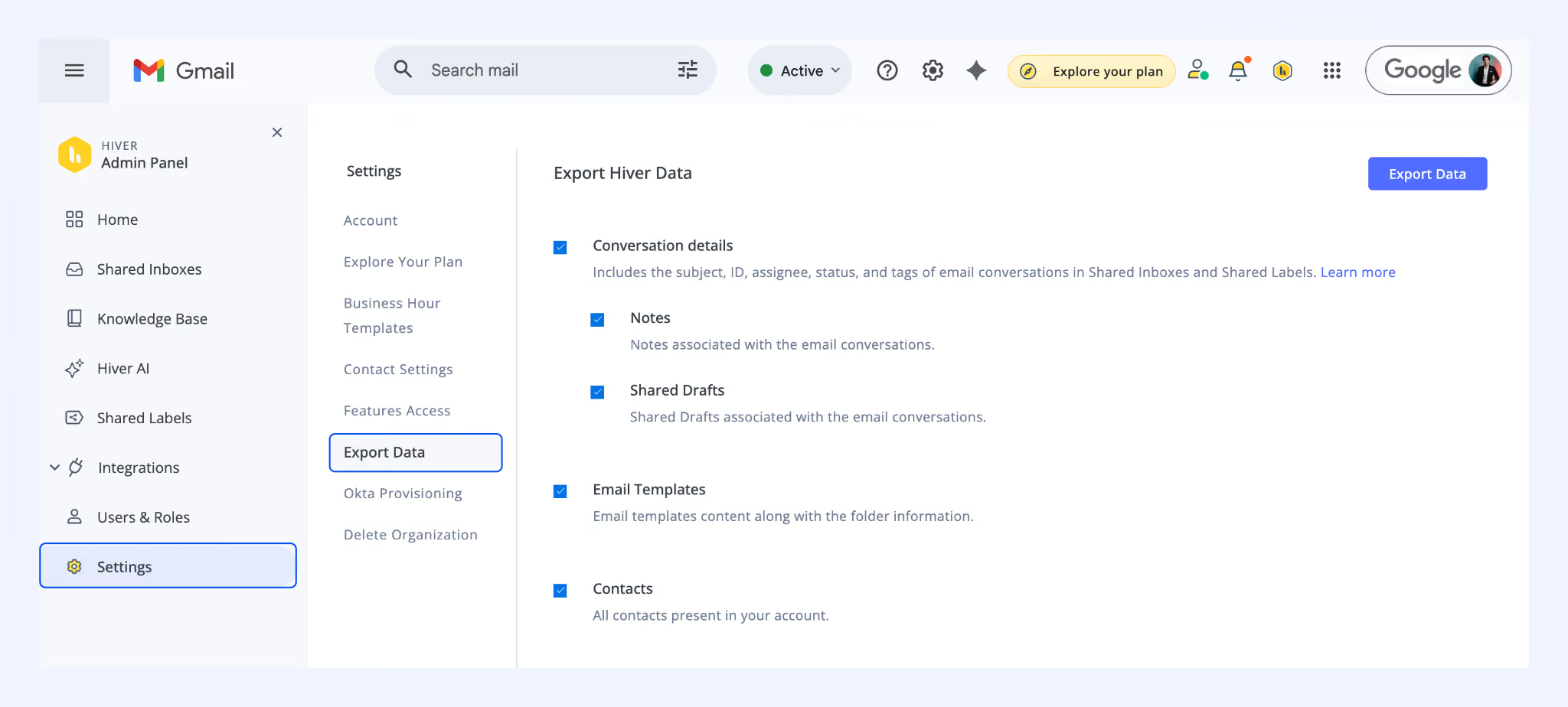
Once the export is complete, Hiver sends an email to the admin who initiated it, containing a link to a folder of XML files. Note that a new export cannot be started while one is already in progress.
The data that can be exported covers:
- Conversation details from Shared Inboxes (including email subjects, conversation IDs, assignee names, open/pending/closed status, applied tags, and shared Notes)
- Email Templates
- Shared Drafts
- All contacts in the account
This exported data can be directly imported into most major customer support and shared inbox platforms, including Gmelius, Front, Help Scout, and others.
What to Look for in a Hiver Alternative
Once the export is done and the deletion request is in, the next question is: what's worth switching to? The most common complaints about Hiver point toward a few things that matter most in an alternative:
- Transparent, all-inclusive pricing — no features locked behind a higher tier
- Reliable, responsive customer support — especially ironic given Hiver's product category
- Automation that doesn't require manual workarounds
- AI features that are actually included, not paywalled
If those are the criteria, the comparison landscape is worth understanding. The AI email assistants comparison guide covers how leading tools stack up across exactly these dimensions. For teams weighing Gmail-native options specifically, the best AI assistants for email roundup is a useful starting point.
It's also worth thinking about what role AI will play going forward. Teams that have used Hiver's basic automation tend to underestimate what's possible with a platform that includes AI agents as a standard feature. AI email response generators can meaningfully reduce the time teams spend on routine replies — features that Hiver gates behind its highest-tier plan.
For teams thinking about broader workflow improvements beyond the inbox, this guide on how to use AI for productivity outlines practical applications that pair well with a shared inbox platform.
Why 10,000+ Teams Trust Gmelius Instead
Gmelius is built for teams that want shared inboxes, automation, integrations, an open API, and AI features without upgrading to access any of it. The core plan includes everything that most businesses need, support is fast, and pricing is clear from the first page.
Unlike Hiver — where the $25/user/month plan excludes key AI and automation capabilities — Gmelius gives teams AI-powered email assistance, workflow automation, shared inbox collaboration, and analytics under a single, honest price. There's no "you'll need to upgrade for that" moment mid-implementation.
Teams making the switch consistently cite three things: cleaner pricing, faster support, and automation that actually works out of the box. For anyone who has spent time navigating Hiver's limits, that's a meaningful difference.
Frequently Asked Questions
Does canceling Hiver immediately stop my team's access?Not automatically — the workspace typically stays active until the billing period ends or deletion is confirmed. To cut access instantly, revoke Hiver's Gmail permissions through your Google Account connections page.
Will deleting Hiver remove my emails from Gmail?No. Deleting your Hiver account removes everything created within Hiver, but your actual emails and Gmail labels remain completely intact in your Google account.
Can I get a refund if Hiver charges me after I request deletion?Hiver states they will issue a refund if a charge goes through after a deletion request is submitted. Monitor your billing statements and follow up with their support if it isn't issued promptly.
How long does Hiver take to process a deletion request?Hiver doesn't publish a set timeline — the process involves a manual review and a representative will contact you via the phone number provided. Revoking Gmail access through Google's permissions page is the most practical way to limit data exposure in the interim.
What's the best alternative to Hiver for Gmail teams?Gmelius is the most common switch, offering shared inboxes, automation, and AI features on a single transparent plan. The AI email assistants comparison is a good place to start if you're still evaluating options.
Switch to a Platform That Respects Your Time (and Budget)
Try Gmelius free today — no feature paywalls, no surprise upgrades, no waiting on hold to cancel. Just a shared inbox platform that works the way your team actually works, inside Gmail.


.avif)
.avif)
.avif)
.avif)
.avif)





