




I write a lot of emails. Vendor check-ins, team scheduling, polite rejections, the whole spectrum. As a growth marketer at Gmelius, my inbox is basically my office.
And I'm not alone. 70% of professionals cite email as their top source of workplace stress , and for those of us in client-facing or growth roles, the inbox never really closes.
So I ran an experiment: writing emails with ChatGPT for seven straight days. One prompt per day. Seven real work scenarios. Here's my honest ChatGPT review of how it went: what worked, what didn't, and whether a dedicated AI email assistant can do the job better.
How Does ChatGPT for Email Work?
Using ChatGPT for email is simple. You open ChatGPT in a browser tab or desktop app, describe the email you need in a prompt, and it generates a draft you can copy into your inbox.
The better your prompt, the better the output. Include the recipient, context, desired tone, and any constraints, and you'll get a solid first draft. You can also paste in an email you've received and ask ChatGPT to write a reply.
ChatGPT supports different output formats too. It can generate subject lines, bullet-point emails, formal letters, or casual Slack-style messages, depending on what you ask for. Some users also use it to rewrite or shorten existing drafts.
Under the hood, ChatGPT is a large language model (LLM), which means it generates text by predicting the most likely next word based on patterns learned from massive training datasets. It doesn't "understand" your email the way a human would. It's pattern-matching at scale, which is why it's excellent at structure and tone but can stumble on context-specific details it wasn't explicitly given.
Each prompt you send exists inside a "context window", essentially, the amount of text ChatGPT can hold in working memory at once. Unlike a purpose-built tool like Meli, Gmelius's AI email assistant, ChatGPT has no access to your inbox history, your contacts, or your calendar. Every conversation starts from scratch.
7 Days of ChatGPT: Hands-On ChatGPT Review for Writing Emails
I went into this with an open mind. ChatGPT is genuinely impressive at generating text, and I wanted to see how far it could carry me through a realistic work week of emails. Each day, I picked one email I actually needed to send, wrote a prompt, and evaluated the output.
Day 1: I Asked ChatGPT to Write a Routine Enquiry Email
The scenario: A publication called CB Herald offered to republish our press release for free. It sounded promising, but I wanted to ask a few questions before saying yes.
I told ChatGPT to write a friendly but slightly cautious reply, asking about audience reach, backlink type, and any hidden upsells.
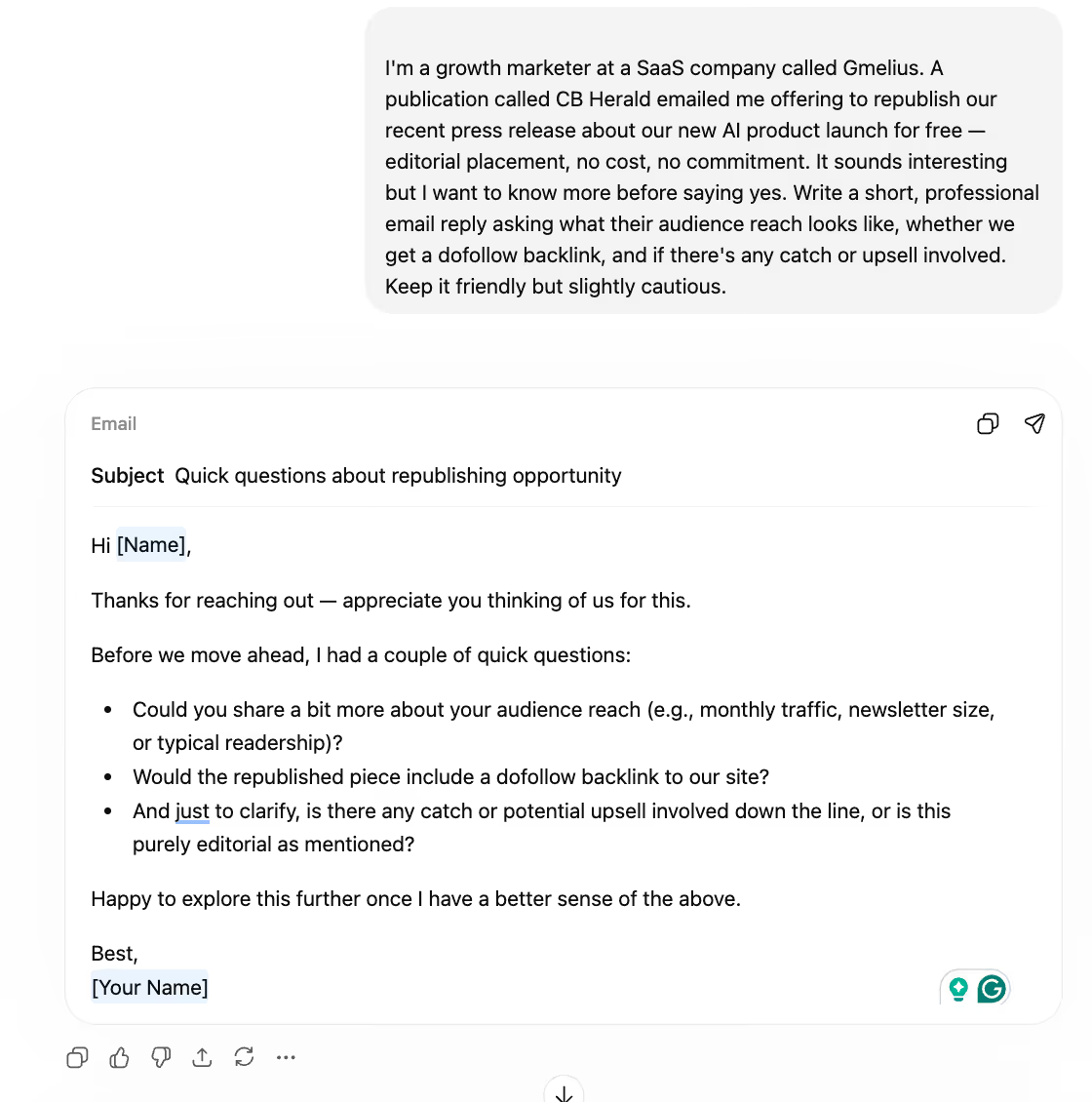
First impressions were good. The tone was polite, and there was a nice touch of gratitude at the top. It felt like the kind of professional reply I'd actually open with.
The structure worked well, too. ChatGPT organized the questions as bullet points, which made the email scannable and clear. For an enquiry like this, that formatting choice was smart.
But a couple of things needed fixing. It asked about "newsletter size", a metric I never mentioned, and that doesn't quite exist in this context. ChatGPT filled a gap in my prompt with a made-up KPI, which would have looked odd to the recipient.
More importantly, my prompt said "slightly cautious," and ChatGPT interpreted that as literally asking "is there any catch or potential upsell?" That's not caution, that's plain bluntness. Caution lives in subtext and phrasing, not in calling someone out directly. It also defaulted to placeholder sign-offs like "[Name]" instead of using "Anwesha," which I'd specified before.
Writing emails with ChatGPT starts well enough. But the details need a human pass.
Day 2: ChatGPT for Internal Communication Emails
The scenario: I needed to schedule a brainstorm with the growth team and a colleague from data, to explore Webflow's MCP integration for our content workflows.
I asked for a collaborative, casual tone with a few suggested time slots.
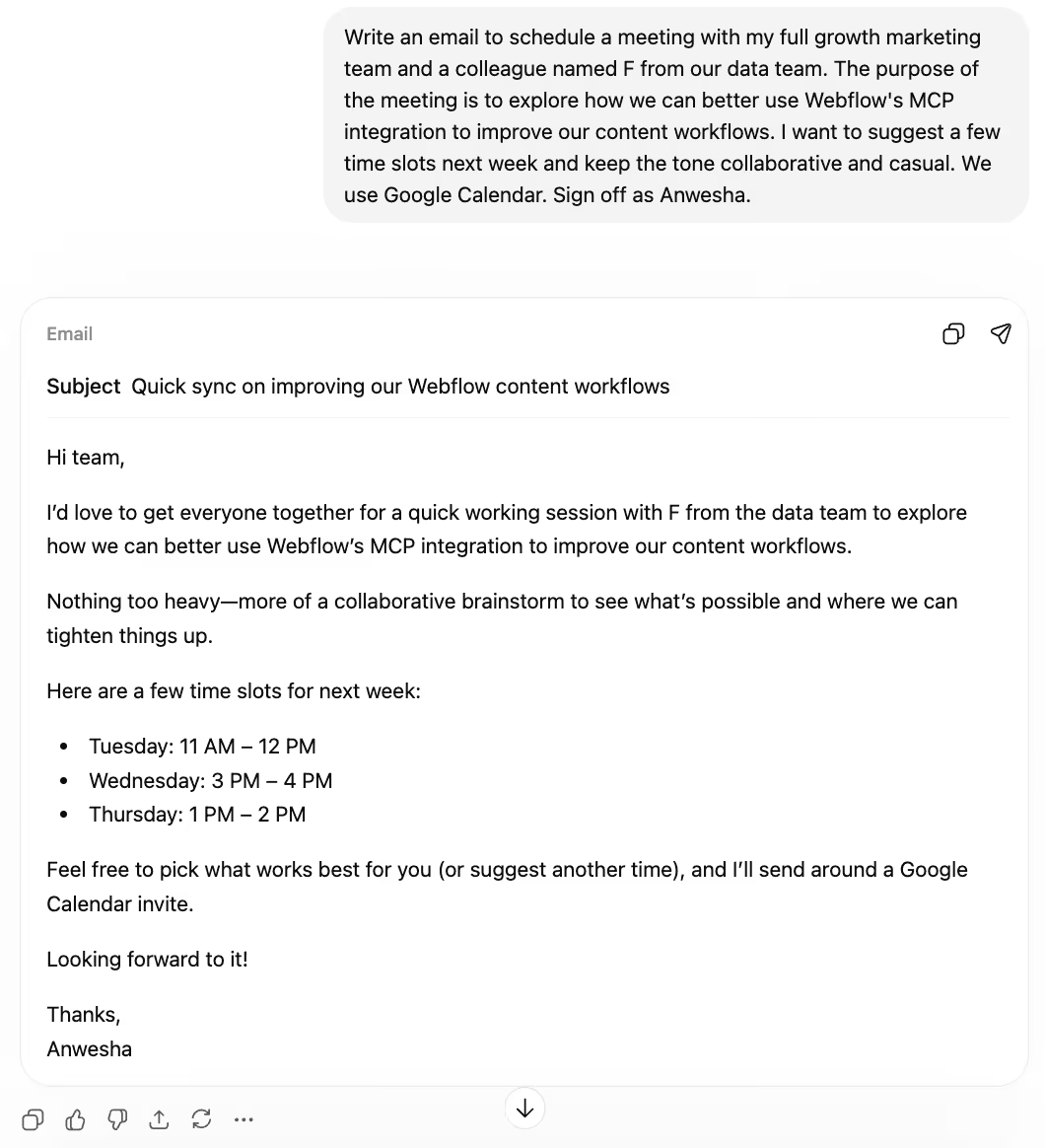
This was a solid draft overall. It captured the collaborative spirit I was going for, proposed three reasonable time slots, and even mentioned sending a Google Calendar invite, a detail I appreciated.
The phrasing "nothing too heavy — more of a collaborative brainstorm" was a nice touch. It set expectations without being dismissive of the meeting's purpose, which is a tricky balance to strike.
But the opening ("I'd love to get everyone together") felt more like a directive than an invitation. In my experience, people respond better to a question. Something like "Would everyone be up for a quick sync?" goes further in a team setting.
The bigger issue: no mention of time zones. For a team spanning Europe, Argentina, and India, that's a significant omission. The time slots it invented were also completely arbitrary, with no grounding in anyone's actual availability. ChatGPT for email doesn't think about distributed teams unless you spell it out word by word.
Day 3: Challenging ChatGPT to Say a Polite No
The scenario: A Google representative offered Gmelius a spot in a free 6-month Ads program aimed at scaling companies to over €15k/month in ad spend. Impressive offer, but we weren't ready for that commitment.
I asked for a polite decline that keeps the door open. No over-explaining.
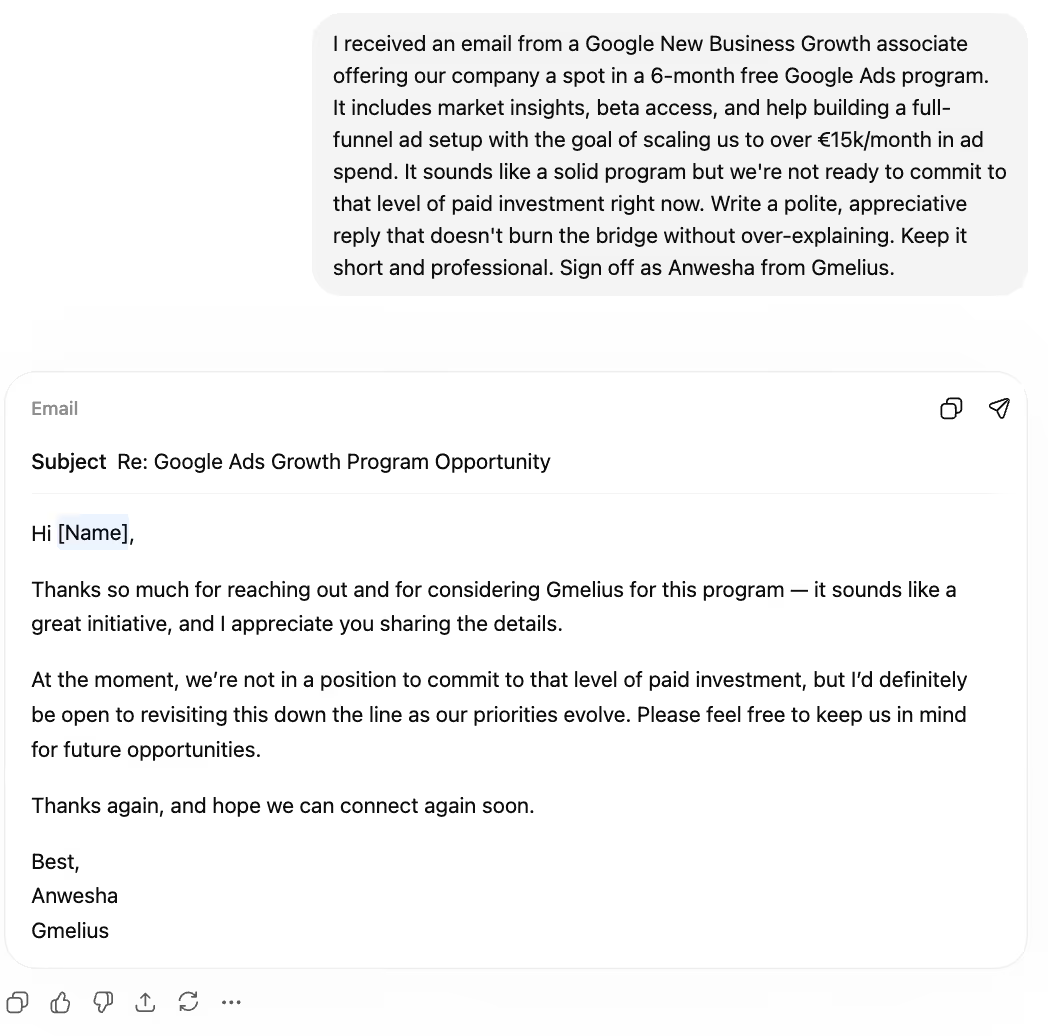
Credit where it's due: the closing was genuinely well done. The part about being open to revisiting as priorities evolve felt natural, and the "thanks again, and hope we can connect again soon" landed as sincerely appreciative, not formulaic.
The overall structure was clean too: short, professional, and it didn't over-explain, which is exactly what I'd asked for. For a decline email, brevity is indeed a feature.
But the core decline needed work. "We're not in a position to commit to that level of paid investment" was stiff and slightly corporate. I had to rewrite that line. In real life, I'd frame it around timing or current focus areas, not make it sound like a financial limitation.
Writing emails with ChatGPT for diplomatically sensitive situations gets you most of the way there. But the most important sentence — the actual "no" — is the one you'll probably rewrite yourself.
Day 4: Another Routine Internal Ping About Daylight Savings
The scenario: Europe's summer daylight saving shift had pushed our weekly syncs to an awkwardly early slot for teammates in Argentina and India. I needed to ask my manager to move it one hour later.
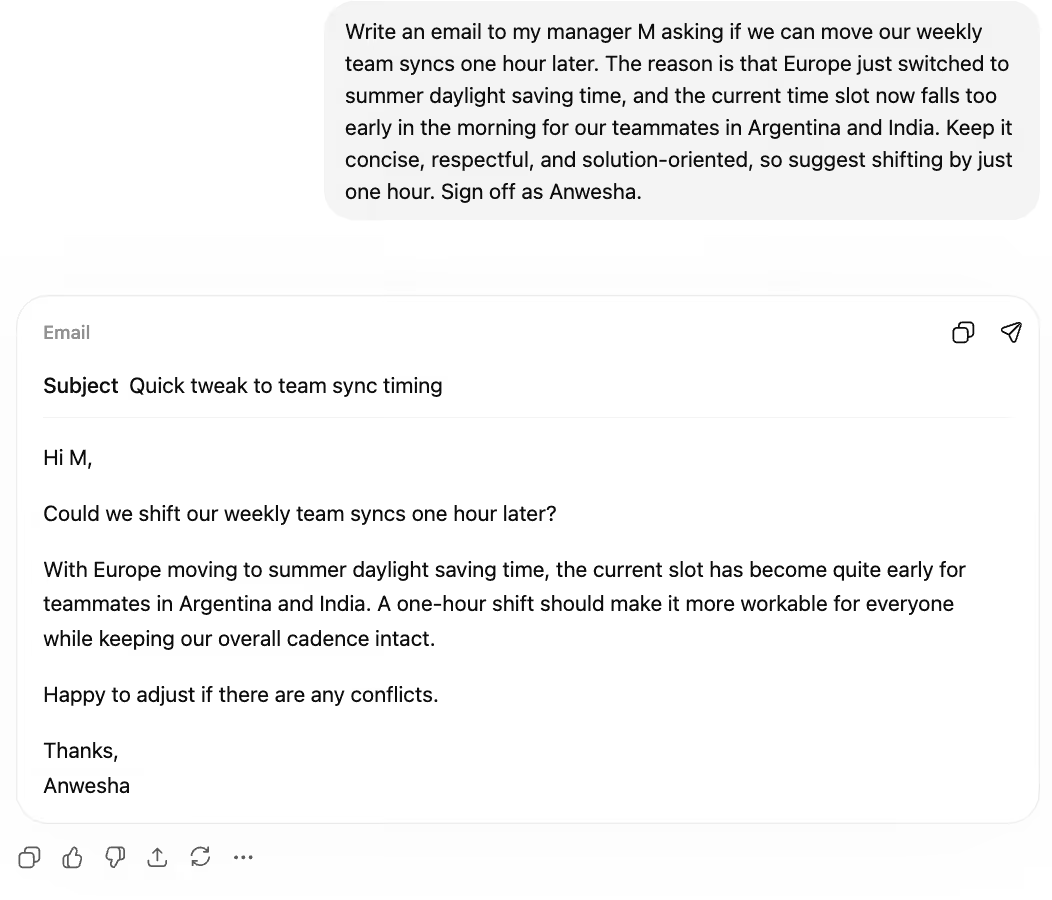
The information was spot-on. The daylight saving context was clear, the one-hour suggestion was practical, and the email was appropriately short. No filler, no over-explanation. For a simple internal request, that discipline is welcome.
The line about keeping "our overall cadence intact" was a good detail. It reassured the reader that this wasn't a bigger request than it seemed. It showed awareness of the manager's perspective, which I didn't expect.
But the opening was abrupt. Starting with "Could we shift our weekly team syncs one hour later?" with no warm-up felt a little cold for an email to your direct manager. A quick "Hey M" or "Hope your week's off to a good start" goes a long way.
The closing, "Happy to adjust if there are any conflicts," was functional but flat. For a minor scheduling ask, you want warmth, not corporate hedging. This is a recurring pattern in my ChatGPT for email review: it nails content but misses emotional register.
Day 5: ChatGPT Wrote an Email to Our PR Vendor
The scenario: I needed to check in with our PR agency about an upcoming press release, confirming editorial tone, aligning on a publication date, and asking for a distribution report ETA.
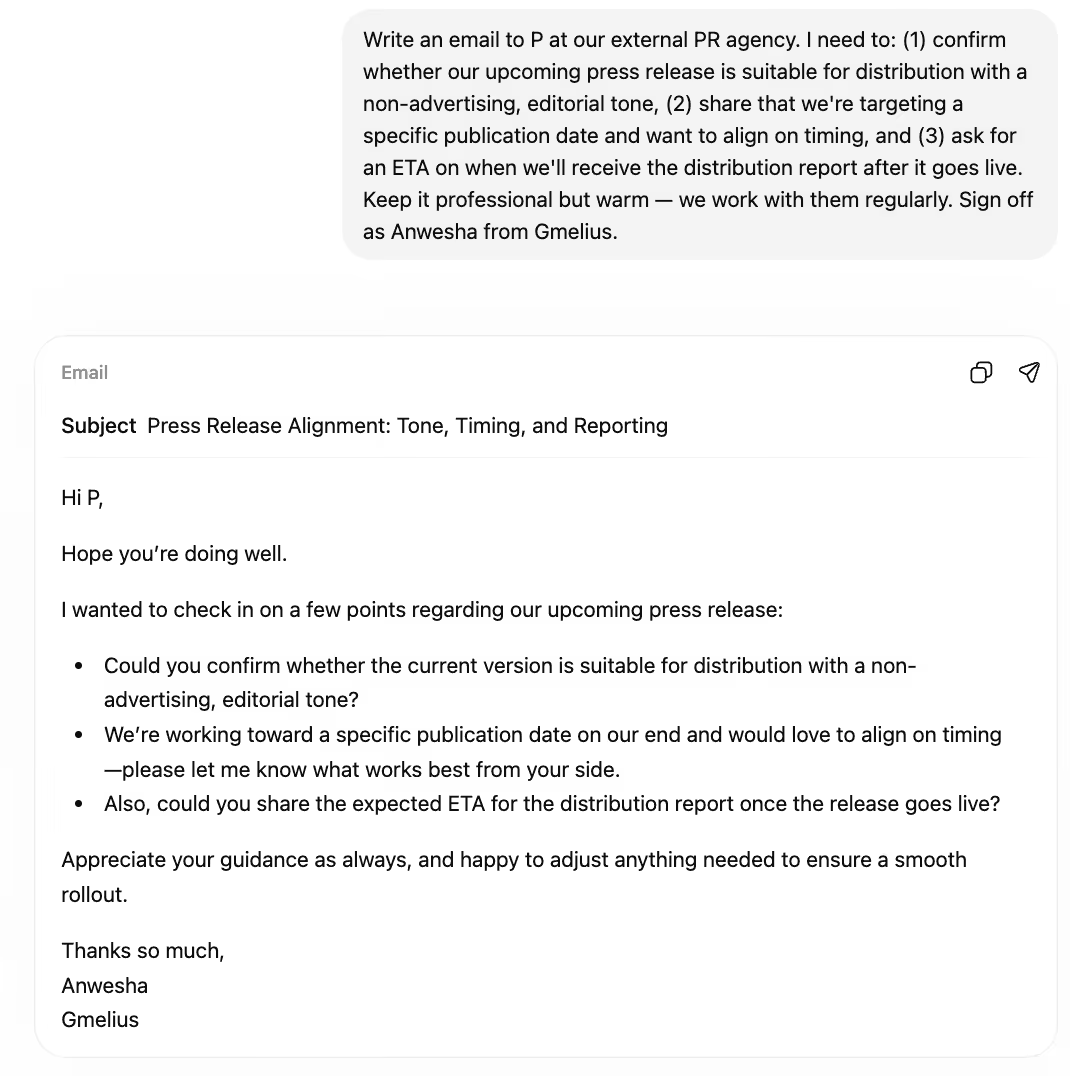
This was the strongest output of the week, and it's worth explaining why.
It opened with "Hope you're doing well" — a small thing, but it set the right relational tone for a vendor we work with regularly. That opening line made the rest of the email feel like a check-in between colleagues, not a cold request.
The three asks were organized as bullet points, which made them easy to scan and respond to individually. I personally don't love bullets in emails (they can feel transactional) but for three distinct questions to a vendor, the format worked.
The sign-off was the highlight. "Thanks so much" and "appreciate your guidance as always" felt warm, specific, and real. Not robotic. If you're using ChatGPT for email with external partners, structured asks like this are its sweet spot. I sent this with only minor tweaks.
Day 6: I Used ChatGPT to Write an OOO Email
The scenario: One-week vacation to the Andaman Islands, starting Thursday. I needed to give the growth team a heads-up and ask them to flag anything urgent before Wednesday.
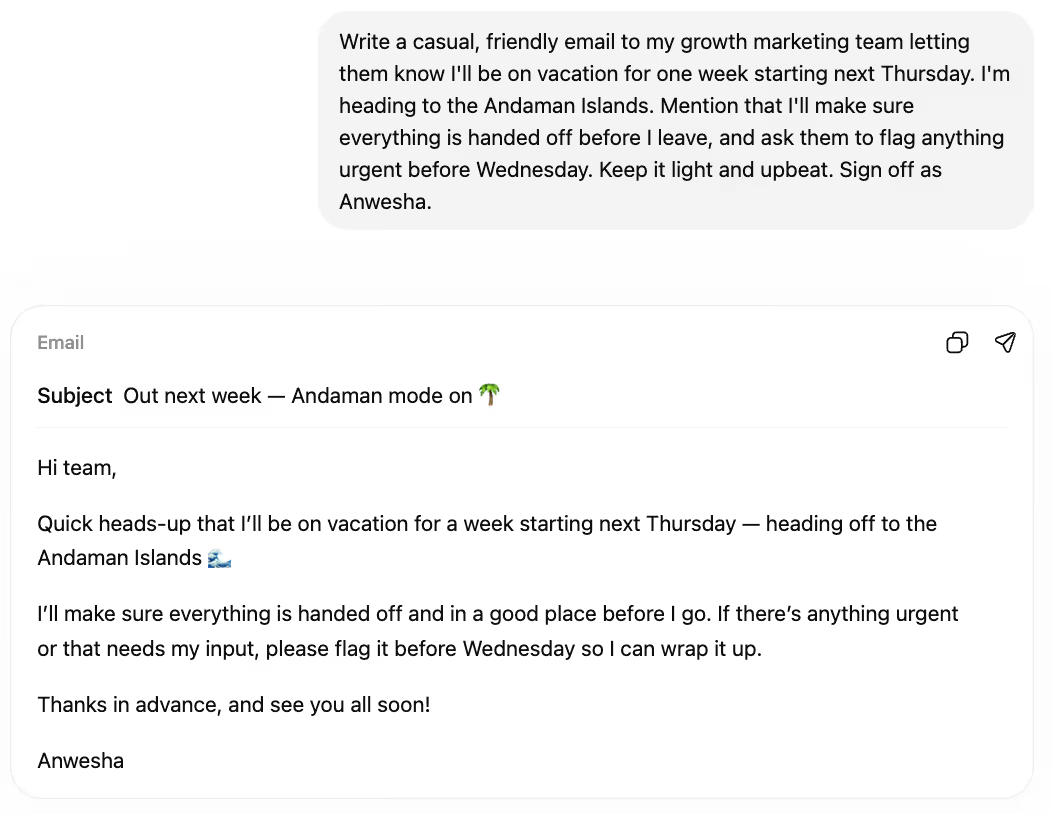
The tone was aptly casual, exactly what you want for a vacation heads-up to your own team. I appreciated the exclamation mark in "see you all soon!" It matched the energy of someone genuinely excited about a break.
The idiomatic phrasing was a pleasant surprise. "Everything is handed off and in a good place" felt natural and human, not AI-generated. That kind of conversational fluency is hard to prompt for, so it was nice to see it show up on its own.
What I missed: there was no placeholder for a substitute contact. No "reach out to [name] while I'm away." For an OOO email, that's a real gap. Most teams need to know who to contact, not just that you'll be gone.
I'd also have liked something with more personality. A line about snorkeling, a joke about being unreachable, something that makes it feel like me, not a template. Writing emails with ChatGPT for low-stakes team updates works, but it plays it safe every single time.
That’s why I typically default to the Gmelius OOO generator for ChatGPT instead of using the vanilla LLM.
Day 7: Closing the Week With a Casual Group Email
The scenario: I found an interesting Forbes article about neural coding and vibe coding, and wanted to share it casually with the growth team.
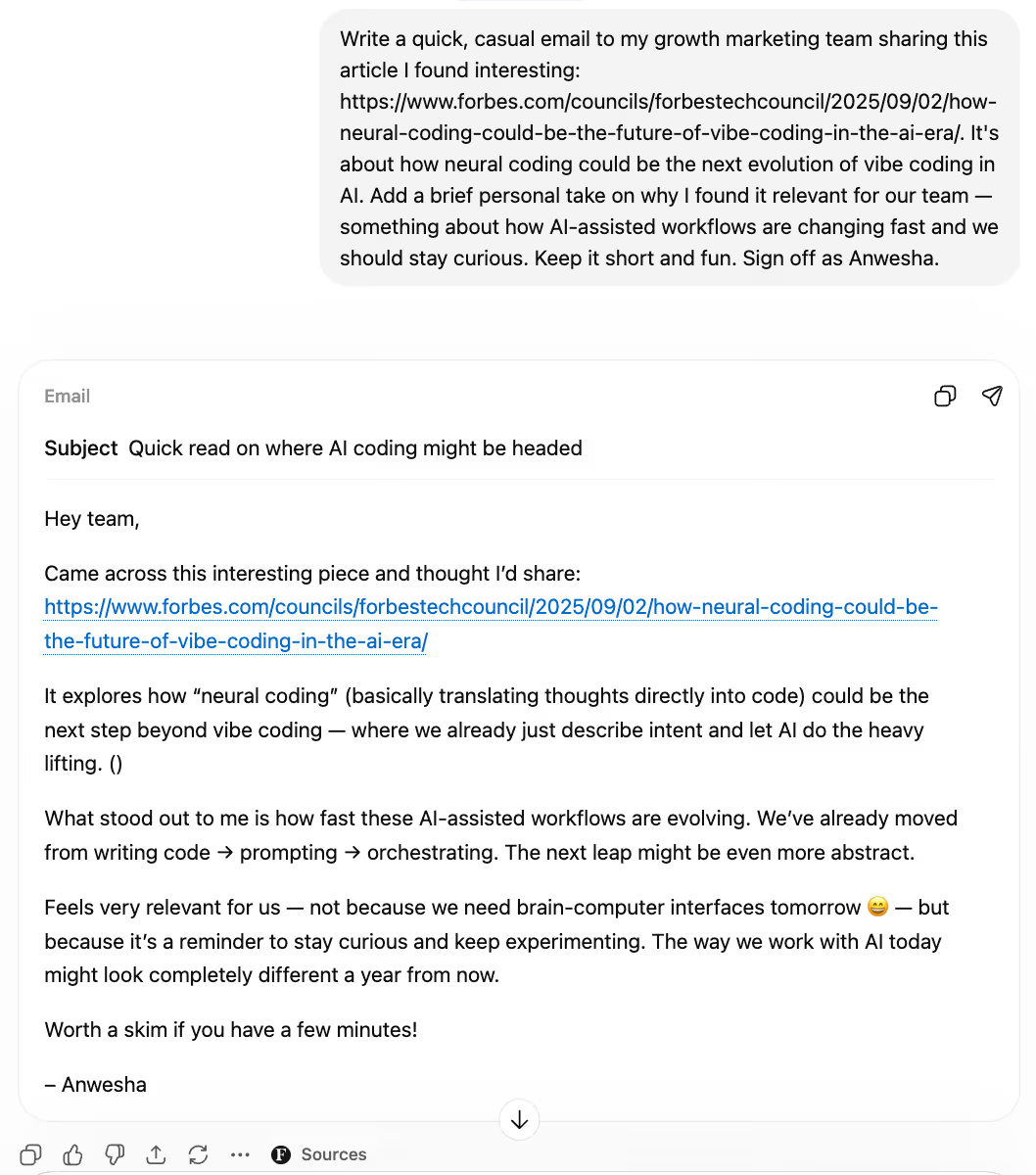
The summary of the article was accurate. It explained the concept clearly (neural coding as the next step beyond vibe coding) and connected it to broader trends in AI-assisted workflows. On a factual level, no complaints.
But the tone was where it fell apart. Phrases like "What stood out to me is how fast these AI-assisted workflows are evolving" and the "not because X — but because Y" construction felt rehearsed and editorial. More LinkedIn posts than internal email.
It also added an emoji (a grinning face mid-paragraph) that just felt odd. Emojis can work in casual emails, but this one felt performative, like ChatGPT was trying to prove it could be informal.
The overall effect was of a curated reading list, not a casual "hey, check this out." I wouldn't have sent this without a full rewrite. Of all seven days in this ChatGPT review, this was the least usable output. Casual is clearly not ChatGPT's strength.
Verdict: Of all seven days in this ChatGPT review, this was the least usable output. Casual is clearly not ChatGPT's strength.
💡 Tired of copy-pasting between ChatGPT and Gmail? Try Gmelius free → Get AI-drafted replies written in your tone, calendar-aware meeting scheduling, and team collaboration, all inside Gmail. No tab-switching required.
ChatGPT for Email Review: Like a Toddler Learning to Run
After a full week of writing emails with ChatGPT, here's where I landed: it's impressive for an AI, but it's nowhere close to the polish or personalization that real work email demands.
What ChatGPT does well:
- Great for non-native English speakers. If English isn't your first language, ChatGPT gets you to fluent and professional fast. That alone makes it a valuable tool. If you're evaluating it on that basis, check out our roundup of the best AI email generators of 2026.
- Tackles email fatigue. On days when you're staring at a blank compose window, having a first draft to react to is genuinely helpful. It breaks the inertia.
- Copy-paste flexibility. You can dump virtually any context into a prompt (forwarded emails, meeting notes, a rough outline) and it'll shape something coherent from it.
- Good structural variety. It varies format well across email types: bullets for enquiries, flowing paragraphs for softer emails, clean subject lines throughout.
- Gratitude and politeness. ChatGPT is unfailingly courteous. It does "thank you" and "appreciate your time" better than most humans do on a busy Thursday afternoon.
Where it falls short:
- No subtlety. It can't do restraint, subtext, or diplomatic ambiguity. "Slightly cautious" becomes "is there a catch?" That pattern repeated all week.
- No thread awareness. You can't reply to a conversation, only start one. Compare that with Gmelius's AI email agent, which scans your entire thread history and drafts a contextualized reply without any prompting from you.
- Constant window-switching. Every email requires opening ChatGPT, typing a prompt, copying the output, and pasting it into Gmail. Need to reference an earlier email? That's another tab. Need to Google something for context? Another one. Gmelius eliminates this entirely: its AI runs inside Gmail, accesses your email context, and can even run an in-app Google search automatically.
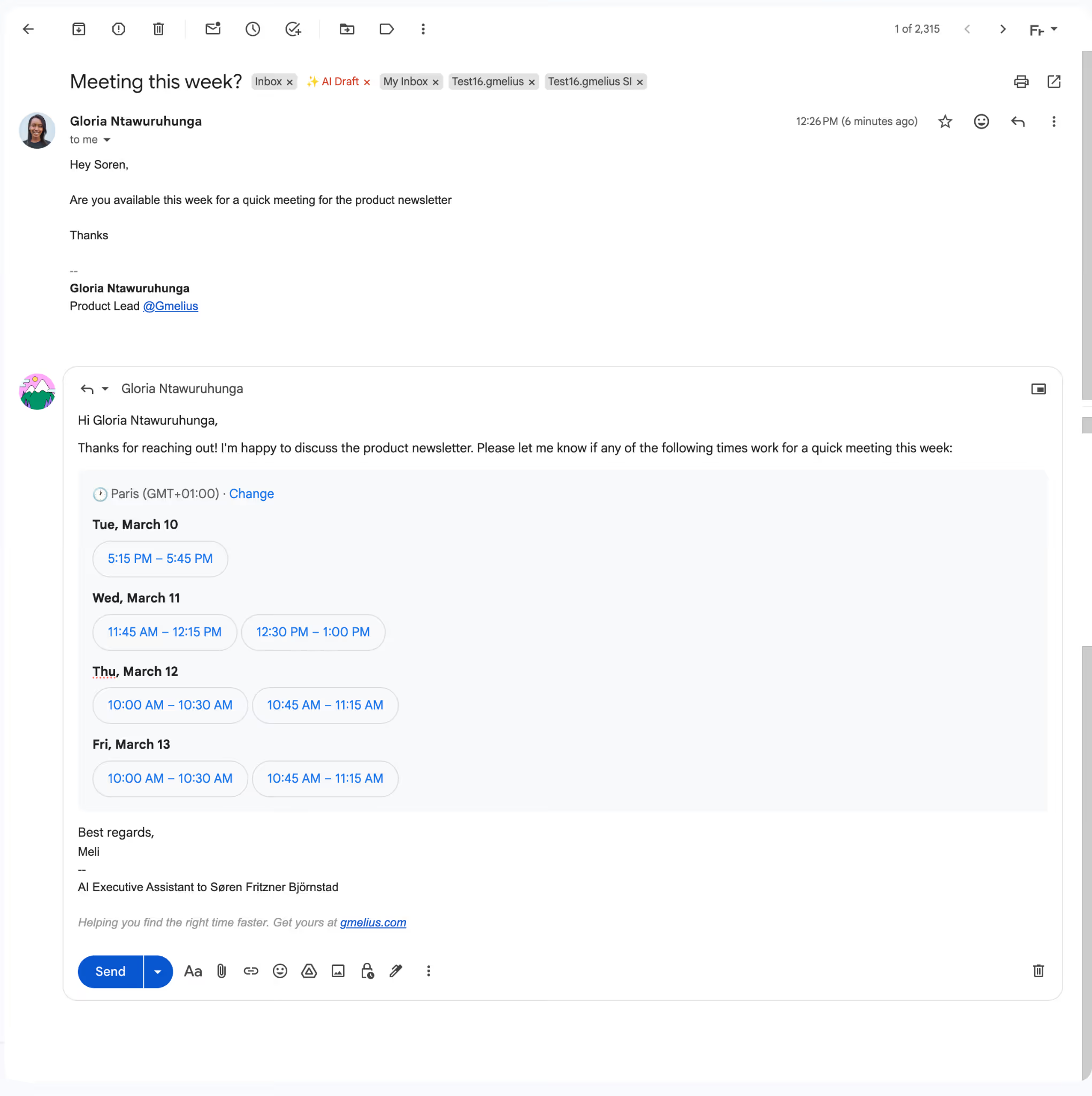
- Meeting emails are half-done. ChatGPT suggested time slots, but they were completely invented. It has no calendar access. Gmelius's AI agent, by contrast, auto-inserts available slots based on your actual calendar and past meeting behavior.
It's fine for those writing a couple of emails a week. But for anyone writing more than that (or handling higher-stakes communication like customer replies), the constant prompting, editing, and copy-pasting gets frustrating, fast.
Eating Our Own Dog Food: Why I Switched Back to Gmelius
Full disclosure: I work at Gmelius. But this experiment wasn't a marketing exercise. I genuinely wanted to see whether ChatGPT could carry my daily email workflow. It couldn't.
Within a day of switching back, the difference was obvious. Gmelius's AI assistant, Meli, had reply drafts, calendar-aware meeting invites, and follow-up suggestions waiting for me — inside Gmail, with zero prompting. There was nothing to copy, nothing to paste, and no context to re-explain.
Meli runs on the latest version of Gemini, already built into the product. I didn't install anything or configure an API key. It just works.
What matters most to me is the learning curve, or rather, the lack of one. Meli draws from over two years of my email history plus every new message that comes in. It knows my tone, my contacts, and my patterns. ChatGPT, by comparison, can't remember what I told it five minutes ago. Every prompt starts from zero.
I can also share AI-generated drafts directly with my growth team inside Gmelius. Collaborative editing, shared visibility, no screenshots of ChatGPT outputs passed around in Slack. That workflow difference is massive when you're coordinating across a team.
And I'll be blunt: I hate copy-pasting. It's a small thing, but it adds up over dozens of emails a day. ChatGPT also pulls your attention in a dozen directions: past prompts, feature suggestions, a whole sidebar ecosystem competing for your focus. Meli doesn't do any of that. It stays inside my inbox, does email, and does it fast.
Is Using ChatGPT for Email a Good Idea?
Yes and no.
Yes — for occasional, low-stakes emails. A quick RSVP, a simple thank-you, a casual introduction, ChatGPT for email is perfectly fine. It's fast, probably free, and gets the job done.
No — if your inbox is where you do real work. LLMs like ChatGPT were built for something much broader than email. They're general-purpose text generators, not inbox assistants. They don't know your contacts, your calendar, your tone, or your history. Every email starts cold.
That's the gap this ChatGPT review made clear to me. Writing emails with ChatGPT works in isolation. But email doesn't exist in isolation, it lives in threads, relationships, and workflows.
If your inbox is where you do real work, you need a tool that lives there too. Try Gmelius for free.
Frequently Asked Questions About ChatGPT for Email
Can ChatGPT write professional emails? Yes, it's fast and grammatically solid. But it lacks tone memory, thread context, and calendar access, so it works best for one-off emails rather than high-volume inboxes.
Is ChatGPT good for email writing? As a starting point, yes. It struggles with nuance and casual tone, and anything that requires inbox context it was never given. For teams handling shared inboxes at scale, a dedicated tool like Gmelius is a stronger fit.
How do I use ChatGPT to write emails? Write a prompt with the recipient, goal, tone, key details, and any constraints. Paste the output into your email client, then edit for voice and context before sending.
What is the best AI tool for writing emails? ChatGPT works for standalone drafts. For Gmail users who need contextual AI, scheduling, and team collaboration built in, Gmelius's Meli is purpose-built for the inbox.
Does ChatGPT remember past emails? No, every prompt starts from zero. Inbox-native tools like Meli, trained on years of your actual email history, have a significant advantage here.
How much time does the average worker spend on email? According to McKinsey, around 28% of the workweek, roughly 11 hours. That's exactly the kind of load that makes the right AI tool matter.


![Guía de 5 minutos para escribir emails con IA [Actualizado 2025]](https://cdn.prod.website-files.com/6737568a4ac417efeb387e5a/6834cf013865425985d8fffe_67b4e9ca43726ce526c9b1c3_67ae4da0c38817d97a2ede1b_Modern%252520Pink%252520Laptop%252520and%252520Hands%252520res%252520(1).avif)

![Beneficios de los generadores de respuestas con IA [+ Herramientas]](https://cdn.prod.website-files.com/6737568a4ac417efeb387e5a/6834cf0856ba371e860ecd6a_67b4e9c96d075e225ae6bb32_67a32b48022f30eecc83f064_smaller.avif)
.avif)
.avif)





