.png)



Freight forwarding is one of the most operationally complex businesses that still runs primarily through email. On any given day, a single coordinator might touch 30 active shipments, coordinate with a dozen carriers across three time zones, manage customs documentation with hard filing deadlines, field client status requests, and handle exceptions without a clear system for any of it.
The tools most teams default to don't match the work: A TMS handles bookings and rate management, a project management tool handles internal tasks. But the actual coordination (the replies, the handoffs, the follow-ups, the document chains, the status threads) all of it happens in email. And most freight teams are managing that coordination with nothing more than a shared Gmail inbox, a spreadsheet, and individual memory.
This guide is the operational playbook for changing that. It covers every layer of how freight teams can build a structured, scalable, agent-augmented workflow on top of the email channel their entire ecosystem already uses, without migrating to a new platform, without asking carriers to change their behavior, and without losing the thread.
Why Freight Operations Software Must Be Email-Native
Before getting into workflow design, it's worth being precise about why email is the right layer to build on, and what that means for software selection.
The ecosystem constraint is real
Most freight tech tools are built on the assumption that coordination should move out of email. The reality is that your carriers haven't moved. Your customs brokers haven't moved. Your warehouse partners haven't moved. Your clients certainly haven't moved.
The parties you coordinate with are independent businesses with their own systems, their own preferences, and no particular incentive to log into your portal. Email is the one universal interface that doesn't require any of them to change their behavior.
Documentation lives in email by necessity
Bills of lading amendments, ISF filings, phytosanitary certificates, proof of delivery, fumigation documentation, customs release notifications, these arrive as email attachments, sent by external parties, often with hard deadlines attached. Extracting them into another system doesn't eliminate the email step. It just creates a parallel process that adds time and introduces failure points.
The freight teams with the smoothest documentation workflows aren't the ones who built the most elaborate extraction processes. They're the ones who built structure around the email thread itself (clear ownership, clear status, clear escalation rules) so that documents get actioned at the right moment by the right person without anyone losing track.
Volume and variety make unmanaged email unsustainable
A mid-size freight forwarding operation handling 200 to 500 active shipments per month will generate thousands of email touches per week across its coordinator team. Carrier status updates, booking confirmations, rate negotiations, exception notifications, client check-ins, customs clearances… the variety is as significant as the volume.
Without structure, this becomes a problem of individual memory and individual heroics. The right freight operations software doesn't replace email; it makes email manageable at scale by adding the assignment, automation, and visibility layer that a shared inbox alone cannot provide.
According to supply chain coordination research from McKinsey, companies that improve multi-party coordination systematically see operating cost reductions of 15% to 20%. The lever isn't automation for its own sake. It's reducing the friction and failure rate in coordination touchpoints that already exist.
The Six Core Workflows in Freight Forwarding Operations
Every freight coordination team, regardless of size or specialty, runs some version of six recurring workflows. Understanding each one separately is the starting point for building a playbook that actually fits how the work happens.
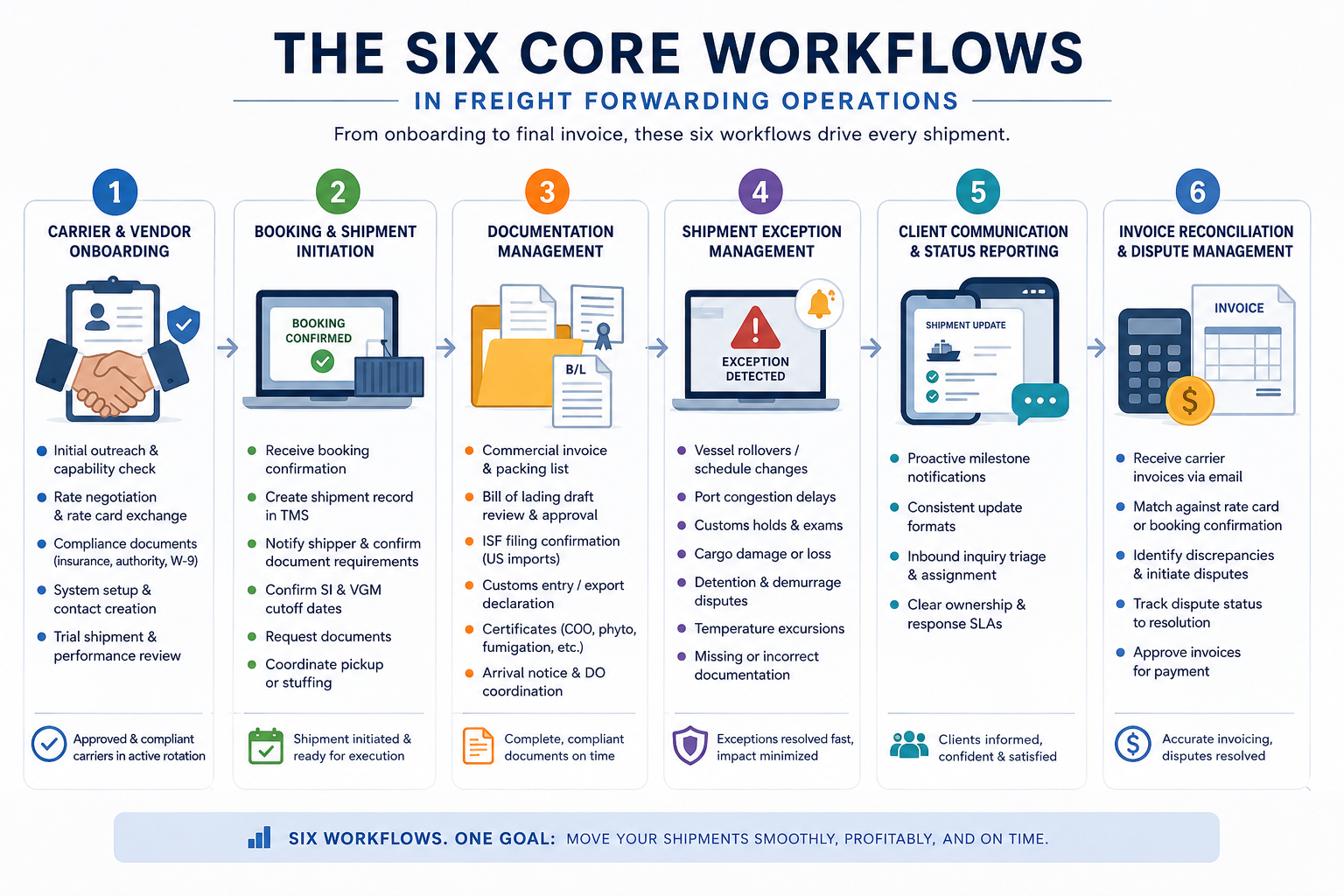
1. Carrier and vendor onboarding
Bringing a new carrier onto your approved list is not a one-email transaction. It typically involves:
- Initial outreach and capability confirmation
- Rate negotiation and rate card exchange
- Compliance documentation (insurance certificates, authority confirmation, W-9 or equivalent)
- System setup (adding carrier to TMS, creating contact records)
- Trial shipment and performance evaluation
In most teams, this process lives entirely in someone's inbox with no formal tracking. Shipments get tendered to a carrier whose compliance documentation hasn't been fully received. Rate cards get buried in threads and referenced incorrectly months later. A new coordinator joins and has no way to know which carriers are approved, at what rates, or who manages the relationship.
A structured onboarding workflow creates a defined sequence of steps, assigns ownership at each stage, and doesn't allow a carrier to enter active rotation until every required document has been received and logged.
2. Booking and shipment initiation
Once a booking is confirmed, the coordination chain begins. A typical booking initiation workflow involves:
- Receiving the booking confirmation from the carrier or shipping line
- Creating the shipment record in the TMS
- Notifying the shipper of booking details and document requirements
- Confirming SI cutoff and VGM cutoff dates
- Requesting documents (packing lists, commercial invoices, certificates)
- Coordinating pickup or stuffing
Each of these steps generates email. Without an assignment and tracking system, the coordinator handling booking initiation may hand off to a documentation specialist without any shared record of what's been sent, what's been received, and what's outstanding.
3. Documentation management
Documentation is where most freight operational failures originate. The stakes are high — missing a customs filing window, submitting an incorrect HS code, or failing to provide a certificate of origin on time can result in demurrage charges, cargo holds, or lost client relationships.
The documentation workflow for a typical import or export shipment might involve:
- Commercial invoice and packing list from the shipper
- Bill of lading draft review and approval
- ISF filing confirmation (US imports)
- Customs entry or export declaration
- Certificate of origin, fumigation certificate, phytosanitary certificate (depending on cargo)
- Arrival notice to consignee
- Delivery order coordination
Every one of these documents has a deadline. Every one arrives via email. A managed documentation workflow — with labeled threads, deadline tracking, and assignment per document type — is what separates teams that rarely miss cutoffs from teams that are constantly firefighting.
4. Shipment exception management
Exceptions are the highest-stakes coordination events in freight ops. They include:
- Vessel rollovers or schedule changes
- Port congestion delays
- Customs holds and exams
- Cargo damage or loss
- Detention and demurrage disputes
- Temperature excursions (for reefer cargo)
- Missing or incorrect documentation post-arrival
The financial stakes of poor exception management are significant. According to a demurrage and detention guide in 2026, these charges cost the global shipping industry an estimated $22 billion per year, with per-container daily rates running from $75 to $300 depending on port and carrier, and those rates have been rising consistently.
Most of these charges originate in exactly the coordination failures that a structured exception workflow is designed to prevent: missed notifications, delayed responses, and documentation errors that don't get caught until cargo is already sitting on a terminal.
Each exception type requires a different response sequence, a different set of internal and external parties to notify, and a different set of decisions to be made. In an unmanaged inbox, exceptions get handled reactively and inconsistently.
A structured exception workflow with triage rules that identify exception signals in inbound email, routing logic that assigns exceptions to the right specialist, and tracking that ensures every exception gets resolved and closed is one of the highest-leverage improvements a freight ops team can make.
5. Client communication and status reporting
Clients want visibility. Most freight forwarders provide it reactively — responding when the client asks rather than proactively pushing status updates at defined milestones.
A proactive client communication workflow defines:
- Which shipment milestones trigger an automatic status update (booking confirmed, documents submitted, vessel departed, customs cleared, delivered)
- What format those updates take
- Who is responsible for sending them
- How inbound client inquiries get triaged and assigned
When this workflow is structured and automated, coordinators spend less time on status emails and more time on exception management and relationship-building. Clients trust the process rather than having to ask for reassurance.
6. Invoice reconciliation and dispute management
Carrier invoices rarely match the original quote. Accessorial charges — fuel surcharges, peak season surcharges, chassis fees, detention — accumulate and need to be reviewed against the original rate agreement.
This workflow involves:
- Receiving carrier invoices via email
- Matching against the original rate card or booking confirmation (also received via email)
- Identifying discrepancies and initiating dispute communications
- Tracking dispute status through to resolution
- Approving invoices for payment
When the original rate confirmation and the final invoice both live in email threads (months apart, naturally) finding the relevant prior correspondence is a research task. Teams with labeled, assigned, searchable email workflows spend a fraction of the time on invoice reconciliation that teams with unmanaged inboxes spend.
Building the Inbox Architecture for Freight Ops
The foundation of a managed freight email workflow is a structured inbox architecture adapted to the needs of an ops team. This is not simply a matter of creating a shared Gmail account. It requires deliberate design around function, assignment, labeling, and escalation.
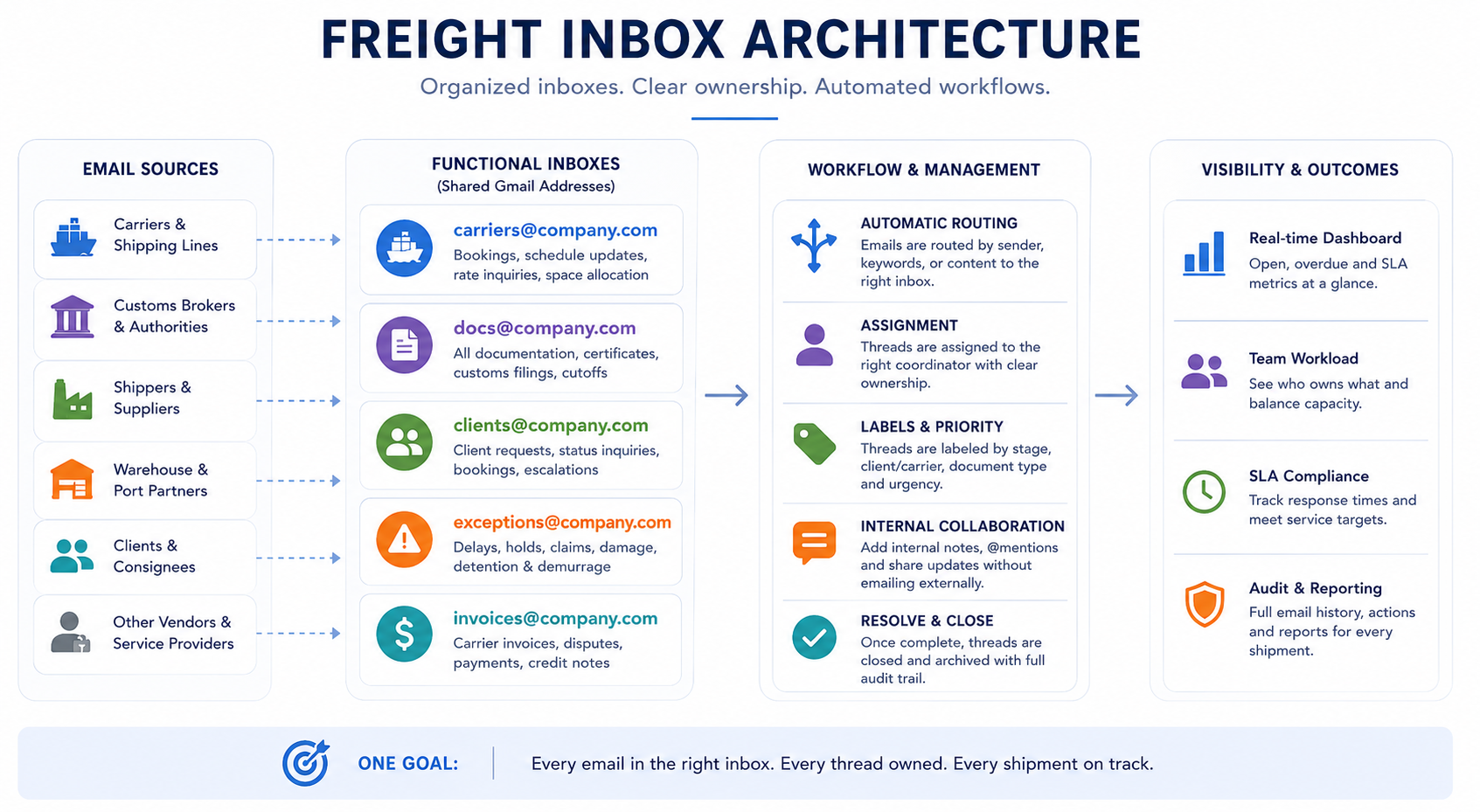
Determining your functional inbox segmentation
Rather than running all freight coordination through a single shared inbox, high-performing teams segment by function. The exact structure depends on team size and specialization, but a common pattern for a 10 to 30 person freight ops team looks like:
- Carrier Ops inbox: handles all inbound communication from active carriers: booking confirmations, schedule change notifications, space availability responses, rate inquiries from carrier sales reps. Coordinators with carrier relationship ownership monitor this inbox and respond to carrier-initiated communications.
- Documentation inbox: receives all document submissions: shipper-provided commercial invoices, packing lists, certificates, and the outbound confirmation flow from customs agents. Documentation specialists monitor this inbox and track cutoffs per shipment.
- Client Services inbox: handles all inbound from clients: booking requests, status inquiries, document requests, complaint escalations. Client-facing coordinators own this inbox.
- Exceptions and Claims inbox: receives exception notifications, damage reports, detention invoices, and dispute correspondence. A senior coordinator or ops manager typically owns this inbox with a triage protocol for incoming items.
This segmentation gives each function a clear ownership model and prevents the most common failure mode of shared inboxes: the assumption that someone else is handling it.
Set up auto-assignment and SLA rules
Within each functional inbox, every inbound email should be assigned to a specific coordinator within a defined timeframe. Recommended SLA benchmarks for freight ops:
- Carrier booking confirmations: assigned and acknowledged within 1 hour during business hours
- Document submissions from shippers: assigned immediately on receipt, reviewed within 2 hours
- Client status inquiries: assigned and responded to within 2 hours
- Exception notifications: triaged within 30 minutes, escalated within 1 hour if no resolution path is clear
These aren't aspirational targets. They're operational commitments that the software needs to enforce through visibility and alerts. If a carrier booking confirmation sits unassigned for 3 hours, the system should flag it not because the coordinator is negligent, but because high-volume freight ops generates more inbound than any coordinator can manually track.
Establish proper labeling and thread taxonomy
A labeling system that reflects the freight lifecycle makes threads searchable, sortable, and reportable. A practical taxonomy:
- By shipment stage: Booking / Docs Pending / Docs Complete / In Transit / At Customs / Cleared / Delivered / Invoicing
- By urgency: SLA Critical / Exception / Standard
- By client or carrier: Client labels and carrier labels enable filtering by relationship, which is essential when a client calls about their shipment and the coordinator needs to pull up the full thread history in seconds
- By document type: BOL / ISF / Customs Entry / Certificate / POD
This labeling structure, applied consistently through automation rules (not manual tagging), will create the audit trail that freight teams need when disputes arise.
Put collision detection in place to prevent double-reply
One of the most trust-damaging errors in freight coordination is sending a client or carrier two different replies to the same inquiry. It signals internal disorganization at exactly the moments when confidence matters most — during an exception, a dispute, or a time-sensitive documentation request.
Collision detection (where the system flags when two coordinators are composing replies to the same thread simultaneously) prevents this at the technical level. No policy or training eliminates it as reliably.
Automation Agents That Match How Freight Actually Works
Automation in freight email operations is most valuable when it reflects the patterns that already exist in how carriers, clients, and vendors communicate. The best automation rules are built around the patterns coordinators already follow manually, without having to reinvent the wheel.
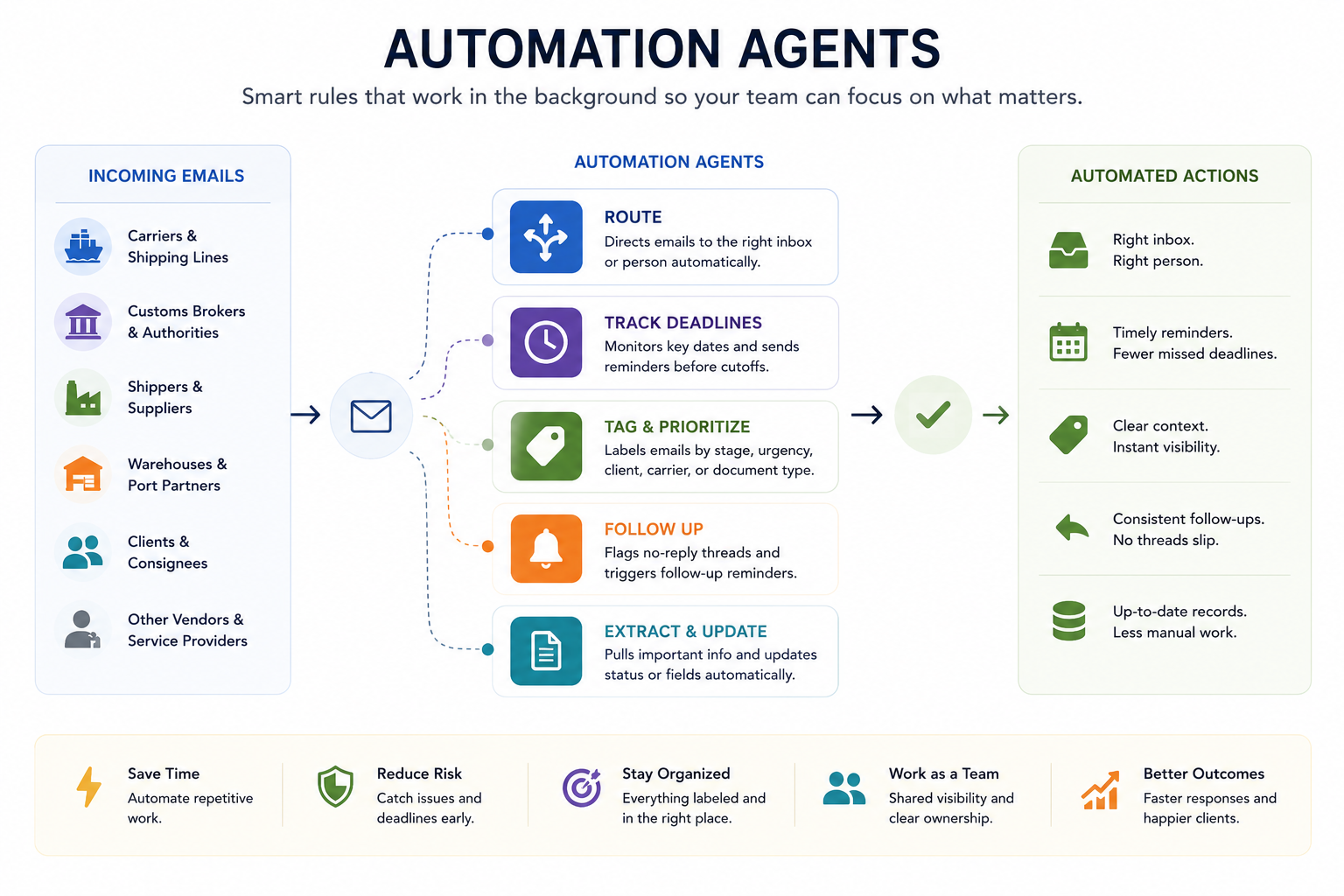
The core agentic operations freight companies need include:
1. Inbound routing
These rules reduce the manual triage step by routing emails to the right functional inbox or coordinator queue based on identifiable characteristics:
- Sender domain rules: Emails from known carrier domains auto-route to the Carrier Ops inbox and auto-label with the carrier name
- Subject line keyword rules: Subjects containing "booking confirmation," "space allocation," or "schedule change" auto-label as Booking events and assign to the duty coordinator
- Subject line exception signals: Subjects containing "detention," "demurrage," "hold," "exam," "damage," or "delay" auto-route to the Exceptions inbox and flag as SLA Critical
- Client domain rules: Emails from client domains auto-route to Client Services and auto-label with the client name
These rules reduce coordinator cognitive load during high-volume periods and ensure that high-urgency items surface immediately rather than sitting in the general queue.
2. Document deadline automation
SI cutoffs, VGM cutoffs, ISF filing windows, and customs entry deadlines are among the hardest constraints in freight ops. Automation that enforces proactive action on these deadlines includes:
- Document request triggers: When a booking confirmation is labeled and assigned, an automated email sequence begins requesting the required documents from the shipper, with a defined follow-up cadence (T-5 days, T-2 days, T-1 day to cutoff)
- Cutoff reminders: Internal alerts to the documentation coordinator at defined intervals before each cutoff
- Escalation rules: If no document receipt has been logged by T-24 hours to cutoff, an escalation notification goes to the documentation supervisor
This type of deadline automation requires the underlying email system to support rule-based triggers on labels and time conditions — not just simple forwarding.
3. Status update automation
Proactive client updates, sent at defined shipment milestones, reduce inbound client inquiry volume by 30% to 40% in teams that implement them consistently. The automation logic is straightforward: when a thread is relabeled from "In Transit" to "Cleared," a template update goes to the client. When the shipment is relabeled "Delivered" and a POD is attached, a delivery confirmation template fires.
The templates themselves need to be specific enough to be meaningful (ETAs, vessel names, reference numbers) while being brief enough that clients actually read them. A well-designed status update template takes 30 seconds for a coordinator to personalize and send, versus 5 minutes to compose from scratch.
4. Follow-up and aging rules
The most common source of missed follow-ups in freight ops isn't negligence — it's volume. A coordinator managing 60 active shipments cannot mentally track which carrier hasn't replied to a booking amendment request, which shipper is 48 hours past the document request with no submission, or which dispute email has been sitting unanswered for 5 business days.
Aging rules surface these threads automatically:
- Carrier non-response: if a thread assigned to the Carrier Ops inbox has had no inbound reply for more than 4 business hours after an outbound, it surfaces as "pending follow-up"
- Document non-receipt: if a document request thread has no incoming attachment after 48 hours, it flags as "document overdue"
- Dispute aging: any thread tagged as a detention or demurrage dispute that hasn't had an inbound response in 3 business days surfaces for escalation review
The Role of AI in Freight Email Operations
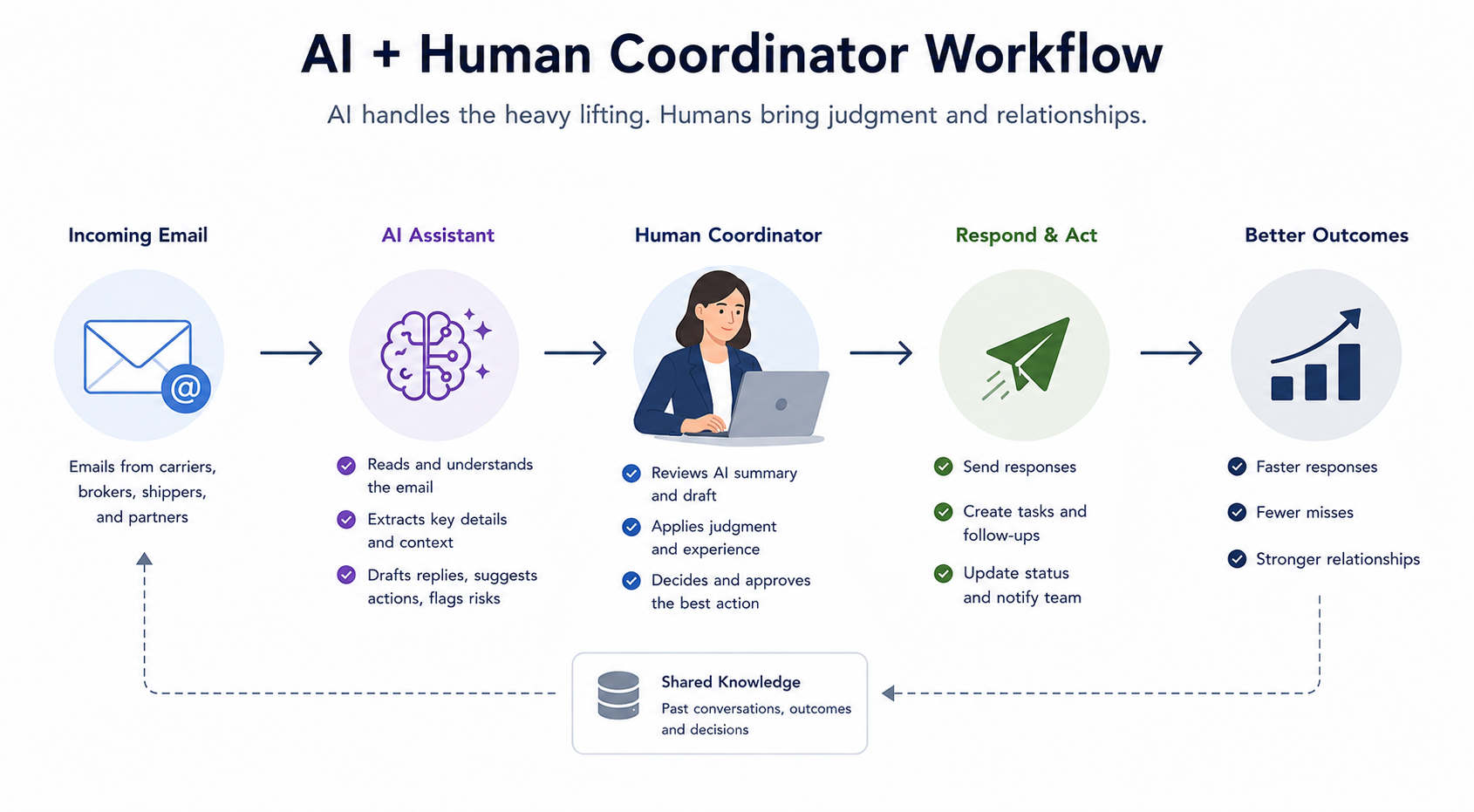
AI tools are beginning to change what's possible at the individual coordinator level. Understanding where they add genuine value (and where they don't) matters for building a workflow that depends on their capability.
For context on how AI email tools are evolving and how they compare across use cases, this comparison of AI email assistants gives a useful framework for evaluating what's on the market.
Where AI adds value in freight coordination today
Draft generation for routine correspondence. Carrier booking confirmations, document request emails to shippers, standard status updates follow predictable patterns. An AI drafting tool that has context on the current shipment (booking reference, cargo details, cutoff dates) can produce a 90% complete draft in seconds. The coordinator reviews and sends. At scale, this is meaningful time savings.
Exception response drafts. When a port hold notification arrives, the response requires pulling in shipment details, assessing options, and communicating clearly to the client under time pressure. AI drafting tools pre-loaded with shipment context can produce a solid first draft of the client-facing update and the customs broker coordination email simultaneously.
Thread summarization. A shipment thread that spans 40 emails over 30 days is not easy to hand off. AI-generated thread summaries (current status, open items, last action taken, next required step) make handoffs between coordinators faster and less error-prone.
Rate comparison and invoice discrepancy flagging. When the original rate confirmation and the final carrier invoice are both available as text, AI can flag line-item discrepancies automatically, surfacing disputes before the invoice gets approved.
Where AI doesn't solve the coordination problem
Individual AI tools. Whether that's an AI assistant in your email client or a standalone drafting tool, theyt operate at the level of the individual user. They make one coordinator faster and more accurate.
They don't assign work across a team. They don't enforce SLAs. They don't give the ops manager visibility into what's open and what's overdue. They don't prevent two coordinators from sending conflicting replies to the same client.
The coordination layer. Shared assignment, shared visibility, and rule-based routing, SLA enforcement is what makes freight ops manageable at team scale. AI tools sit on top of that layer and enhance individual performance within it. The clearest breakdown of how AI assistants work and what they can realistically do helps set the right expectations before building a workflow that depends on them.
The knowledge graph problem
There's a deeper limitation to current AI tools in freight coordination that's worth naming explicitly: A carrier relationship built over three years contains a lot of context: which rate cards have been negotiated, what exceptions have occurred and how they were resolved, which contacts at the carrier are responsive versus not, what the carrier's performance pattern has been across lanes.
This context is distributed across thousands of email threads, spread across multiple coordinators who may have since left the company.
An AI assistant operating on a single thread or a single session doesn't have access to this institutional knowledge. The teams that will get the most from AI in freight coordination are the ones building a structured knowledge layer on top of their email operations, so that when AI drafting tools are invoked, they're pulling from a rich, organized context rather than working from scratch.
This is the operational argument for investing in email structure now, even before AI tooling matures further. The teams that organize their carrier correspondence, documentation trails, and exception records today are building the context layer that makes AI genuinely powerful in 12 to 24 months.
For a broader view of how AI agents are being deployed in operations roles and what the roadmap looks like, the distinction between individual AI tools and orchestrated multi-agent systems is increasingly relevant to how freight ops teams should be planning their tooling strategy.
Workflow Management for Multi-Coordinator Freight Teams
The operational challenges scale differently depending on team size. A solo freight coordinator can manage with a personal system and strong habits. A team of 15 coordinators sharing responsibility for 400 active shipments needs a fundamentally different approach.
The handoff problem
In most freight ops teams, knowledge about active shipments is distributed unevenly. The coordinator who handled the booking knows the carrier preferences and any special handling requirements. The documentation specialist knows which documents are outstanding. The coordinator who handled the last client call knows what was promised. When none of this is captured in a shared system, every handoff is a risk.
Structured handoffs require:
- A shared record of every open item on the shipment at the point of handoff
- A defined format for the handoff note (usually an internal comment on the shared thread)
- An explicit assignment transfer, so the receiving coordinator knows they own it
- A brief acknowledgment that confirms the receiving coordinator has reviewed the handoff note
Visibility without meetings
The daily standup in freight ops teams exists because there's no other way for the manager to know what's happening. Who owns the contested detention charge from Hapag-Lloyd? Which client has been waiting more than 24 hours for a status update? Which shipment has a customs cutoff in 6 hours and hasn't had its entry filed yet?
A well-structured shared inbox with proper labeling, assignment, and SLA rules makes this visible at a glance without a meeting. The ops manager can see open items by category, by coordinator, by urgency, and by aging, in real time, from anywhere. This changes the role of the standup from information gathering to decision-making.
Scaling coordinator capacity
When a well-structured email workflow is in place, coordinator capacity scales more predictably. Onboarding a new coordinator becomes faster because the workflow is in the system, not in someone's head. Training focuses on judgment calls and carrier relationships rather than on the mechanics of how to track what's open. During peak periods, additional capacity can be added without a proportional increase in coordination errors, because the structure handles the overhead.
The standard benchmark for a freight coordinator managing a structured email workflow versus an unmanaged shared inbox is roughly 40% to 60% more active shipments per coordinator, with a significantly lower rate of missed deadlines and client escalations. The investment in workflow structure pays back in reduced headcount requirements and improved client retention.
Freight Operations Software: What to Evaluate and What to Ignore
The market for freight operations software is fragmented and often misleading. Most products in the space are built around one of three paradigms that don't fully solve the email coordination problem:
TMS-first tools handle bookings, rate management, and documentation in a proprietary system. They're valuable for the structured data layer of freight management. They don't solve the email coordination layer, and they require carriers and clients to use a portal that most of them won't.
Generic project management tools (Asana, Monday, Smartsheet, Notion) handle task assignment and tracking. They're visible, auditable, and flexible. But they sit alongside email rather than inside it — creating a second system that coordinators have to update manually, which means it's probably out of sync with reality.
Helpdesk and ticketing tools are built for one-to-one support interactions. They assume a defined client and a defined issue. Freight coordination is multi-party, multi-thread, and multi-stakeholder — a single shipment might involve the carrier, the broker, the shipper, the consignee, a port agent, and a customs examiner simultaneously. Helpdesk ticketing logic doesn't map to this structure.
For a broader comparison of how shared inbox tools differ across categories (including which are built natively for Gmail teams versus which require leaving your existing interface) this roundup of shared inbox software tools for 2026 provides useful context for the evaluation.
What email-native freight operations software actually requires
The evaluation criteria that matter for freight ops:
- Lives inside Gmail. Not alongside it, not through a portal — inside the inbox your coordinators are already working in. Adoption resistance is directly proportional to the distance between the tool and the actual work.
- Shared inbox with real assignment. Per-thread assignment to a specific coordinator, with timestamps and status. Not just a shared login — a structured ownership model.
- Automation rules based on email content. Keyword routing, SLA alerts, and auto-labeling based on sender, subject, and content patterns.
- Internal notes on threads without polluting the external conversation. This is essential for handoffs and for flagging context without emailing the client or carrier.
- SLA tracking and aging alerts. Not just "you have unread emails" — specific visibility into what's overdue relative to defined service targets.
- Full audit trail. Who replied, when, what internal notes were added, when the thread was relabeled and by whom. This matters for dispute resolution and for quality review.
- Manager visibility without standup overhead. A view of open items by coordinator, by urgency, by function — updated in real time.
Most generic collaboration tools meet two or three of these criteria. Freight ops needs all of them, in a single layer, sitting directly on top of Gmail.
The tool that checks every box: Gmelius
For freight teams running on Google Workspace, Gmelius is the closest thing to a purpose-built solution for this exact stack of requirements.
Gmelius is a Gmail-native shared inbox platform, meaning it adds a full coordination layer on top of the inbox your team already uses — no migration, no new interface to learn, no asking carriers to change how they communicate with you.
Key features for freight ops teams:
- Inbox architecture for functional addresses like carriers@, docs@, and exceptions@, each with their own assignment rules and SLA settings
- Per-thread assignment with open/pending/closed statuses visible to the whole team in real time
- Collision detection that flags when two coordinators are about to reply to the same thread
- Automation rules for sender domain routing, keyword-triggered escalations, and document follow-up sequences
- Internal notes and @mentions on threads, visible to the team but never sent externally
- Real-time analytics dashboard for response times, coordinator workload, and aging threads — built into Gmail
Gmelius also integrates natively with Slack, Salesforce, and other tools already in most freight ops stacks, so exception escalations or high-priority bookings can trigger notifications in the channels where the right people are already paying attention.
The result is a coordination layer that matches how freight actually works: email-native, team-visible, automatable, and measurable, without asking anyone in your ecosystem to change their behavior.
Building the Playbook: A Step-by-Step Implementation Guide
For freight ops teams moving from an unmanaged shared inbox to a structured email workflow, implementation works best in four phases. Trying to build the full system at once creates resistance; phasing it allows coordinators to adopt each layer before the next one is added.
Phase 1: Inbox architecture (Weeks 1–2)
- Define the functional inbox segmentation (Carrier Ops, Documentation, Client Services, Exceptions)
- Create the shared inboxes and migrate existing active threads to the appropriate inbox
- Establish the labeling taxonomy (shipment stage labels, urgency labels, carrier/client labels)
- Define SLA targets for each inbox category
- Brief the coordinator team on the structure and the rationale
At the end of Phase 1, the team has a structured home for every type of inbound communication. The improvement in organization is immediately visible, which creates buy-in for the subsequent phases.
Phase 2: Assignment and ownership (Weeks 3–4)
- Implement per-thread assignment for all new inbound
- Define the assignment rules (who covers which carriers, which clients, which functions during off-peak hours)
- Establish collision detection so no thread gets double-replied
- Run the first two weeks with manual assignment to identify gaps before automating
At the end of Phase 2, the team has clear ownership on every active thread and the manager can see open-by-owner at a glance.
Phase 3: Automation rules (Weeks 5–6)
- Build the sender domain routing rules for top 20 carriers and top 10 clients
- Build the exception keyword routing rules
- Build the document deadline reminder sequences for the three highest-volume document types
- Build the first aging alerts for carrier non-response and document overdue
At the end of Phase 3, the most common routing and follow-up tasks are running automatically. Coordinator time that was going to manual triage is freed for higher-judgment work.
Phase 4: Reporting and iteration (Weeks 7–8)
- Establish the weekly ops review metrics: open items by category, SLA compliance rate, exception volume and resolution time, average time-to-first-reply by inbox
- Identify the top three workflow gaps the first month revealed
- Iterate automation rules based on actual pattern data
- Plan the first AI drafting tool integration for routine correspondence types
At the end of Phase 4, the team has a managed email workflow that is measurable and improvable. The foundation is in place for adding AI drafting, advanced automation, and eventually agent-based orchestration as those capabilities mature.
Bottom Line
Freight forwarding operations run through email because the ecosystem demands it. The problem isn't email — it's running freight ops through email without the assignment, automation, visibility, and escalation infrastructure that makes that coordination manageable at scale.
The playbook:
- Segment functional inboxes to give each type of work a clear home
- Implement per-thread assignment with defined SLA targets per category
- Build automation rules that reflect actual freight communication patterns — carrier domains, exception keywords, document deadlines
- Add proactive client communication at defined shipment milestones to reduce inbound inquiry volume
- Use AI drafting tools for high-volume routine correspondence, while maintaining the team coordination layer that AI alone doesn't provide
- Measure compliance rates and aging metrics weekly, and iterate the automation rules based on real pattern data
The freight forwarding teams that own the next decade of this market will be the ones that figure out how to run their operations with the same rigor that the best logistics software companies apply to their product: structured, visible, repeatable, and continuously improving.
The email workflow is where that rigor gets applied first.
Ready to bring structure to your freight email operations?
Gmelius gives your coordination team shared inboxes, automated routing, SLA tracking, and full thread visibility — all inside Gmail, with no migration and no disruption to how your carriers and clients already reach you. Start your free Gmelius trial


.avif)