



How to Build a Collaborative Workflow for an Ops Team That Lives in Email
Most operations teams did not choose email. They inherited it. Vendors send purchase orders by email, clients approve scope changes by email, and freight brokers confirm pickups by email. Nobody designed this system, but it is where the work actually happens, and it is not going anywhere.
Email was built for one person talking to another person, not for a team of five running forty open requests at once. When operations work lives in a personal inbox, ownership gets fuzzy, status lives in someone's head, and the only source of truth is "ask Sarah, she handled that one." That is not a workflow. That is a bottleneck wearing a workflow's clothes.
This guide covers what collaborative workflow management looks like for a team running multi-party work out of email, how to build it step by step, and when you need more than a better inbox.
What Collaborative Workflow Management Looks Like for an Ops Team
Defining collaborative workflow within the specific context of an ops team
Ops work is rarely a single exchange between two people. A vendor coordination request might touch a buyer, a warehouse manager, and the vendor's account rep before it closes. An RFP response might need sales, legal, and a subject matter expert, all threaded through the same email chain.
A collaborative workflow for ops means everyone touching a request sees the same history, the same status, and the same next step, without a meeting or a forwarded thread to explain it. This is where team workflow management differs from personal productivity: a hack that shaves ten seconds off drafting a reply does not matter if the request itself has no defined owner. The unit of improvement is the request, not the inbox.
The signs your current setup isn't suitable for collaboration
A few patterns show up consistently in teams that have outgrown a personal inbox:
- Requests get answered twice, or not at all, because nobody knows who has it
- Status checks require someone to manually search a name or subject line
- Coverage during PTO means forwarding a login and hoping it gets seen
- The only record of a decision is buried three replies deep in a thread
None of these are people problems, they are structural ones. A shared inbox architecture built for an ops team gives every request a visible owner, a visible status, and a shared history that survives someone being out sick or leaving the company.
A misconfigured inbox leaves a request with no owner and no clear status
This is the most common failure mode. An email lands in a general address like ops@ or vendors@. Three people see it, and either all three assume someone else will handle it or two people step on each other. The requester follows up a week later, and the team is now working reactively instead of proactively.
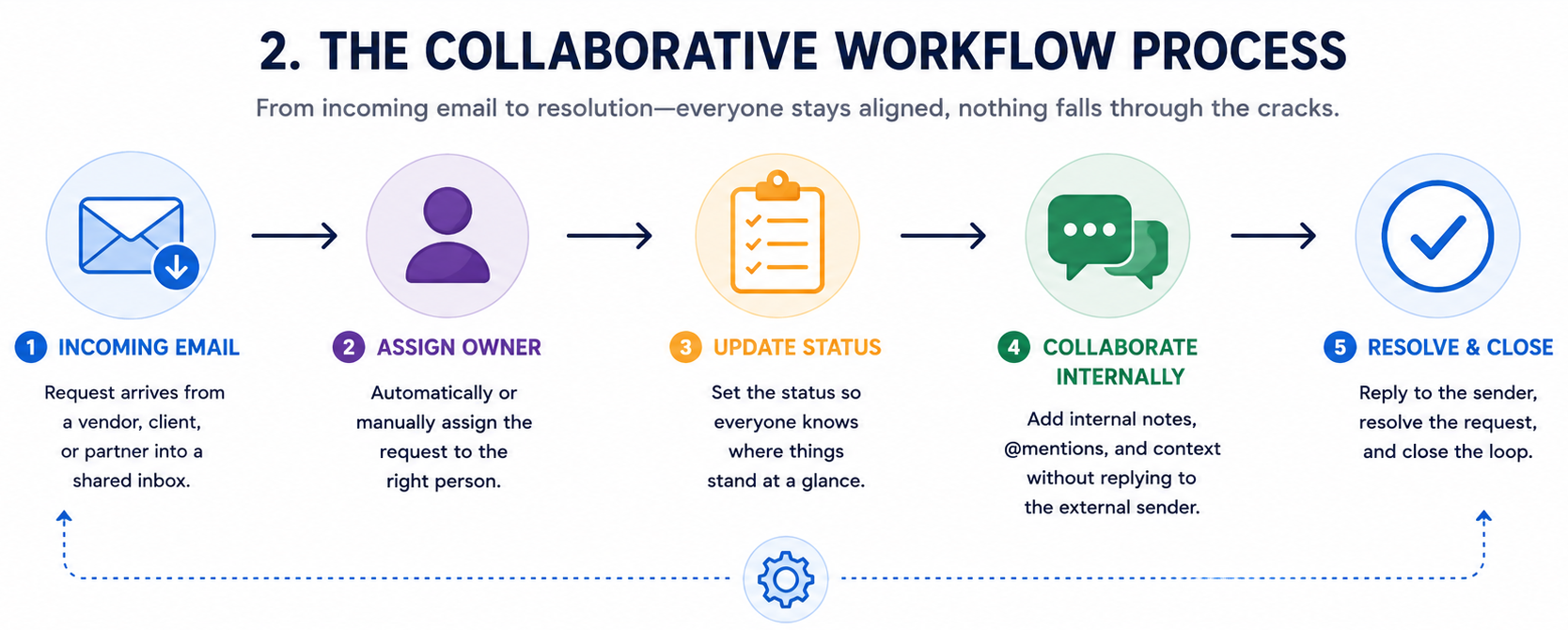
The fix is not a better filter. It is a structural rule: every incoming request gets an owner and a status the moment it lands, before anyone reads past the subject line.
How to Build Your Team's Workflow in Email, Step by Step
Trace one request from first email to done and find where it stalls
Before adding any tool, map one real request end to end. Pick a recent vendor issue or RFP and note who received it first, who it was forwarded to, how long it sat, and what closed it. Most teams find the same chokepoint every time, usually a handoff between two people or a decision nobody explicitly asked for.
Move shared work into a shared inbox
Anything involving more than one person on your side should not live in a personal inbox. Vendor coordination, account management, and RFP intake belong in a shared address the whole team can see and act on, without duplicating each other's work.
Give every request a single owner
Assignment should happen automatically, or at least immediately. One person is responsible for a thread at any given time, and if ownership changes, the whole team sees the handoff rather than inferring it from silence.
Make the status visible on the thread
Status should not require a spreadsheet or a Slack message. Whether a request is new, in progress, waiting on the vendor, or resolved should be visible directly on the thread, the same place the work is happening. This is the real difference between collaborative work management and a pile of inboxes that happen to share a domain.
Keep internal notes separate from the customer reply
Ops threads often need internal commentary, a warning about a difficult vendor, a pricing note, a flag for legal, that should never accidentally go out in a reply-all. Internal notes attached to the thread but invisible externally let the team collaborate honestly.
Set coverage so work doesn't stall when an owner is out
If one person's vacation means a request stalls for a week, the workflow is not resilient. Build coverage rules in advance: if an owner does not respond within a set window, the request reassigns or escalates automatically.
Set a response time the whole team works to
"Get to it when you can" is not a standard. Set an explicit response time per request type, four hours for a client escalation, two days for a routine vendor check-in, and make it visible enough that everyone works to the same clock.
Turn your most-repeated replies into shared templates
If three people are writing versions of the same reply about payment terms, that reply should exist once, as a shared template anyone can personalize. Some teams look at AI message writers or email response generators to speed up drafting without losing the specificity ops work requires.
Automate routing, acknowledgments, reminders, and follow-ups
This is where a lot of manual work disappears. Routing should recognize a request type and send it to the correct owner automatically. Acknowledgments should go out the moment a request lands. Reminders on a stalled vendor thread should fire on their own.
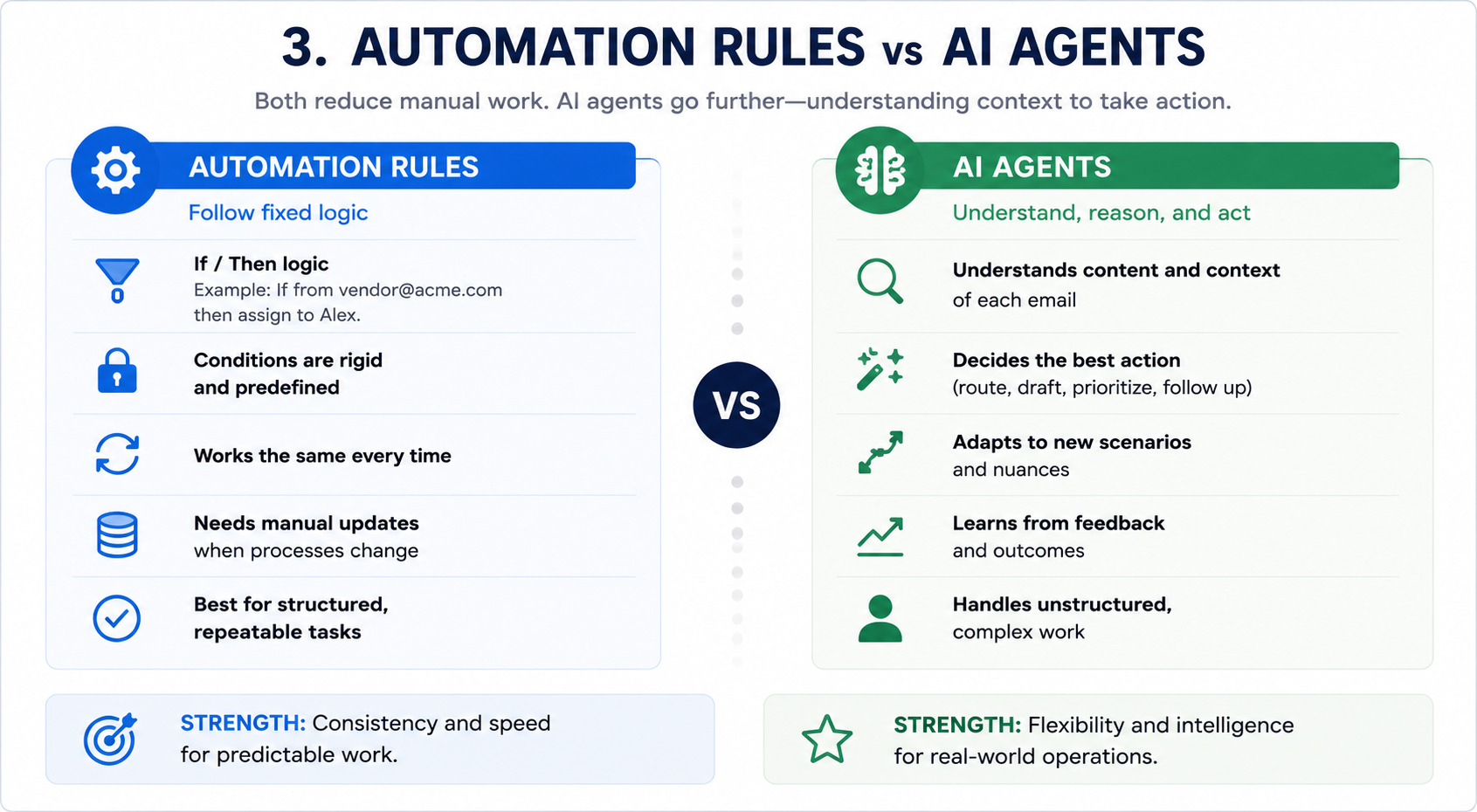
The distinction worth making is between automation rules and automation agents. A rule fires a fixed action on a fixed condition. An agent reads the content of the request, pulls relevant context like prior history or contract terms, and proposes the next action based on that context. For ops work, where every vendor and client relationship carries its own history, that distinction matters more than it sounds like it should.
Use MCPs and agents to do all of the above for you
The next layer of maturity is not another rule engine, it is agents doing the reading, routing, and drafting a human currently does by hand. A well-built setup runs on four functions:
- Triage reads an inbound email, classifies it, and pulls relevant history, contracts, or account status.
- Routing assigns the request and loops in the right internal or external party, including outbound notifications to a vendor or partner.
- Drafting proposes the next reply, quote, or escalation, pre-loaded with the context triage retrieved.
- Tracking monitors the thread for deadlines and exceptions, escalating and rolling up patterns like a vendor's on-time rate or an account's recurring issues.
This is meaningfully different from a solo AI writing assistant. A single-user AI tool can draft a good reply, but it cannot reconstruct who owns a thread on your team or what was agreed with a vendor eighteen months ago. That context has to come from something structural, not a prompt. For more on this category, see this overview of what AI agents are, this roundup of the best AI agents, and the current agentic AI statistics worth knowing before committing to a direction.
Track the numbers that show the workflow is holding
A workflow that cannot be measured cannot be trusted. Track first response time, resolution time, how often requests reassign, and how many exceed your response window. A number trending the wrong way is your signal to revisit the workflow before it breaks under more volume.
%205.13.29%E2%80%AFp.%C2%A0m..png)
Do You Need a Work Management Platform, or a Better Inbox?
The case for building on top of email, not replacing it
Teams often assume the next step after outgrowing a shared inbox is a full work management platform. But for teams whose work is fundamentally email-based (vendor coordination, deal desks, RFP responses, partner ops) an orchestration layer built on top of the inbox is often the better move than a replacement for it. McKinsey Global Institute research puts knowledge workers at close to 28% of the workweek spent reading, writing, and managing email. Trying to move that work into a separate platform only adds a second system to keep in sync with the first.
Messaging tools haven't reduced email's role, even at companies that adopted them specifically to replace it. The average worker now manages well over a hundred emails a day on top of a comparable volume of chat messages — total communication load went up, not down. For ops functions dealing with external vendors and clients who will never install your internal chat tool, email remains the one channel everyone can actually use.
Keeping your CRM and other tools in sync
Even an email-native workflow needs to talk to the rest of your stack. A vendor request might update a status in your CRM; an RFP might need a document pulled from a shared drive. The workflow layer should push and pull from those systems automatically, so nobody re-enters the same information twice.
Why an inbox-native tool like Gmelius makes sense here
For teams not moving vendor coordination or client account work into a separate app, the practical answer is a tool that turns the inbox itself into the workflow surface. Gmelius is built around that idea: structured inbox architecture, shared ownership, visible status, and automation agents that read context and act on it, without asking your team or external partners to change how they work. If your workflow depends on people outside your organization responding where they already are, an inbox architecture isn't a compromise — it's the right tool for the job.
Keeping Collaborative Work Management in Place as You Grow
Keeping ownership clear as volume and headcount rise
What works for three people handling twenty requests a week breaks quietly at thirty requests a day with eight people involved. Revisit ownership rules whenever headcount changes meaningfully, since routing logic built for a small team usually needs new categories or escalation paths as volume grows.
Spotting when work drifts back into personal inboxes
Watch for CC patterns that suggest people are quietly reverting to one-on-one handling instead of the shared system. That usually means the workflow is missing a case the team runs into often, and the fix is to add that case rather than let the workaround become the norm.
Adjusting when a new request type or a big account changes the work
A new large account, a new vendor category, or a request type that does not fit your existing routing rules is a signal to update the workflow, not to handle the exception manually every time.
The Bottom Line
Operations teams do not need to abandon email to run a collaborative workflow. They need the inbox to behave like the coordination tool it has quietly become: one where ownership is clear, status is visible, coverage is built in, and the repetitive parts, routing, acknowledgments, follow-ups, drafting, are handled by automation agents instead of memory and goodwill. The teams that get this right are not the ones with the most tools. They are the ones whose email stopped requiring a mental map to navigate.
If your team is coordinating vendors, clients, or partners out of a shared inbox and still relying on someone's memory to know what is happening where, it is worth seeing what a purpose-built inbox architecture looks like in practice. Try Gmelius for free and see what it looks like when your inbox actually runs the workflow instead of just holding the messages.


.avif)
.avif)


.avif)