
.avif)



Shipment Exception Automation: How to Streamline Logistics Email Coordination
Shipment exceptions are a fact of life in freight and import/export operations. According to a FedEx industry study, most supply chains experience shipment delays regularly, but only 18% of organizations can intervene fast enough to prevent customer impact. Each exception triggers a cascade of emails across brokers, carriers, suppliers, and clients that can spiral fast without a structured system behind it.
The problem isn't that exceptions happen. It's that most ops teams still manage them the same way they manage every other email: reactively, manually, and without clear ownership. This guide covers how to fix that with structured inbox architecture and automation agents.
What Exactly Is a Shipment Exception (and Why Email Is Still the Center of It)
A shipment exception is any event that causes a deviation from the planned delivery: weather delays, customs flags, incorrect documentation, failed delivery attempts, carrier capacity issues, or temperature excursions for sensitive cargo.
Despite the growth of TMS platforms and carrier portals, the actual coordination when an exception hits almost always flows through email. Carriers notify you by email. Customs brokers reply by email. Clients want email updates. Suppliers confirm corrective actions by email. Slack doesn't help here because your external parties aren't in your Slack.
This is exactly the coordination problem that a structured inbox architecture is designed to solve — not just a shared inbox, but a system with rules, ownership logic, and visibility across every thread.
The Real Cost of Unstructured Exception Handling
When a shipment exception hits an unstructured inbox, a few things happen reliably:
- The email sits unread or gets missed during a busy window
- Someone eventually picks it up, but there's no record of who owns it or what the next step is
- The team sends duplicative replies or, worse, sends nothing while everyone assumes someone else responded
- Follow-ups pile up over 24–48 hours while the shipment sits in limbo
- The client escalates before the team has a coherent update to give
According to a Descartes Systems Group industry report, shipment exception resolution that takes longer than four hours significantly increases the probability of a missed delivery SLA. For freight ops teams handling dozens of active shipments, that window closes fast.
The fix isn't more headcount. It's a better system for how exceptions flow through your inbox.
Building an Exception Workflow on Top of Your Inbox Architecture
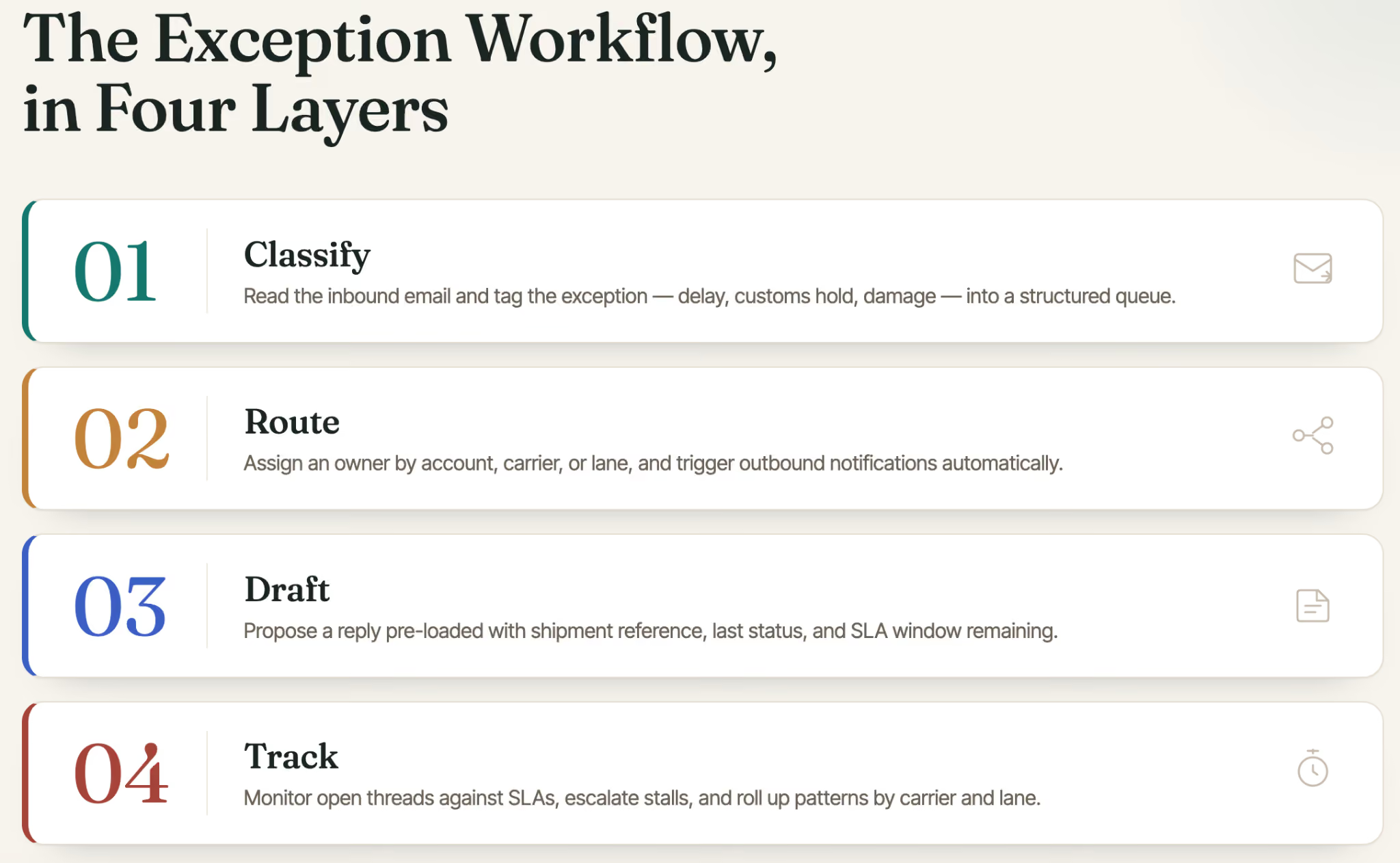
The foundation of effective shipment exception automation is a structured inbox architecture adapted to the needs of an operations team. Here's how to think about it in layers:
Layer 1: Classification at the Point of Arrival
Shipment exception automation begins the moment an exception notification arrives. A triage automation agent identifies the issue rather than relying on a team member to read and categorize each email, the agent reads the inbound message, classifies the exception type (delay, customs hold, damage, missing documentation, carrier refusal), and tags it accordingly.
Classification at arrival means your team sees a structured queue instead of an undifferentiated inbox. A customs hold goes to one lane. A carrier delay goes to another. Damage claims go to a third. Each lane has its own rules about who gets assigned and what the response template looks like.
For teams looking at how AI agents are changing operational workflows, triage is the clearest entry point — it's high volume, repetitive, and well-suited to pattern recognition.
Layer 2: Routing and Ownership Assignment
Once classified, the exception needs an owner. This sounds obvious, but in most freight ops teams, ownership is implicit and assumed rather than assigned. That's where things break down during high-volume periods or when someone is out.
A routing automation agent handles this by applying assignment rules based on the exception type, the account, the carrier, or the trade lane. If your customs broker contact is Maria and all customs-related exceptions for the EU lane go to her, the agent routes accordingly — and logs the assignment so there's no ambiguity.
This is also where external notification logic kicks in. If a carrier needs to be looped in, or a supplier needs to confirm alternative packaging, the routing layer triggers outbound notifications without waiting for a team member to manually forward the thread.
Layer 3: Drafting the Response
The drafting layer is where AI assistants for email show their clearest value in freight ops. When an exception lands and ownership is assigned, the drafting agent proposes a reply pre-loaded with the relevant context: the shipment reference, the last known status, the carrier contact, the SLA window remaining.
The team member reviews and sends — rather than opening five browser tabs to reconstruct the history themselves. For external-facing replies to clients or partners, the draft includes the key facts without over-explaining or escalating tone unnecessarily.
The distinction from a generic AI email assistant is context. A solo AI assistant drafts from what's in the thread. An ops-layer drafting agent drafts from what it knows about the account, the carrier relationship, the shipment history, and the team's past handling of similar exceptions — context that lives in the Meli knowledge graph, not just the email thread.
Layer 4: Tracking, Escalation, and Pattern Recognition
Handling the exception is only half the job. Tracking it to resolution — and learning from it over time — is where most teams leave value on the table.
A tracking automation agent monitors open exception threads against defined SLA windows. If a carrier hasn't responded within two hours of a delay notification, the agent nudges the assigned team member. If the thread goes cold for four hours during a customs hold, it escalates to the ops manager. At the end of the week, it rolls up exception data by carrier, lane, and type — so the ops team can see whether a specific carrier is generating a disproportionate share of delays, or whether a particular trade lane has a recurring documentation issue.
This is the kind of institutional memory that agentic AI makes possible at scale — not just answering individual emails faster, but building a record of operational patterns that improves decision-making over time.
What the Team Actually Experiences
Once this system is in place, a typical exception day looks different:
A carrier sends a delay notification at 6:47am. The triage agent classifies it as a carrier delay on a time-sensitive LTL shipment. The routing agent assigns it to the account manager for that lane and triggers a client notification draft. By the time the account manager opens their laptop at 8:30am, the exception is classified, assigned, and has a draft reply waiting. They review, adjust, and send. The tracking agent watches the thread and flags it again if the carrier doesn't confirm a new ETA within three hours.
No email was missed. No one had to decide who owned it. The client got a proactive update before they asked.
Common Exception Types and How to Handle Each
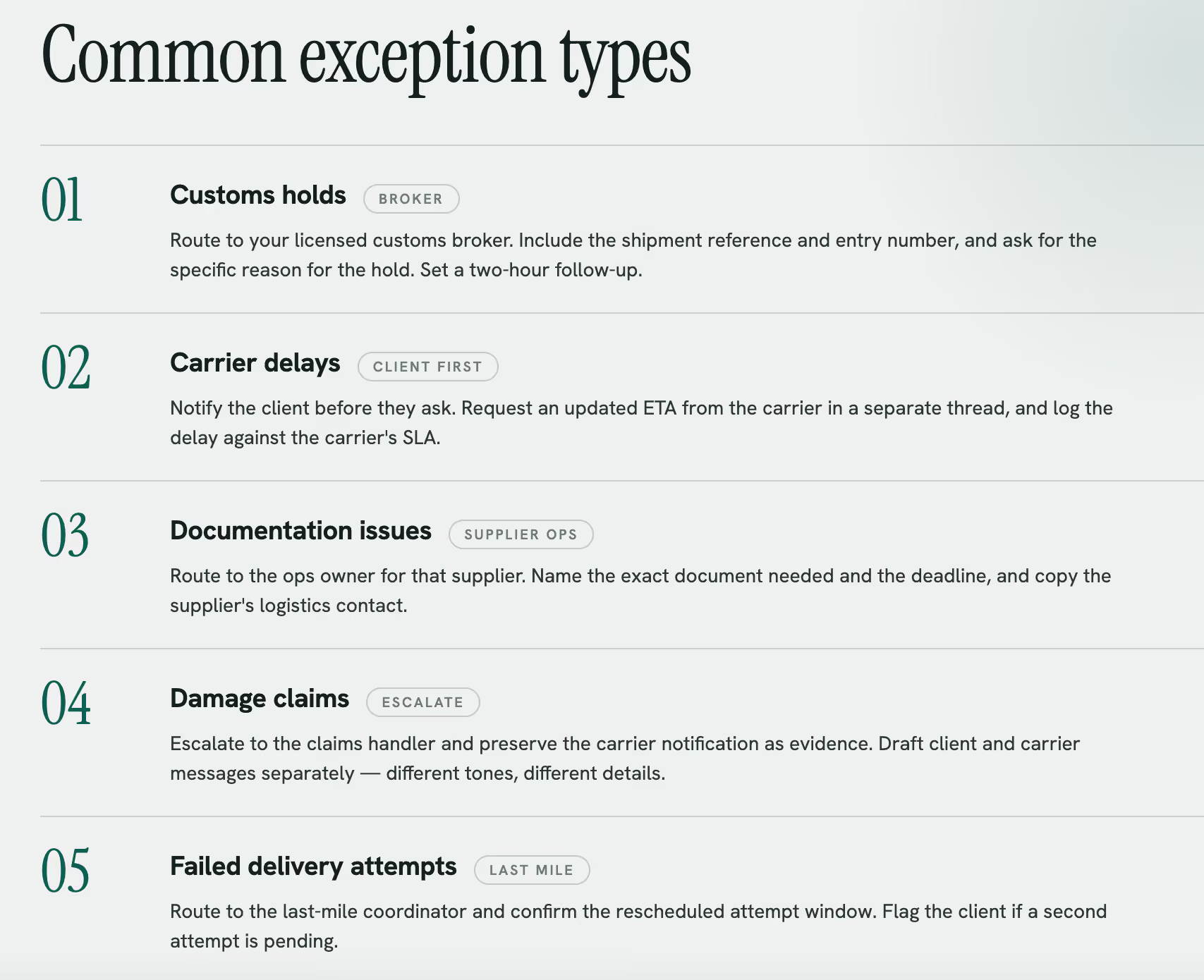
Customs holds: Route to your licensed customs broker contact immediately. Draft should include the shipment reference, the entry number if available, and a request for the specific reason for the hold. Set a two-hour follow-up trigger.
Carrier delays: Notify the client proactively before they ask. Request an updated ETA from the carrier in a separate thread. Log the delay against the carrier's SLA record.
Documentation issues (missing BOL, incorrect commercial invoice): Route to the ops team member who manages that supplier relationship. Draft should specify the exact document needed and the deadline. Copy the supplier's logistics contact.
Damage claims: Escalate immediately to the claims handler. Preserve the original carrier notification email as evidence. Draft the client communication separately from the carrier communication — they require different tones and different information.
Failed delivery attempts: Route to the last-mile coordinator. Draft should request confirmation of the rescheduled attempt window. Flag to the client if a second attempt is pending.
Why Solo AI Tools Don't Solve This
It's worth being direct about this. Tools like ChatGPT for email or individual AI message writers can help a single person draft a reply faster. That's useful. But it doesn't solve the coordination problem.
When a shipment exception hits, the challenge isn't writing a good email. The challenge is: Who owns this? What does the client already know? What did we tell this carrier last time this happened? Has this supplier had documentation issues before? A solo AI assistant can't answer those questions because it doesn't have access to the team's shared history, account context, or operational record.
That's the distinction between an AI writing tool and an operations layer. The former speeds up individual work. The latter orchestrates work across a team with shared context and structured rules.
Getting Started: What to Set Up First
If you're implementing shipment exception automation for the first time, prioritize these steps:
- Define your exception categories. List the five to eight exception types your team handles most frequently. These become your classification rules.
- Map ownership rules. For each exception type, define who gets assigned by default and what the escalation path looks like.
- Build your response templates. Draft a base template for each exception type — carrier reply, client notification, broker escalation. These become the starting point for the drafting agent.
- Set SLA windows. Define how long the team has to respond to each exception type before escalation triggers.
- Start tracking by carrier and lane. Even a simple weekly rollup by exception type and carrier will surface patterns within 30 days.
The Bottom Line: Exceptions Are Manageable When the System Is Built for Them
Shipment exceptions will always happen, no matter how hard you try. The variable is whether your team has a system that handles them consistently or whether each one is a small crisis that depends on who happens to see the email first.
A structured inbox architecture with automation agents for triage, routing, drafting, and tracking turns exception handling from a reactive scramble into a repeatable process. The emails don't change. The coordination does.
Gmelius is built for exactly this kind of multi-party email operations work (freight coordination, vendor ops, client services, deal desks) where the work lives in email and the team needs shared rules, visibility, and handoffs to keep things moving.
Try Gmelius free and see how your freight ops team handles the next exception.


.avif)
%20(2).avif)
.avif)
.avif)
.avif)





