



OpenAI dots (yes, that's dots with a lowercase d) are always-on agents inside ChatGPT, and they are the company's first attempt to give its chatbot a standing job instead of a single question. OpenAI introduced them at its DevDay conference in San Francisco on September 29, 2026, and each dot was given a cloud computer of its own, so it can keep working after its owner has closed the app.
OpenAI now counts 1.2 billion weekly ChatGPT users, although the launch came in a difficult week. Just a day before DevDay, OpenAI shelved its ChatGPT Astra launch after GPT-6.1 Astra, the model it had planned to release in October, failed the company's own safety and alignment tests.
ChatGPT dots are therefore powered by the earlier GPT-6 Astra, and for now they are offered only to Pro and Business Premium subscribers. This guide explains what dots can do and what they cost, before comparing them with the always-on agents that Google and Meta have released this year.
What Are ChatGPT Dots?
A dot is an AI agent that accepts an ongoing responsibility, such as a monthly presentation or a change to an app, and keeps making progress on it between conversations. OpenAI's help center describes it as an agent that can help a person take a project from an idea to work they can use.
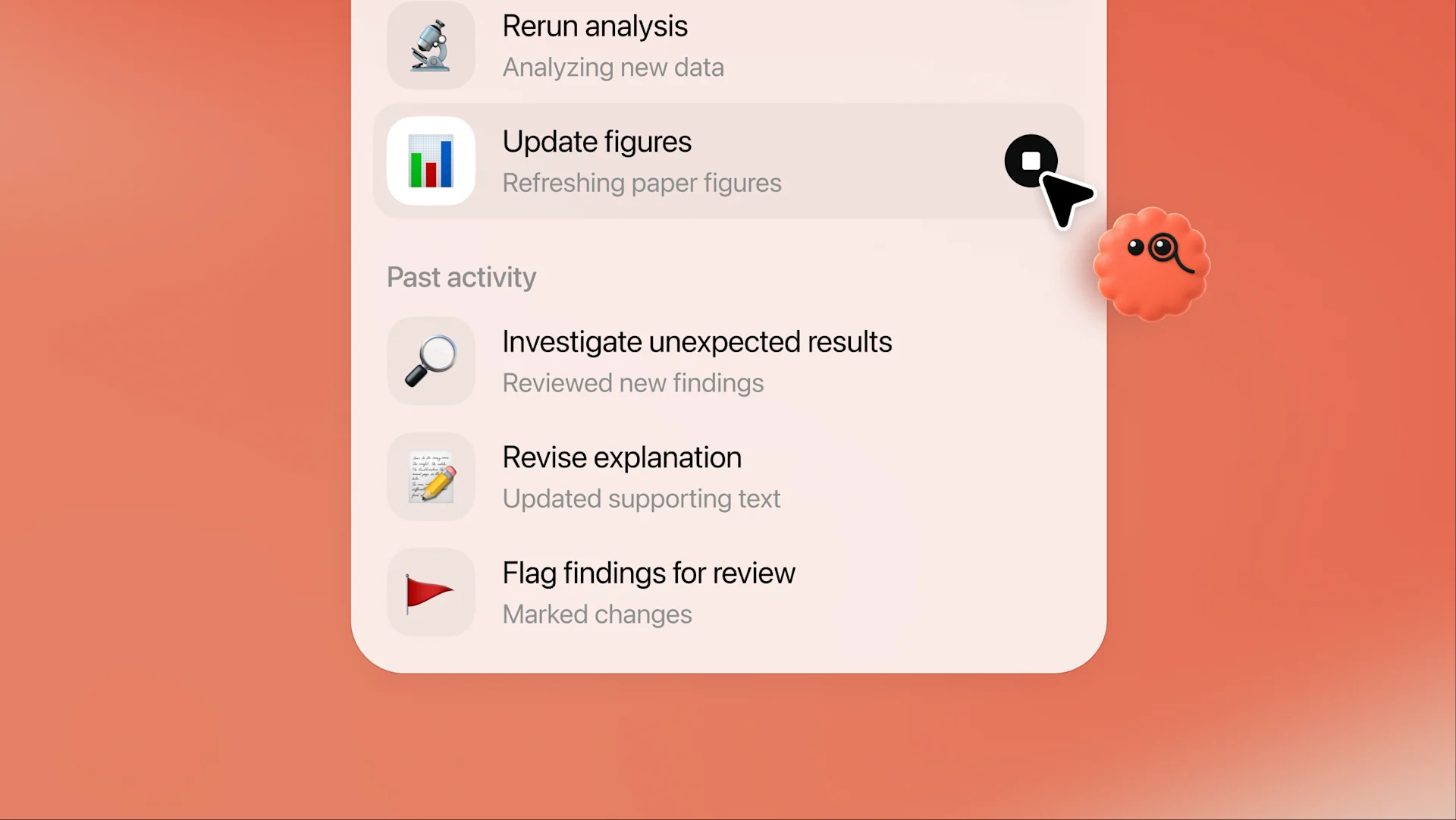
An ordinary chatbot answers a question and stops, whereas ChatGPT dots are given a goal and the apps they need, along with rules about what they may do without asking, after which they work toward that goal on their own and consult their owner when a decision needs a person's judgment.
Each subscriber receives one dot at launch, which can be given a name and a character, or a pet that the dot may generate for itself, and its default handle takes the form @yourname-dot. OpenAI dots will not always come one at a time, however, since OpenAI has said that subscribers will be able to add more of them later.
How Do Dots Work?
OpenAI’s dots are built on GPT-6 Astra, and each one works from a cloud computer with its own browser, which its owner can open at any time to watch what the dot is doing or to take control of it.
Access to the owner's own computer is optional, and it will be disabled until you allow it from the ChatGPT desktop app.
A dot begins with context from ChatGPT's memory and then forms memories of its own, including memories drawn from connected apps, so it can review a calendar or an inbox without being asked. That background research, according to OpenAI, relies on read-only tools that cannot send messages or change anything inside an app.
Owners can message their dot in the ChatGPT apps or call it with the phone button, and they can connect it to Slack and Microsoft Teams, where its context follows it, so a project begun in ChatGPT can be passed to a team without a fresh briefing. Texting has also been offered as a limited beta to some Pro users in the US.
With access to its owner's computer, a dot can create tasks in ChatGPT Work and Codex, and it can open Codex cloud tasks in environments that have already been prepared, so it behaves more like a manager of OpenAI's other tools than a replacement for them.
What Can You Do With ChatGPT Dots?
ChatGPT dots have a very wide range of use cases, from a monthly presentation to a working change in an app, and most of them have one thing in common, which is that the work continues over days instead of minutes.
1. Keep a presentation up to date
A dot can gather data and customer feedback for a recurring presentation and revise the deck whenever new figures appear, so the slides are ready before the meeting instead of during it, while its owner reviews each set of changes at the end.
2. Show notes and social posts from an interview
Given a transcript, a dot can write show notes and social posts, and when its owner edits one draft, it will apply the same changes to the others, which saves a podcast producer or a marketer from correcting the same sentence several times over.
3. Make tested changes to an app
A dot can write and test a change to an app, so that its owner receives working code to review, and it can hand larger jobs to a Codex cloud environment that has already been prepared for that project.
4. Automate morning briefings and reminders
Owners can ask a dot to review their calendar each morning and say what is coming, or to send a reminder at a set time, and those scheduled runs appear both in the dot's conversation and in ChatGPT's Scheduled section, where they can be paused or edited.
5. Run background research on connected apps
Without a new message from its owner, a dot can review the information in connected apps and suggest ways to help. Inside OpenAI, according to SiliconANGLE, dots began investigating bugs as soon as they were reported in the company's Slack, while staff spent their time on customer feedback.
6. Create projects shared in Slack and Teams
Because a dot can be connected to Slack and Microsoft Teams, a manager can pass a project to a team channel and let the dot continue there with the context it gathered in ChatGPT, instead of writing a fresh briefing for colleagues.
7. Browse websites and local files
The dot's cloud browser keeps its own sign-in sessions, so it asks its owner to sign in, or to take control briefly, when a website needs a login. With permission, it can also work with files on its owner's computer, or use the local browser when a website blocks the cloud one.
8. Discuss voice calls
Owners can call their dot from its conversation with the phone button and discuss a task aloud, although at launch a dot cannot call its owner, and anything said in the call can be continued in text afterwards.
ChatGPT Dots Availability and Pricing
ChatGPT dots are available to Pro subscribers outside the European Economic Area, Switzerland and the UK, and to Business Premium users in every supported ChatGPT region, while Enterprise, Edu and Healthcare workspaces can try a beta once an admin has enabled it.
The first dot is included in the plan at no extra cost, and conversations with it do not count toward ChatGPT's usage limits, although the deeper work it performs draws on the plan's allowance, which OpenAI extended for the first month after launch. Business Premium seats, which were introduced in August, also require a minimum of two seats per workspace.
OpenAI dots will be sold in larger quantities later, since the company has said that subscribers will be able to add more dots and pay to make each one faster or to raise the amount of work it can handle each month, although it has not yet named a price for either.
How to Create Your First Dot
OpenAI has made a dot quick to create, although the rules chosen at the start will decide how much it does without asking, so they deserve more care than the name or the avatar.
- Open ChatGPT on a supported device. Dots can be created in the ChatGPT desktop app or on desktop web, and OpenAI's help center now lists the latest iOS and Android apps as well, although mobile web is not supported.
- Name the dot and choose a character. The onboarding prompts ask for a name, which changes the handle from @yourname-dot to one that includes the dot's own name, and either a character or a pet for its avatar.
- Connect only the apps it needs. Each plugin's permissions should be reviewed before it is connected, because disconnecting an app later will not delete the information the dot has already obtained from it.
- Set custom rules. For each kind of action, a rule can let the dot proceed without asking, proceed only when the action was requested explicitly, ask first, or hand the step back to its owner, and asking for a draft never authorizes sending it.
- Give it one clear goal. Describe the goal and attach the files it needs with the + button, and then review its progress from the dot's profile, where work in progress, scheduled runs and completed tasks are listed separately.
- Pause or reset when needed. The ••• menu in the dot's profile pauses it until its owner resumes it, whereas Reset deletes the dot along with its memories and scheduled tasks, so any results that its owner needs should be saved first.
Dots vs Gemini Spark, Claude Cowork and Meta Muse
ChatGPT dots aren't the only everyday agents in the market, so we also looked at the competition.
OpenAI dots cost almost exactly the same as Gemini Spark to start, since Pro 100 and Google AI Ultra are a cent apart, whereas Meta Muse is free, and that gap reflects a difference in audience as much as a difference in price.
Meta built Muse for everyday errands, such as booking a dinner or selling a car, while OpenAI has pitched dots at professionals who would otherwise delegate work to an assistant or a junior colleague, and Anthropic designed Claude Cowork around multi-step office work drawn from a folder of files.
For most teams, the choice will depend on where their work already happens, which is why tools built for a single job, such as sales follow-up or a shared inbox, still appear alongside dots among the best AI agents for work.
Is ChatGPT Dot the Right Choice for Your Team?
Each dot belongs to one subscriber, and although it can post in a Slack channel, it works from its owner's apps and memories, so it has no shared view of which colleague owns a customer's request or whether anyone has already answered it. That is its biggest shortcoming, as per our analysis.
A dot can use its owner's personal email account once that account has been connected, but at launch, it cannot have an email address of its own, so every message it sends appears under its owner's name. So, a support address that five colleagues share would therefore need five separate ChatGPT dots, each with its own memories and none with a common record.
Teams that answer customers from a shared inbox need agents that work from shared rules instead of personal ones, and they can build AI agents for email that assign each request to one person and keep a record of every reply where the whole team can see it.
Frequently Asked Questions About ChatGPT Dots
Are ChatGPT dots free?
Dots are not offered on the Free, Go or Plus plans. The first dot is included at no extra cost in a Pro plan, which starts at $100 a month, or in a Business Premium seat, which costs $125 a month, or $100 a month on an annual plan.
Does a dot keep working when ChatGPT is closed?
A dot keeps working on its own cloud computer after its owner has closed the app, and it sends progress updates and questions back to its conversation, although it will stop whenever its owner pauses it from the ••• menu in its profile.
Can a dot send emails?
Once its owner's personal email account has been connected, a dot can send messages from it, subject to the automatic review and any custom rules, but at launch it cannot be given a separate email address of its own.
Can a subscriber have more than one dot?
Each subscriber received a single dot at launch, and OpenAI has said that it will allow people to add more dots later, along with options to make each dot faster or to raise its monthly workload, although no prices have been announced.
Are dots available in Europe?
The Pro rollout excluded the European Economic Area, Switzerland and the UK at launch, whereas Business Premium users can create a dot in every region that ChatGPT supports, so a European company can use dots through a Business workspace.
Conclusion
OpenAI dots are the most capable personal agents that ChatGPT has offered so far, and for a professional on a Pro plan, they're a sensible way to delegate the recurring work that fills a week, provided that the custom rules have been set with care.
The price, and the year OpenAI's agents have had, will make some buyers cautious, though, and a dot is still built around one person's apps and memories, so it can't tell a team who owns a customer's request.
Meli, Gmelius's AI agent, works inside Gmail from a team's shared inbox and its business context, and it also powers an army of custom AI agents that complete tasks across other applications, with each conversation assigned to one person and each reply recorded for the rest of the team.
Install Gmelius for free to give your team's inbox AI agents that know your business.