



Most products marketed as email agents are really just drafting boxes with a scheduler attached. They write a reply when someone prompts them, and that's where they stop. In comparison, a real AI agent needs four things to really count as an agent and not just an AI assistant. These are:
- A trigger: Something that starts the process without a person giving the instruction, like a new message or a scheduled review.
- Tools beyond writing text: Applying a label or updating a CRM record means connecting to that system directly.
- A decision loop: Reads the message, works out the intent, picks a plan, and executes it, checking the result as it goes, trying again or handing the thread to a person if that check comes back wrong.
- An authority boundary: Explicit rules for which actions need a human's approval. Most failures come from nobody having defined that boundary, not from the model getting something wrong.
An AI agent for email brings these autonomous, always-on capabilities to the email inbox, and here’s how to start using one today.
3 Options to Build an AI Agent for Email
Now that you know what an AI agent looks like, let’s look at how to build one for email. Fortunately, the process is much simpler than building an AI assistant because of GUI-driven platforms like Gmelius.
Option 1: Use the native features in Gmail and Outlook
Gemini in Gmail and Copilot in Outlook already summarize threads, suggest replies, and increasingly handle multi-step tasks across the rest of the suite. None of this needs integration work or another vendor, and the data stays inside a single environment.
But customization capabilities are very limited, and integration doesn't usually extend beyond that vendor's own products. This might work for one person operating alone, but not a shared inbox with defined ownership rules and diverse needs.
Option 2: Try general automation platforms
Zapier, Make, and n8n can connect a mail trigger to an LLM model API, then to whatever other systems the business already uses. A new message reaching a labeled inbox triggers an AI agent that sends its content to a model for classification, and depending on the result, the flow can create a record, draft a reply, or notify a channel.
The connector library is enormous, and a working version only takes a day or two to build.
But teams that have pushed a flow past twenty nodes have generally found the conditional logic hard to manage, and the pricing adds up, since a four-step flow processing three thousand messages a month totals twelve thousand billed tasks.
These platforms have also rarely included anything built for email specifically, so shared inbox ownership and an audit trail have had to be built by hand.
Option 3: Use email-native agent builders
There's a newer category that applies this same if-this-then-that logic directly to the inbox, using a GUI to connect a trigger to actions across other apps with no code needed.
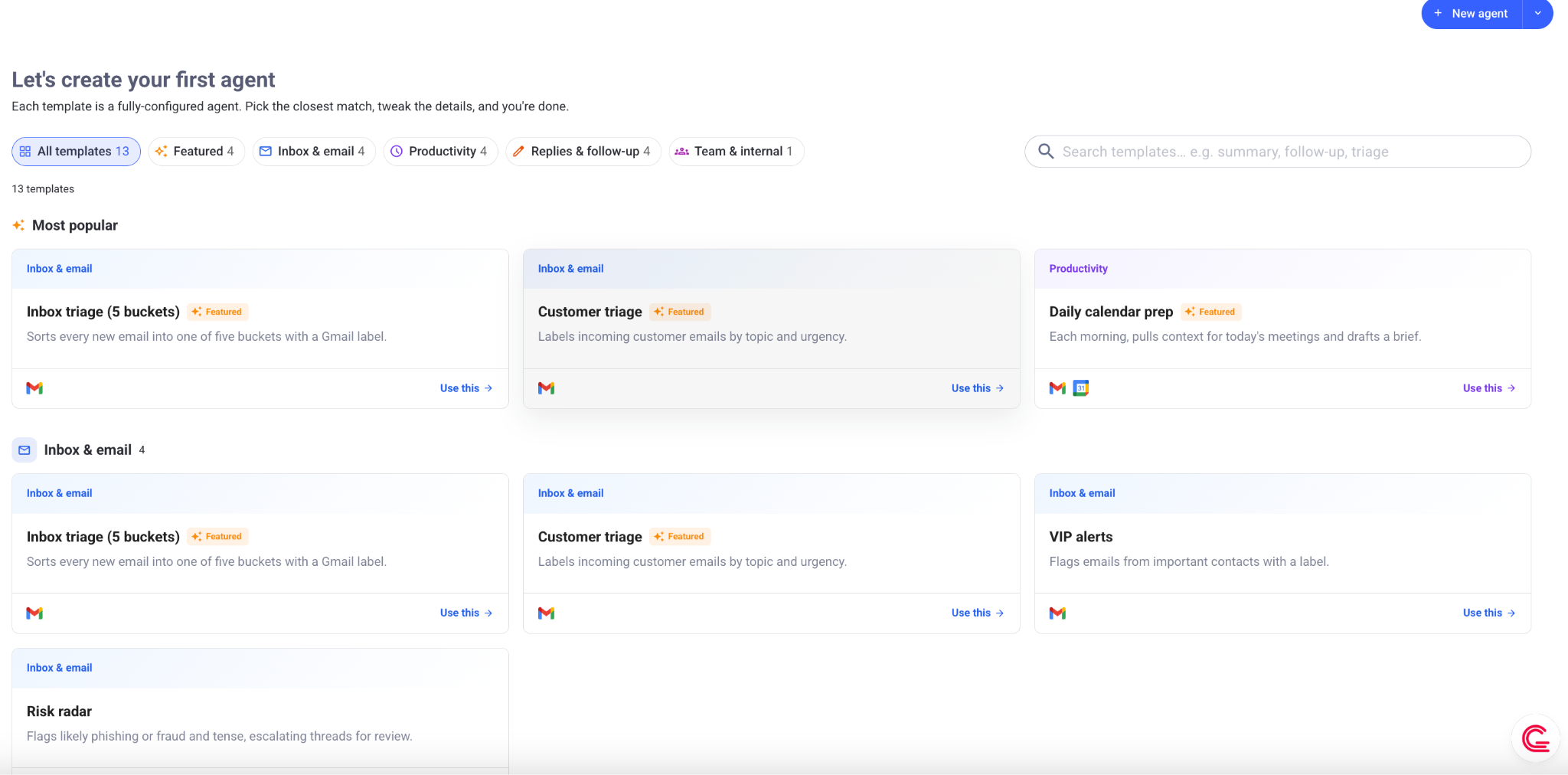
A message matching a label can start actions in a CRM, a calendar, or a chat tool, much like a Zapier flow, but the mail side already understands threads and senders instead of treating each message as a generic event.
What sets this apart from a general platform is that the mail integration, the permission model, the ownership rules, and the audit log all come built in. Gmelius is building in this category, with a visual AI agent builder that handles the cross-app logic, and Meli, the intelligence layer underneath, has learned from years of shared inbox operations, so it can suggest defaults a generic builder would, at best, guess.
5 Permission Levels for an AI Agent for Email
When building an AI agent that operates from an inbox, it can be allowed several levels of permissions:
1. Read-only: The agent classifies and summarizes without acting. Two weeks here shows how its judgment compares with the team's own.
2. Draft-only: The AI agent writes replies and saves them as drafts for a person to edit and send. Nothing reaches a recipient without that review.
3. Internal actions: Labels, owner assignment, record creation, internal notifications, all visible and reversible since no outside party sees them.
4. Send with approval: For high-stakes workflows, the agent proposes a send, a person confirms with one click, and the approval log becomes a natural audit trail.
5. Conditional autonomy: The agent sends without approval only for message types where the right response is unambiguous. Delivery confirmations and appointment reminders qualify. Pricing, commitments, and complaints don't.
What to Include in an Email Agent's Operating Instructions
An agent needs an operating document, not a prompt, since a prompt describes one task while an operating document defines a role across many. Think of it like a Claude skill, which triggers in a similar way to an AI agent.
- Role and scope: Describe what's excluded than what's covered
- Category definitions: Include two or three real examples of each from the actual inbox.
- Tone rules: Highly specific. "Professional and friendly" tells a model almost nothing, but "contractions are fine, no exclamation marks, never apologize for a delay the team didn't cause" is more detailed.
- A refusal list: Name topics the agent must never handle alone, like legal questions or anything touching a regulator.
- Escalation triggers: The conditions that send a thread to a person regardless of category, like detected frustration or an executive's message.
- Output formats: Explicitly define wherever the agent produces structured data.
- Version control: Record how the AI agent instructions change (even a basic Google Doc), since a recent change is almost always why it’ll start behaving unexpectedly.
Where to Implement the AI Agents in Email?
The first thing to remember is that not every email task is a good candidate for automation. The best candidates will have high volume and not much variation, like:
1. Triage and routing
The AI agent reads each inbound message, works out a category, applies a label, and sends the thread to the right person or queue. Six categories or fewe works best, since accuracy can drop fast once the list grows, and any scheme with 20+ routes risks becoming inconsistent regardless of the underlying model.
Anything the agent can't classify with real confidence should go to a manual review queue instead of a default bucket, as a misfiled message nobody notices can cost you.
2. First-draft Replies for Repeat Questions
A large share of any operational inbox is questions already answered somewhere else, things like pricing confirmations or refund policy. It helps to sample a few hundred incoming emails and see how many fall into this group. The bigger that group is, the more useful a first-reply AI agent will be.
Given access to past threads and a knowledge base, the AI agent can put together a draft a person approves in about fifteen seconds.
3. Data extraction into a system of record
The agent can read a message and its attachments, pull out defined fields, and write them into a CRM, database, or spreadsheet. That’s the kind of retyping somebody is doing by hand right now. This workflow is a good starting point because the error rate is easy to measure, and doing it by hand is so slow. Agents can be configured to show a confidence score for each field, so that anything below the threshold is checked by a human being.
4. Follow-up reminders
If a customer doesn't reply within a set window, that should trigger a reminder. Ideally, the AI agent should have some visibility into client operations to do this accurately. Most simple automations won’t check whether the person already replied through another channel, like a phone call, so the reminder can go out anyway, which looks careless. But an AI can connect with the CRM and make a contextualized decision before sending a follow-up.
5. Meeting scheduling
The AI agent checks availability, proposes times, handles counterproposals, and creates the event once everyone's agreed, and calendar tools already handle most of this well. It gets more useful when the agent also applies specific preferences instead of raw open slots, like no meetings before ten or a buffer between calls.
6. Shared inbox assignment and response deadlines
Each conversation gets assigned to an owner based on expertise, current load, and time zone, and the agent tracks response deadlines to escalate before a breach rather than after. By hand, this consumes a large part of a team lead's day, but the automated version costs almost nothing once built.
A system that has already seen thousands of shared threads will start from a sensible default instead of an empty rule set. For example, inside Gmelius, the AI Chief of Staff Meli tells every agent exactly which assignment and response rules to follow.
7. Thread Summaries for Handover
When a conversation is transferred from one team member to another, the agent can put together a summary covering the original request, what's already been decided, commitments made, and open questions still hanging. This is infinitely better than the alternative (reading forty messages to piece the context back together).
How to Test an Email Agent Before Deployment
It helps to start with a golden set of fifty to a hundred real threads with known outcomes, including hard cases and at least ten that should get escalated. The agent can run against that set after every change, and there are four metrics to track:
- Classification accuracy: > 90% before anything moves past read-only.
- Draft edit distance: % of the draft that had to be edited, and a rising number usually means the instructions are drifting or the agent isn't pulling the right documents.
- Escalation rate: Ideally, 10-30%. Near-zero means overconfidence and above forty percent means the scope was drawn too wide.
- False send rate: How often the agent sends something it should have escalated. This should be 0% before any autonomy is granted.
AI agents for email can also be tested in shadow mode, where the agent processes live mail and records what it would have done. Meanwhile, people keep working as usual. By comparing the two at the end of the test period, we get a realistic picture of readiness.
Why AI Agent Builders Fail Without Operational Context
Zapier figured out the wiring part long of inter-app operations before anyone was talking about language models. A trigger, a condition, an action, an app on the other end. That was never the hard part of building an email workflow. The hard part was judgement.
Say a customer's renewal is coming up. One email about it is routine. Another one, almost identical on paper, means they're about to cancel. Or say the same person emails twice in an hour. That usually means they're frustrated, not that they forgot what they already asked.
A generic workflow builder doesn't know any of that going in. It leaves the whole thing to whoever sets it up. So an operator starts from a blank page, writes the categories, guesses at the thresholds, invents the escalation rules, and finds out which guesses were wrong the first time a customer complains, not during a test.
That tends to go wrong in one of two directions. Either the AI agent escalates too much, because someone played it safe with the thresholds, and within a month the team has given up on it because it isn't saving anyone time. Or it escalates too little, resolving conversations it should have handed to a person, because nobody told it what a fragile account actually looks like.
Tools like Gmelius start with context. Its AI Chief of Staff, Meli, has watched how conversations get assigned, what usually comes right before an escalation, which response times tend to save an account, and which ones tend to lose it.
An AI agent builder that knows nothing will still work – eventually. It just costs more, in terms of the team's time, and however much patience the customer has left.
How to Choose Your Build Path
Building an AI agent for your inbox starts with matching the approach to the situation, not the other way around. A personal inbox may not need anything beyond native features in Gmail or Outlook. But workflows spanning several tools with modest volume suit a general automation platform, priced per task and owned by whoever runs the process.
A shared inbox with defined owners and real deadlines needs something built for email specifically, which is where Gmelius comes in. A visual builder connects a trigger to actions across other apps, in the if-this-then-that spirit of Zapier but built for the inbox itself.
Get a Gmelius demo and ask our team to test AI agents for your inbox.


.png)
.png)

.png)
.avif)