



Superhuman AI Review: Is This Email Tool Worth It?
If you've been researching ways to spend less time in your inbox, you've likely come across Superhuman. It markets itself as "the fastest email experience ever made," and it has a loyal following among founders and executives willing to pay a premium for it.
But is Superhuman AI actually worth it in 2026? And how does it compare to other AI-powered productivity tools on the market?
This Superhuman AI review covers what it does well, where it falls short, and who should (or shouldn't) be using it.
What Is Superhuman AI?
Superhuman is a premium email client built on top of Gmail and Outlook. Its core promise is speed: get through your inbox faster using keyboard shortcuts, a clean interface, and a command palette that eliminates friction from almost every action.
It was founded in 2014 and gained significant traction among Silicon Valley's productivity crowd. The app has since evolved to incorporate AI, repositioning itself as more than just a fast email client.
How Superhuman Uses AI
Superhuman's AI layer, called Superhuman AI, adds a set of features designed to reduce the cognitive load of email:
- AI Replies: Generate draft responses based on the thread context with a single shortcut
- Summarize: Collapse long email threads into a brief, scannable summary
- Auto Labels: Automatically categorize incoming messages
- Instant Reply: One-click suggested short responses for quick acknowledgment
The AI is trained to sound like the user over time, adapting to your writing style and vocabulary. If you want to understand how this kind of technology works under the hood, our guide on how AI assistants work breaks it down clearly.
Key Features of Superhuman AI
Superhuman's feature set is built around a single idea: remove every possible point of friction from email. .
AI Email Writing
Superhuman can generate contextually relevant replies based on the full email thread. You type a few bullet points or a brief prompt, and Superhuman drafts a complete response. The quality is generally solid for professional communication, though it occasionally requires editing for tone or specificity. For a broader look at tools in this space, see our roundup of the top AI email response generators.
AI Email Summaries
Long back-and-forth threads get collapsed into a readable summary. This is genuinely useful when you return from a few days out of office, or when you're looped into a thread mid-conversation. According to Superhuman's own data, users report saving an average of 3+ hours per week on email.
Fast Keyboard Shortcuts
This is Superhuman's founding feature. The entire platform is navigable without touching your mouse. Every action, from archiving to scheduling, has a keyboard command. For users who spend several hours a day in email, this alone can meaningfully reduce friction.
Inbox Management Tools
Superhuman includes:
- Reminders that bring emails back to the top of your inbox at a set time
- Follow-up nudges that flag emails you haven't replied to
- Snooze to defer messages until you're ready to act
- Split Inbox to separate categories like newsletters, notifications, and team emails
These are well-implemented, though they're now fairly standard features across email clients.
Superhuman AI Pricing
Superhuman now offers three plans, all billed monthly, with email AI included from the entry tier. Pricing is one of the most debated aspects of any Superhuman AI review, and for good reason.
The Three Tiers
Starter: $30/user/month. The entry plan covers email productivity, Superhuman AI, team collaboration, calendar and scheduling, and group productivity coaching. Email AI is included here, which is a meaningful change from previous pricing structures.
Business: $40/user/month. Adds more advanced AI features including Auto Drafts, Ask AI, and custom auto labels. CRM integrations with HubSpot and Salesforce also unlock at this tier, along with recent opens tracking.
Enterprise: custom pricing. Built for teams that need advanced security, SSO, a dedicated customer success manager, team analytics, and priority support.
Who the Pricing Is Best For
At $30/user/month, Superhuman is still a premium product, a 10-person team pays $3,600 per year just for email. That's easier to justify for founders or executives who treat inbox speed as a competitive advantage, and harder to defend for support or operations teams who need shared workflows and automation on top of individual productivity.
Pros and Cons of Superhuman
Pros
- Extremely fast interface with virtually no latency between actions
- Powerful keyboard shortcuts that genuinely replace mouse dependency
- Clean, distraction-free design that reduces cognitive overload
- AI writing tools that are contextually aware and improve over time
- Split Inbox for separating email categories without plugins
If you want a structured breakdown before committing, our analysis of the pros and cons of AI assistants gives useful context for evaluating any AI productivity tool.
Cons
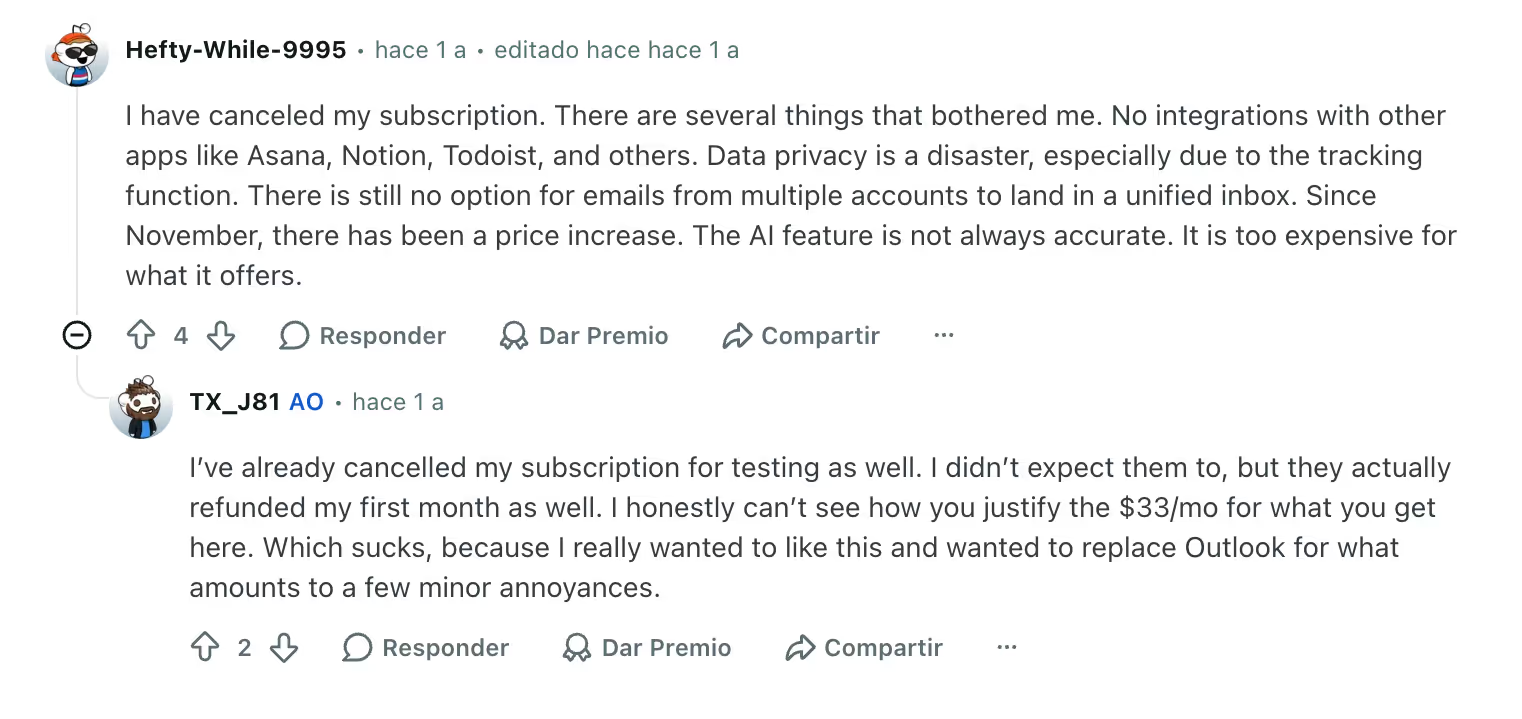
- Expensive for teams. At $30/user/month, a 10-person team pays $3,600 per year before adding any other tools
- No shared inbox at any tier. There's no native way to assign, collaborate on, or co-manage email threads as a team
- Limited third-party integrations. Beyond HubSpot and Salesforce on the Business plan, Superhuman connects with very few external tools compared to most productivity platforms
- Cost scales poorly for teams. CRM access and advanced AI are locked behind the $40/user/month Business plan


Superhuman AI vs Gmail Productivity Tools
Individual Productivity vs Team Collaboration
Superhuman is built for individual performance. It optimizes one person's experience of their inbox. That's a deliberate design choice, and it shows: there's no concept of a shared inbox, no way to assign an email to a teammate, and no visibility into what others on your team are working on.
This is fine if you're a solo operator or executive with a dedicated EA. It's a genuine limitation for support teams, operations managers, or any role where email is a shared responsibility.
Gmail-Native Workflow Tools
This is where tools like Gmelius take a fundamentally different approach. Rather than replacing Gmail, Gmelius enhances it with AI-powered automation, shared inboxes, and collaborative workflows, all inside Gmail.
Where Superhuman helps one person move faster, Gmelius helps teams work smarter. Features like shared labels, AI-powered email routing, and workflow automation are built for operational efficiency at the team level. For a fuller picture of how it compares to other tools in the category, our AI email assistants comparison is a good starting point.
Superhuman Alternatives
Tools for Team Email Collaboration
Front is another popular option for teams, combining email, SMS, and chat in a shared workspace. It's well-suited for customer-facing teams that need visibility across all inbound communication channels. Pricing starts higher than Gmelius and can become expensive as teams scale.
Help Scout focuses on customer support, offering a shared inbox with conversation assignments and a built-in knowledge base. It's purpose-built for support, which makes it less flexible for general team communication.
Gmail-Native AI Productivity Platforms
Gmelius stands out as a Gmail-native platform that combines AI productivity with real team infrastructure. It's not just a shared inbox — it's a workflow layer built directly into Gmail that lets teams:
- Automate repetitive email tasks using AI-powered rules
- Assign, track, and collaborate on emails without leaving Gmail
- Build Kanban-style pipelines from email threads
- Use AI to draft, suggest, and route messages based on context
Our guide on how to use AI for productivity goes deeper into how teams can get measurable results from tools like Gmelius. For teams that live in Gmail and need both individual efficiency and collaborative workflows, Gmelius covers ground that Superhuman simply wasn't designed to.
A Superhuman AI Review Verdict: Who Should Use It?
Best for Individual Power Users
Superhuman delivers a genuinely exceptional experience for the right user profile:
- Founders and CEOs who manage high email volume independently
- Investors and VCs responding to hundreds of deal-related threads
- Consultants and freelancers who want a premium, focused inbox experience
- Executives with personal inboxes separate from team communication tools
If you're comfortable paying $30/month for a faster, cleaner solo inbox experience, Superhuman is one of the best options available.
Not Ideal for Support or Operations Teams
If your team shares responsibility over an inbox (a support@ address, a sales@ alias, or an info@ contact form) Superhuman won't help. The tool has no architecture for shared communication. You'd still need a separate system for ticket assignment, thread ownership, and team-level visibility.
Similarly, if your goal is building intelligent routing rules or automating repetitive email tasks, Superhuman offers very little in that direction. It optimizes how fast you process your inbox, not how intelligently your inbox routes, categorizes, or responds to incoming messages. If automation is your priority, it's worth reading about the best AI assistants for email before making a decision.
A 2024 McKinsey report found that knowledge workers spend an average of 28% of their workweek managing email. Tools that address that problem at the team level, like Gmelius, can have a broader organizational impact than tools that optimize a single inbox.
Conclusion
Superhuman AI is a well-built, genuinely fast email client with useful AI features. For individual power users who live in their inbox and value speed above everything else, this Superhuman AI review lands on a clear verdict: it earns its price.
But it's not the right tool for most teams.
If your work involves coordinating with others over email, sending routing requests, assigning conversations, or building workflows that scale beyond one person, you need something built for collaboration. That's where AI productivity platforms like Gmelius offer a more complete solution: AI-powered, Gmail-native, and designed for teams, not just inboxes.
The question isn't just whether Superhuman is worth $30/month. It's whether individual inbox speed is the bottleneck you actually need to solve.


.avif)
.avif)

.avif)
.avif)