



Business information ends up inside AI chatbots more often than most teams realize. A Cisco study found that 48% of organizations admitted entering non-public company information into generative AI tools, covering everything from internal processes to customer details. Once it's in there, it stays in your history until you delete it.
Deleting that history is basic housekeeping, and both ChatGPT and Claude make it fairly quick once you know where the controls are. However, removing a conversation and stopping your chats from training the model are two separate actions, and doing one doesn't do the other. This guide covers both, plus what actually happens to your data on the provider's servers after you delete it.
It's part of our Using AI for Business series. If you're weighing the two tools more broadly, our Claude vs ChatGPT comparison goes deeper on how they differ.
What Deleting Your AI History Accomplishes
Two different things get confused here: your visible history, and what the provider does with your data behind the scenes.
Your visible history is the list of past conversations tied to your account. The behind-the-scenes part is really two questions: do your chats train future models, and how long does the company keep copies on its servers?
When you delete a conversation, it leaves your account right away, and both companies say they purge the data from their systems within about 30 days. That takes care of your history, but it does nothing about training.
If a chat already fed a model before you deleted it, unfortunately, deletion can't undo that. To stay out of training, you switch off the training setting first, and it's in a different menu, as we explain below.
How to Delete ChatGPT History
ChatGPT's controls are split between the sidebar and the settings menu. Here's how to use each one.
Delete a single conversation
- Open the left sidebar and find the conversation.
- Hover over it and click the three-dot menu, or the trash icon.
- Click Delete, then confirm.
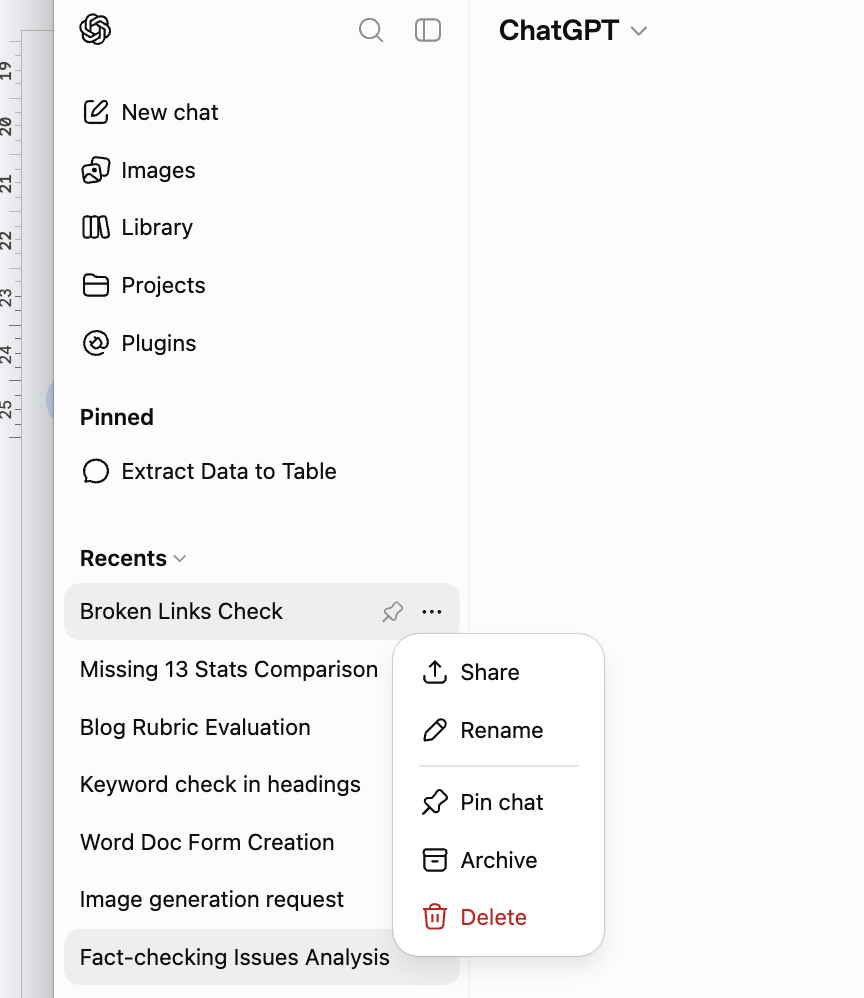
The conversation disappears from your history immediately. ChatGPT still has no multi-select as of 2026, so removing a specific handful of chats means repeating this for each one. And If you'd rather hide chats than remove them, the Archive option keeps them stored and out of the sidebar.
Delete all conversations at once
- Click your profile icon, then open Settings.
- Go to Data Controls.
- Click Delete all chats, then confirm.
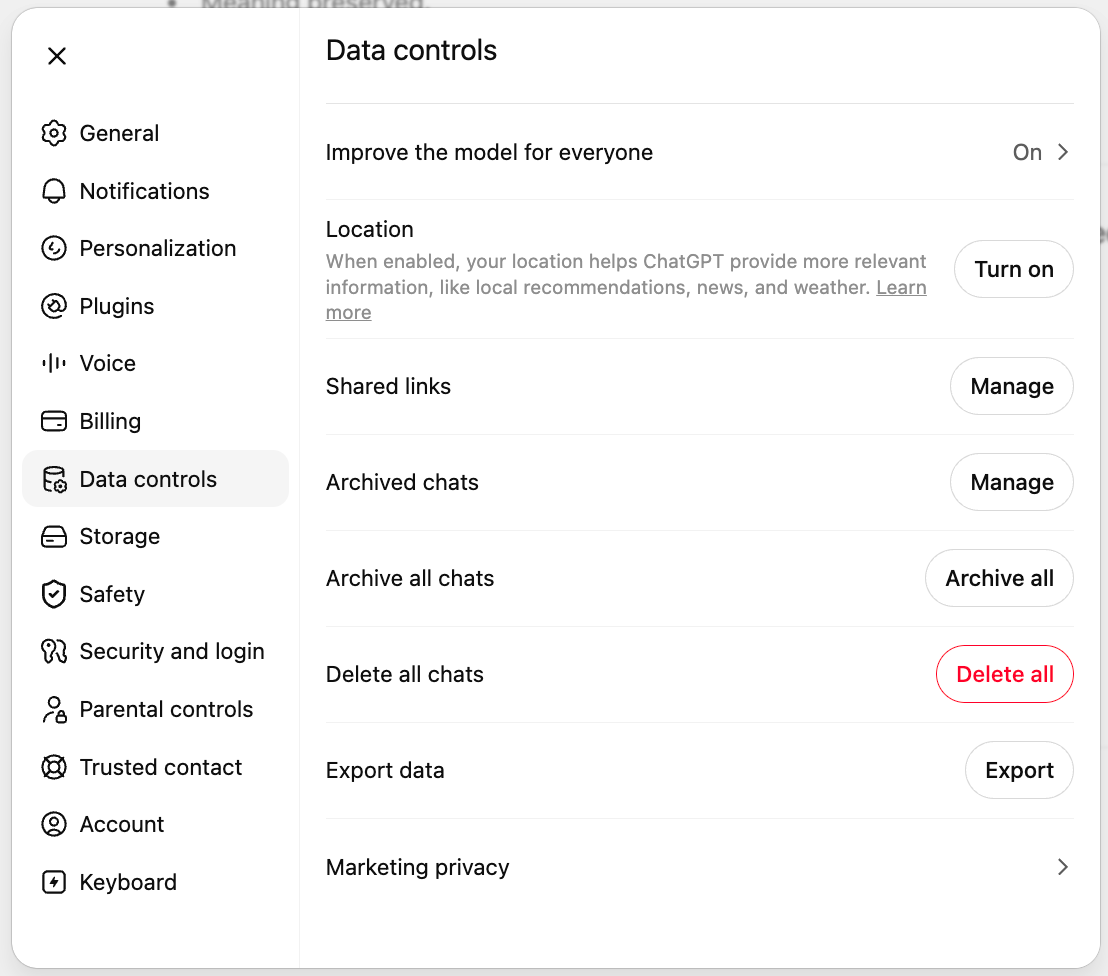
This clears your entire conversation history in one move. Bear in mind that it leaves your saved memories and your account untouched, so those need to be handled separately.
Stop ChatGPT from training on your chats
Turning off training won't delete anything you've already sent, but it stops future conversations from feeding model development.
- Open Settings, then Data Controls.
- Turn off "Improve the model for everyone."
Your chats from that point on are excluded from training. Existing history stays where it is until you delete it.
Use Temporary Chat for sensitive work
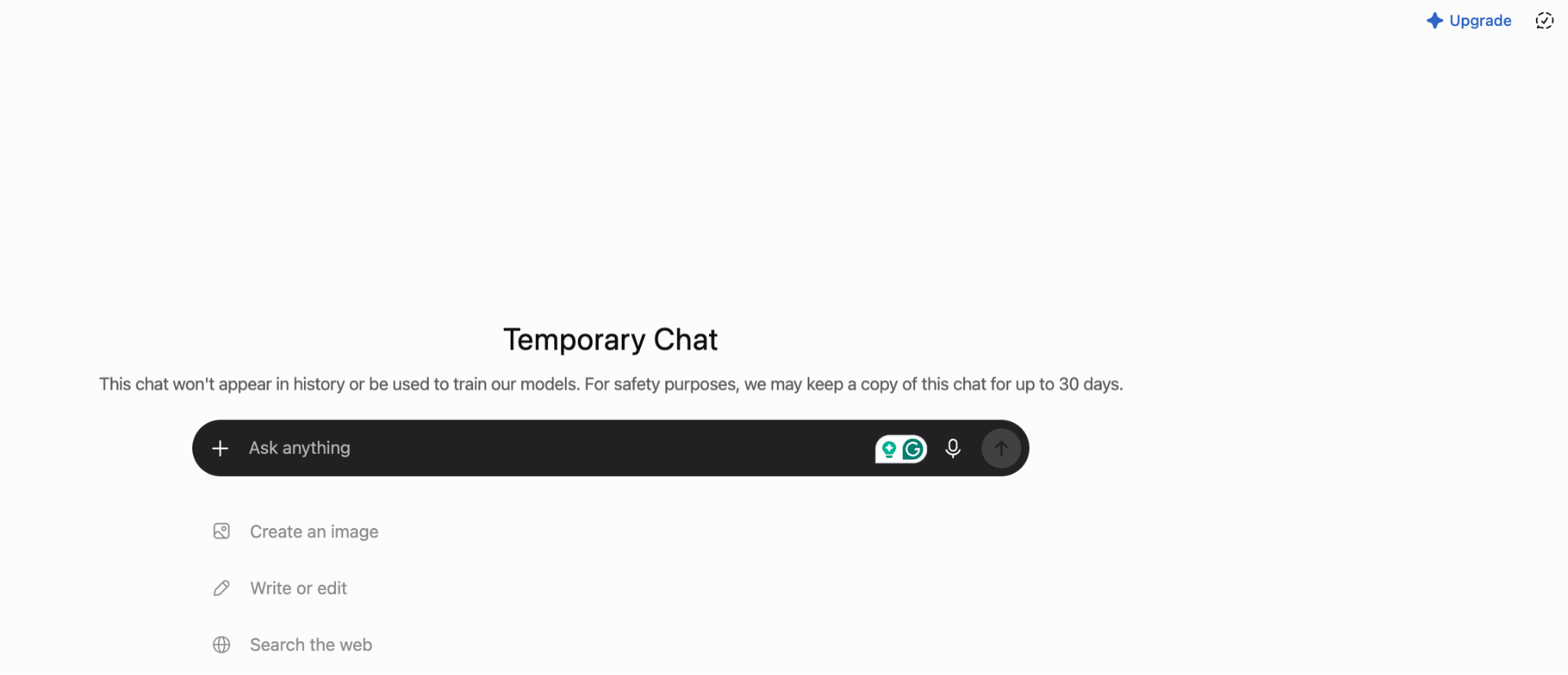
When you don't want a conversation saved at all, start a Temporary Chat from the model picker at the top of a new chat. These don't appear in your history and aren't used for training, and OpenAI deletes them from its systems within 30 days. It's the recommended option for conversations you know you might have to delete later, similar to Incognito Mode on browsers.
For a plan-by-plan look at what's included, see our guide to ChatGPT's free and paid tiers.
Clear memories and shared links
ChatGPT will also store information outside your chat list: saved memories are in Settings under Personalization, where you can delete them one at a time or all at once. Any conversations you've shared via link are in Settings under Data Controls, Shared Links, and you can revoke them there.
Delete your ChatGPT account
For a full wipe, account deletion is the only route. In Settings, under Data Controls, choose Delete account and confirm. This removes your conversations along with your saved memories and personal data, but this action can't be undone. If you're leaving over billing rather than privacy, our walkthrough on cancelling a ChatGPT subscription covers that path instead.
What OpenAI keeps, and for how long
Deleted conversations and Temporary Chats are removed from OpenAI's systems within 30 days, per the company's own statement on data retention.
One caveat: During the New York Times copyright lawsuit, a court ordered OpenAI in mid-2025 to preserve logs that would normally have been deleted. That order was lifted in late 2025 and standard 30-day deletion resumed, but a limited set of data from roughly April to September 2025 remains in restricted storage while the case continues.
OpenAI says access is limited to a small audited team and that the data can't be used for anything beyond the litigation. But conversations from the European Economic Area, the UK, and Switzerland were excluded from the hold.
How to Delete Claude History
Claude's controls are in a similar place, though the layout differs and there's no one-click way to wipe everything.
Delete a single conversation
- Open your conversation list.
- Find the chat, open its menu, and choose Delete.
- Confirm.
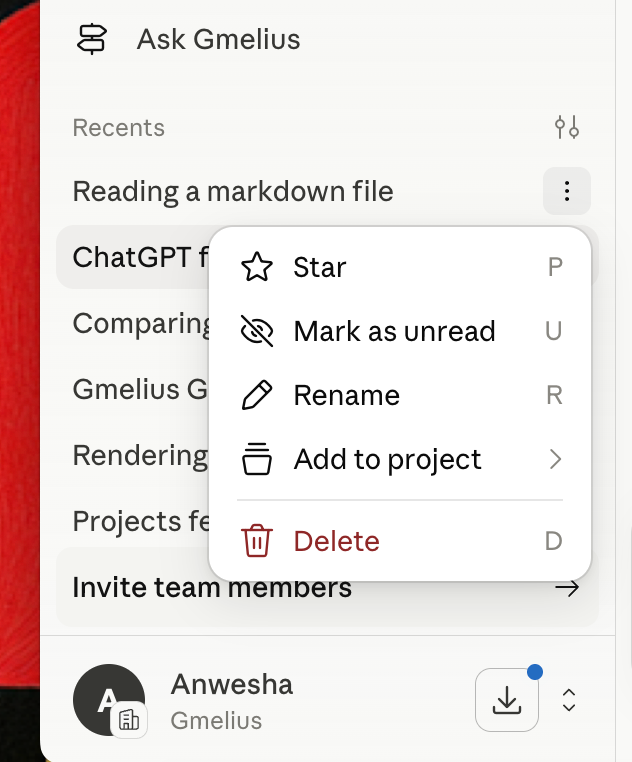
It's removed from your history immediately and cleared from Anthropic's back-end within 30 days.
Clear your whole history
Claude doesn't offer a single "delete all" button the way ChatGPT does, at least as of this writing, so clearing everything means deleting conversations one at a time. If you want a genuine clean slate, deleting your account triggers full data removal, which is the more thorough route.
Turn off training on your Claude chats
Anthropic changed its consumer policy in 2025. Chats from Free, Pro, and Max accounts can now be used to train future models when the setting is switched on, where previously they weren't used for training at all.
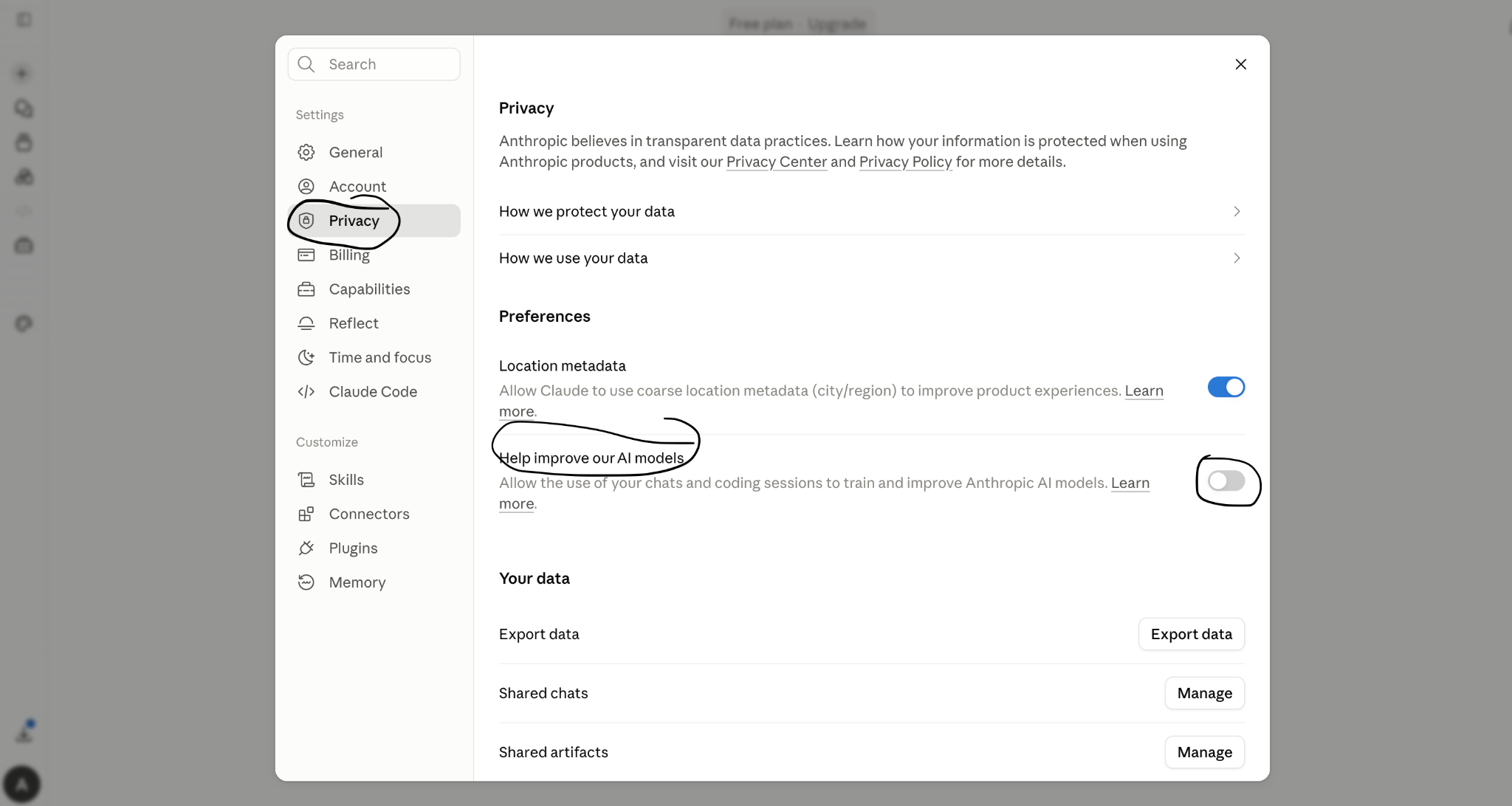
Luckily, you control this in Privacy Settings under the "You can help improve Claude" option. Switch it off and your conversations stay out of training. Of course, when you delete a conversation, it's excluded from future training regardless.
For how the plans themselves compare, see our breakdown of Claude's free and paid options.
Use Temporary Chat
Like ChatGPT, Claude has a Temporary Chat toggle at the top of a new conversation. Anything in one of these sessions is never used for training, whatever your other settings say, which makes it the right choice for client-confidential work.
What data Anthropic stores, and for how long
When you delete a conversation, Anthropic purges it from its back-end within 30 days, according to its published retention policy. However, if you've turned the training setting on, Anthropic can hold your chats in de-identified form for up to five years in its training pipelines, applied to new or resumed chats after you enabled it. And if a conversation gets flagged for violating usage policies, the inputs and outputs are kept for two years, with safety scores retained longer.
Delete your Claude account
Deleting your account starts full data removal under Anthropic's policy, and you'll find the option in your account settings. As with ChatGPT, the action is permanent.
Can You Delete ChatGPT and Claude History on a Business Plan?
Everything above describes personal accounts, meaning Free, Plus, Pro, and Max. Business plans work differently. ChatGPT Team, Enterprise, and Edu, along with Claude's Team and Enterprise tiers, don't use your data for training by default, and they hand retention and deletion controls to an admin rather than the individual user.
Some business setups, including OpenAI's Zero Data Retention API and Anthropic's enterprise equivalents, don't store your prompts and outputs at all. If your company runs one of these, check with whoever administers it before assuming your personal delete button behaves the way you expect.
Our guide to using AI assistants at work covers the wider setup.
Habits That Reduce What You Need to Delete
Deleting after the fact works, but the cleaner approach is to keep sensitive information out of your history in the first place.
Use Temporary Chat for anything confidential, and turn off the training setting on both tools if you'd rather your work stayed out of model development. It also helps to keep a line between personal experiments and real company data, since the second kind is what creates the exposure.
There's a structural fix for one common case, too. A lot of the sensitive material people paste into ChatGPT and Claude is email: the customer thread you're answering, the internal note you're reworking. Gmelius keeps that work inside Gmail instead.
Its AI, Meli, drafts from the thread you're already in, so the customer's messages and your company's context never get copied into a separate consumer chatbot that then stores them.
You skip the whole cycle of pasting data in and remembering to wipe it later. For email-heavy teams, that removes a recurring source of exactly the history this article is about deleting.
Want AI that keeps your business email out of a chatbot's history entirely?
Start your free Gmelius trial and let Meli work directly inside your inbox.
Frequently Asked Questions
Does deleting a chat remove it from the model's training?
No. If a conversation was already used to train a model, deleting it afterward doesn't pull it back out. The only way to keep your chats out of training is to turn off the training setting first, or to use Temporary Chat, so the data never goes in.
How long until my deleted chats are really gone?
Both OpenAI and Anthropic say deleted conversations are removed from their servers within about 30 days. The exception is data under a legal hold, like the ChatGPT logs preserved for the New York Times lawsuit, which stays in restricted storage until the case allows its deletion.
Can I recover a conversation after deleting it?
No. Deletion is permanent on both platforms, so export anything you want to keep before you remove it.
Does turning off history or training delete my old chats?
No, and this trips people up. Turning the setting off changes what happens to future conversations only. Your existing history stays in your account until you delete it yourself.
Is it safer to keep sensitive work out of these tools altogether?
For genuinely confidential material, yes. Temporary Chat and training opt-outs cut the exposure, but the surest approach is to avoid pasting anything you couldn't stand to see stored. For business email specifically, tools like Gmelius that work inside your existing workspace sidestep the problem by design.


.png)

.png)
.png)
.png)