.avif)



Freight forwarding is, at its core, a coordination problem. A single shipment can involve a shipper, a customs broker, an ocean carrier, a trucker, a warehouse, a port agent, and a buyer — all exchanging documents, status updates, and instructions, mostly over email. When that coordination breaks down, cargo sits. When it works, shipments move and margins hold.
Workflow management is how ops teams stop relying on memory and people-dependent processes to keep shipments moving, and start running their operations through structured, repeatable systems.
This guide covers what workflow management actually means in a freight context, where the common failure points are, and which tools are worth evaluating.
Defining Workflow Management — TL;DR
In a freight forwarding context, workflow management is the practice of defining, assigning, tracking, and automating the steps that move a shipment from booking to invoicing. It covers internal tasks (who does what, when), external coordination (brokers, carriers, customs agents, clients), and the documents that tie everything together.
A workflow management system is the software layer that makes this visible and repeatable. It replaces the combination of scattered email threads, shared spreadsheets, and institutional knowledge that most ops teams currently run on.
Why Freight Forwarding Teams Find It Hard to Standardize Their Workflows
The challenge isn't that freight forwarders don't know what a good process looks like. It's that freight operations are inherently multi-party, exception-heavy, and document-intensive in ways that most workflow tools weren't designed to handle.
Email communication often leads to long threads where shipment updates become difficult to track, and important information may be missed or misinterpreted. When those threads span three time zones and five external parties, the problem compounds fast.
Common patterns in teams that have outgrown their current setup include headcount increasing without process simplification, exception handling increasing month on month, rates being managed across multiple sources reconciled manually, and workflows depending on specific individuals — so when key people are unavailable, the process stalls.
The result: the operation is running on people, not on process. That's manageable at low volume. At scale, it breaks.
What Does a Workflow Management System Cover in Freight Operations?
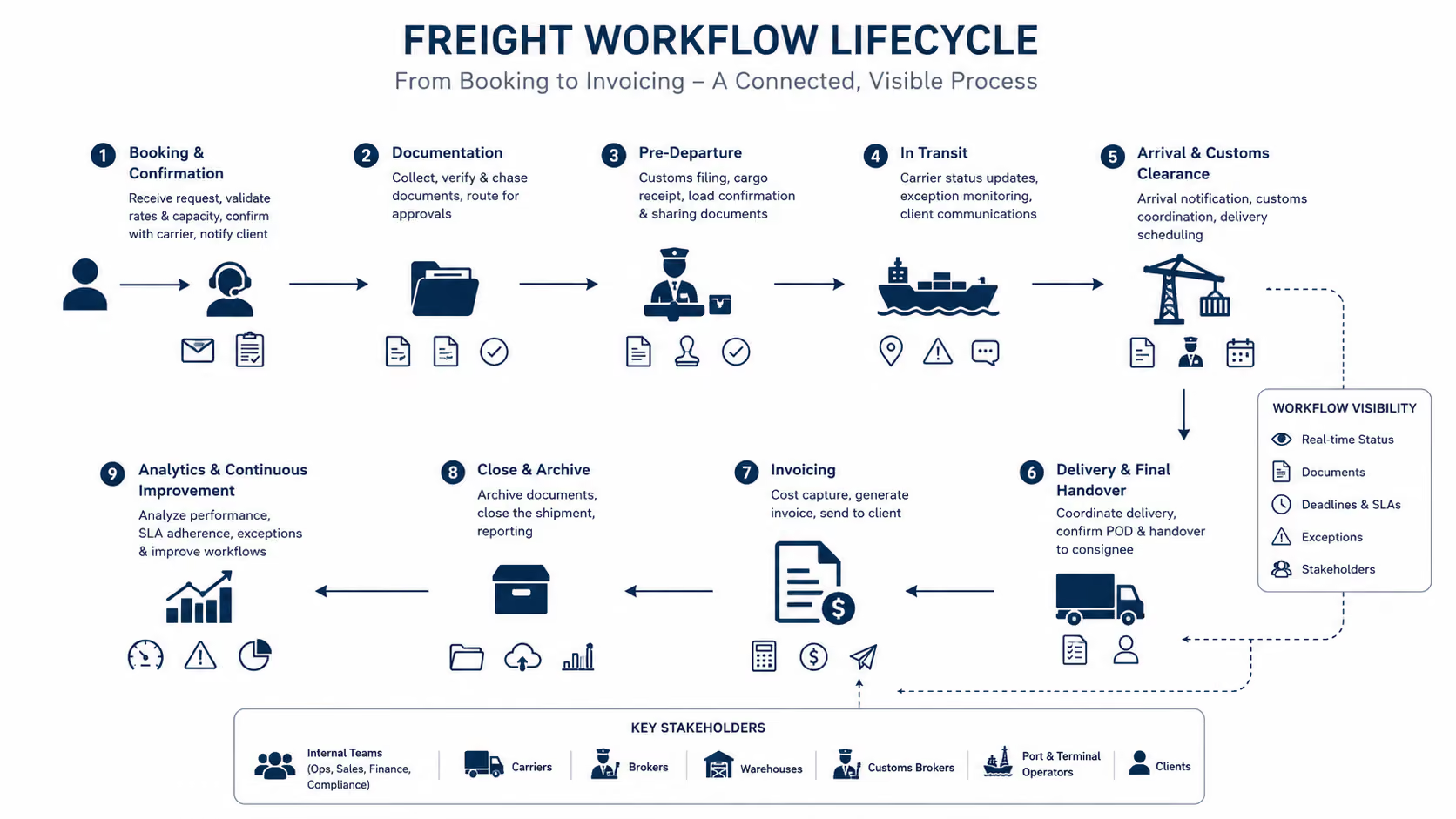
Defining the term in a logistics context
In logistics, workflow management isn't about task lists. It's about the orchestration of interdependent steps across teams and parties who don't share the same system. A workflow management system in freight should handle:
- Task assignment across internal roles (ops, sales, finance, compliance)
- Handoffs to external parties (carriers, brokers, warehouse contacts)
- Document collection and status tracking
- SLA and deadline monitoring
- Exception escalation when something goes off track
Booking to invoicing: structuring the shipment lifecycle
A structured freight workflow typically spans several distinct phases:
Booking and confirmation: receiving the shipment request, validating against capacity and rates, confirming with the carrier, and notifying the client.
Documentation: collecting the required documents (commercial invoice, packing list, bill of lading, certificates of origin, phytosanitary documents), chasing missing items, and routing for approval.
Pre-departure: customs filing, cargo receipt at origin, load confirmation.
In-transit: carrier status updates, exception monitoring (delays, holds, reroutes), client communications.
Arrival and customs clearance: arrival notification, customs coordination, delivery scheduling.
Invoicing and close: cost capture, invoice generation, file archiving.
Each phase has owners, dependencies, documents, and deadlines. Without a workflow management system surfacing all of that in one place, ops teams are manually reconstructing status from email and carrier portals multiple times a day.
Maintaining visibility across internal teams and external parties
Manual tracking — checking carrier portals individually, compiling status updates by hand, emailing customers when someone remembers to — cannot meet modern expectations at volume.
The visibility problem in freight is structural: the parties who generate the most important status updates (carriers, port agents, customs brokers) don't share your internal systems. A workflow management system has to bridge that gap, either through integrations or through structured inbox architecture that captures inbound updates and routes them to the right owner.
The Role of Document Management Workflows in Freight Forwarding
Document management is where most freight workflow breakdowns are felt first. A missing certificate of origin or an unsigned bill of lading can hold a shipment at port. The document management workflow is the process layer that prevents that from happening.
Common failure points in document collection and approval
The most common failure points aren't lost documents — they're documents that were never requested at the right time, sent to the wrong person, or sitting in someone's inbox without a clear owner.
Specific patterns that create problems:
- Document requests sent manually, with no tracking of whether they were received or acted on
- Approval chains that depend on email forwarding rather than structured routing
- No central record of which documents have been received, which are pending, and which are blocking progress
- Version control issues when amended documents arrive and it's unclear which copy is current
How automation handles reminders, requests, and status updates
A document management workflow built on automation agents changes the dynamic. Instead of a coordinator manually chasing a broker for a certificate of origin three days before departure, the system:
- Knows which documents are required for the shipment based on origin, destination, and commodity
- Sends the initial request at the right point in the workflow
- Monitors for a response and sends a follow-up reminder if none arrives within a defined window
- Flags the item as blocking if it remains outstanding past a threshold
- Routes the received document to the right approver and updates the shipment record
This is the difference between a workflow management system and a shared inbox. The inbox captures everything; the system acts on it.
How Freight Workflows Differ from Standard Project Management Workflows
Where general project tools fall short for logistics teams
General-purpose project management tools like Asana, Monday.com, and ClickUp are built around tasks, projects, and milestones. They work well for work that's initiated internally and progresses in a predictable sequence.
Freight forwarding doesn't work that way. Shippers are increasingly demanding multi-modal solutions — ocean to road, air to courier, rail connecting to the final-mile. Each mode transition introduces a new set of carriers, documentation requirements, compliance obligations, and status update protocols.
That means:
- Workflows are triggered by inbound email (a booking request, a carrier update, a customs query), not by internal task creation
- The most important status updates come from parties outside your organization
- Compliance requirements vary by lane, commodity, and counterparty
General project tools have no native understanding of any of this. Connecting them to the email layer where freight coordination actually happens requires significant workaround effort.
Exception handling — delays, holds, reroutes
In freight, exceptions are a daily operational reality. A vessel delay, a customs hold, a port congestion event, or a documentation rejection can cascade across multiple shipments simultaneously.
The workflow management layer that handles exceptions well needs to:
- Detect the exception early (ideally from a carrier or port update, not a client complaint)
- Identify which shipments are affected
- Assign an owner to manage the response
- Trigger client communication automatically
- Update downstream milestones to reflect the revised timeline
Most general project tools require all of this to be done manually. A logistics-aware workflow management system (especially one with a structured inbox architecture) can detect an inbound exception notice and trigger the appropriate response sequence without a coordinator having to parse the email and create a task from scratch.
Milestone tracking across a multi-leg shipment
Multi-leg shipments have dependent milestones that don't map neatly to a standard task list. The customs filing deadline depends on the estimated arrival of the export docs. The delivery appointment depends on the estimated discharge. If one milestone slips, the downstream ones need to shift automatically.
This dependency logic is something freight-aware workflow tools understand natively, and general-purpose project management workflow tools typically require manual re-sequencing.
What Freight Teams Should Evaluate in Workflow Management Software
1. Integration with TMS, ERP, and carrier portals
Workflow management software doesn't replace your TMS or ERP — it sits alongside it and coordinates the people and communication layer. The key question is how well it connects. Look for:
- Native integrations with the TMS your team already uses
- Ability to pull in carrier status updates without manual entry
- Data flow to finance systems so invoicing doesn't require re-keying shipment data
- API access for custom integrations with carrier portals
According to this article about digital freight forwarding trends, logistics teams that adopt integrated freight platforms report up to a 30% reduction in booking time and a 25% improvement in shipment visibility.
Separately, workflow automation reduces freight forwarding costs: teams report a 17% reduction in operational costs and 61% faster processing times. Most of those gains come from eliminating the manual steps between systems, not from any single platform feature.
2. How the tool handles shared inbox architectures and task assignment
In freight, the inbox is the workflow entry point. Booking requests, carrier updates, customs queries, client escalations — they all arrive by email. A workflow management system that doesn't handle the inbox natively will always have a gap between where work originates and where it's tracked.
Evaluate how the tool handles:
- Shared inbox architecture for functional inboxes (operations@, customs@, accounts@)
- Automatic task creation from inbound email
- Assignment rules based on sender, subject, or content
- Visibility across the team into what's open, assigned, and pending
3. Automation depth — rules, triggers, escalation paths
The difference between a basic shared inbox tool and a real workflow management system is automation depth. Look beyond "you can set up rules" and ask:
- Can automation agents send outbound emails to brokers or carriers when a trigger fires?
- Can the system escalate to a supervisor when an SLA is breached?
- Can it detect when a document has arrived and move the shipment to the next workflow stage automatically?
- Can it generate a draft reply or action based on the content of an inbound message?
This is where automation agents become relevant. Agents that can read context, retrieve history, and propose the next action are meaningfully different from rule-based triggers that only fire on exact conditions.
What Is the Best Workflow Management Software for Freight Forwarding?
There's no universal answer, because the right tool depends on shipment volume, team size, whether you need a TMS or already have one, and how much of your coordination happens in email versus purpose-built freight software.
10 Workflow Management Software Tools Logistics Professionals Trust
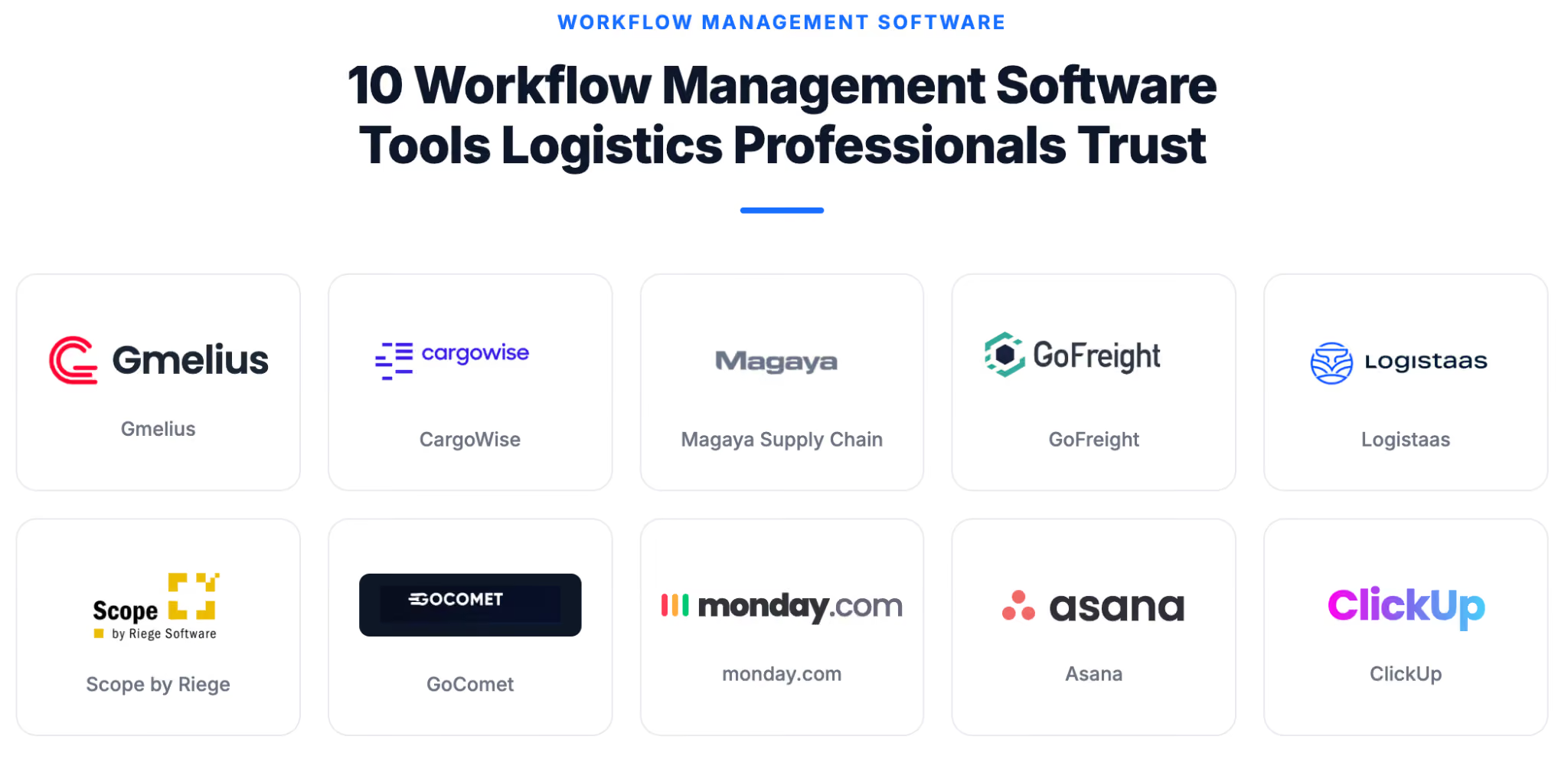
1. Gmelius
Gmelius is an inbox architecture and workflow management platform built on top of Gmail. It's designed for operations teams that run their business out of email and need shared visibility, automation agents, and structured handoffs without leaving Gmail.
The core use case for freight teams: a managed inbox architecture where inbound shipment emails are automatically triaged, classified, assigned to the right coordinator, and tracked through to resolution. Automation agents handle routine sequences (document requests, status updates, deadline reminders) while the team focuses on exceptions.
Gmelius is particularly effective for forwarders who aren't ready to replace their TMS but need a coordination and visibility layer on top of the email work that happens around it. See how AI agents are reshaping email-based operations and what AI agents actually are for context on where this category is heading.
2. CargoWise
CargoWise is an end-to-end freight forwarding and logistics platform used by mid-to-large forwarders globally. It covers the full shipment lifecycle (booking, documentation, customs, finance) within a single system. Strong on compliance and multi-modal capability. Higher implementation complexity and cost than lighter-weight tools.
3. Magaya Supply Chain
Magaya is a cloud-based freight management platform targeting small to mid-size forwarders. It covers warehousing, freight forwarding, and customs brokerage in one system. Good fit for teams that need a TMS with built-in workflow structure and don't want to stitch together multiple tools.
4. GoFreight
GoFreight is a modern cloud TMS designed for freight forwarders, with a clean UI and strong documentation workflow features. It handles shipment management, document generation, and customer portal access. Well-suited for teams looking to replace legacy TMS without a multi-year implementation project.
5. Logistaas
Logistaas is a freight forwarding software platform covering air, ocean, and land freight. It includes CRM, operations, accounting, and customs modules. Designed for forwarders who want a single system covering the full commercial and operational cycle.
6. Scope
Scope by Riege Software is an enterprise freight management system used by mid-to-large forwarders in Europe. Strong compliance and customs capabilities across multiple trade lanes. Best for organizations with complex cross-border requirements and established IT infrastructure.
7. GoComet
GoComet is a freight procurement and visibility platform focused on rate management, container tracking, and vendor negotiation. It sits alongside a TMS rather than replacing it, adding visibility and procurement automation on top of existing systems.
8. Monday.com
Monday.com is a general-purpose project management platform. Some freight teams use it for internal task tracking and milestone visibility. Its main limitation in freight is the lack of native email integration — inbound coordination from external parties doesn't flow in automatically, requiring manual task creation.
9. Asana
Asana is similar to Monday.com in its strengths and limitations for freight use cases. It works well for internal project tracking but doesn't handle the email-first nature of freight coordination natively. Teams that use it typically pair it with a separate inbox management tool.
10. ClickUp
ClickUp is a highly configurable work management platform that some freight teams use for operations tracking. Its flexibility is both its strength and its complexity — teams need to invest time building the right structure for their freight workflows before it becomes useful.
Evaluating options by team size and shipment volume
For teams handling fewer than 200 shipments per month, a TMS-plus-inbox-management combination often delivers more value than a full enterprise platform. The coordination overhead is lower, and the priority is visibility and basic automation rather than complex compliance workflows.
Above that threshold, the math shifts. A freight forwarder handling 200 shipments monthly with three operations staff could easily lose 30+ hours weekly to inefficiencies from outdated software. At that point, investing in workflow management software with deeper automation and integration pays back quickly.
Email-native tools vs. standalone platforms
The most common mistake freight teams make when evaluating workflow management software is treating email as an output channel rather than the primary coordination surface. Most freight coordination — with clients, brokers, carriers, and customs agents — happens over email by necessity. Moving that coordination into a standalone platform that external parties won't log into creates more work, not less.
Email-native workflow tools like Gmelius are designed for exactly this dynamic. They bring the workflow management layer into the inbox rather than asking the inbox to feed a separate system. For teams where email is the center of operations, that distinction matters more than any feature comparison.
For deeper context on how AI is changing email-based work management, see how to use AI assistants for work and agentic AI statistics.
How Gmelius fits into a freight team's existing stack
Gmelius doesn't replace your TMS. It covers the coordination layer that TMS platforms typically don't: the shared inbox architecture, the email-based handoffs with external parties, the automation agents that handle document requests and status updates, and the visibility into what's open across the team.
The typical integration pattern for freight teams:
- TMS handles shipment records, documentation generation, and financial data
- Gmelius handles inbound email coordination, task assignment, automation agent sequences, and SLA tracking across the email layer
- Reporting pulls from both, giving ops managers visibility into both the shipment status and the coordination workload
Using Gmelius to Simplify Workflow Management in Logistics
The foundation of a managed freight email workflow is a structured inbox architecture adapted to the needs of an ops team: functional inboxes the whole team can see, with automation agents handling classification, assignment, and follow-up sequences that coordinators currently do manually.
Gmelius doesn't replace your TMS. It covers the coordination layer your TMS doesn't: the inbound email triage, the handoffs with external parties, the document request sequences, and the SLA tracking that currently lives in someone's head.
The teams that scale profitably in freight build coordination infrastructure before they need it. For teams running their operations out of email, that's where to start.


.avif)
.avif)
%20(2).avif)
.avif)
.avif)