.png)



An AI business assistant is software that helps a team complete work across people, not just help one person move faster. Seems obvious but that distinction matters more than it sounds. Most tools marketed as "AI business assistants" today are built to speed up a single inbox or a single task list. Very few are built to coordinate work that involves multiple people, multiple parties, and multiple handoffs, which is what most B2B operations actually look like.
If you run vendor relationships, client accounts, RFP responses, or partner coordination out of email, you already know the gap. A chatbot can draft a reply, but it cannot tell you who owns the next step, what happened on this account six months ago, or whether the vendor you are emailing has missed the same deadline twice before.
What Is an AI Business Assistant?
An AI business assistant sits on top of the work a team already does and helps that work move: classifying incoming requests, assigning them to the right person, drafting a response, or flagging something that has gone quiet too long.
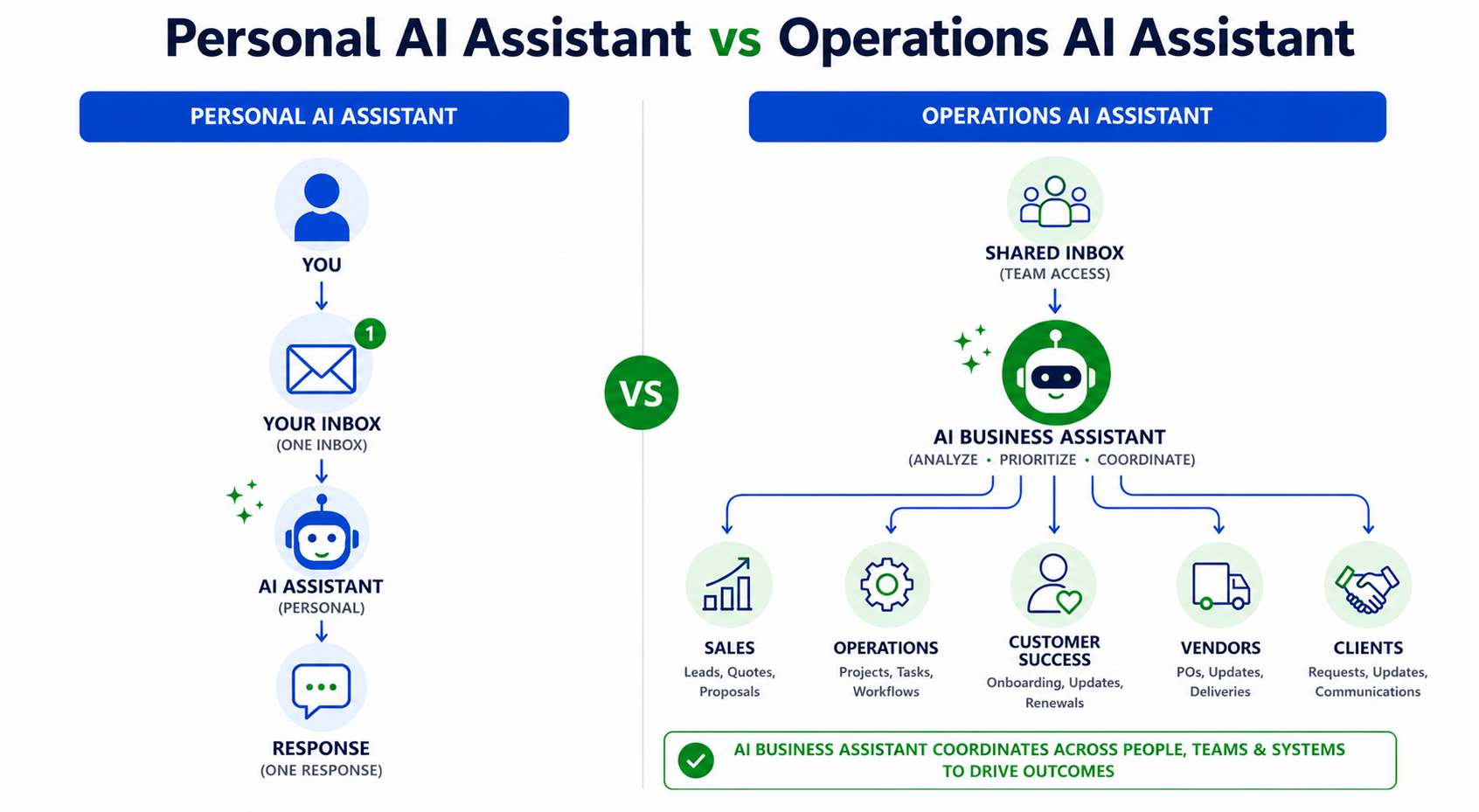
The confusion comes from lumping two different categories under one name. Personal AI assistants help one person get through their day, summarizing a thread or drafting a reply. Tools like Claude, ChatGPT, and Gemini are excellent at this, and our comparison of AI assistants beyond ChatGPT and Gemini breaks down where each one is strongest. Operations assistants help a team of people move shared work forward, which requires visibility across everyone touching a workflow, not just the person typing the prompt.
The Difference Between a Personal Assistant and an Operations Assistant
A personal assistant works for you, with access to your inbox, calendar, and history. An operations assistant works for the workflow itself, tracking a request as it moves between a client, an internal owner, and a vendor while keeping context intact the entire time. See how AI assistants actually work for more on how these systems function day to day.
AI Business Assistant vs. AI Chatbot: What Is the Difference?
The two terms get used interchangeably, but they describe different things.
An AI chatbot answers questions. You type a prompt, it responds, the conversation ends when you close the tab. It does not know what happened yesterday on this account unless you paste that history back in, and it cannot act on behalf of a team once you look away.
An AI business assistant is embedded in the workflow itself. It does not wait for a prompt. It watches a shared inbox or process, classifies what comes in, routes it to the right person, and keeps working after you have moved on. The distinction comes down to three things:
- Memory. A chatbot resets with every new conversation. A business assistant retains context across threads, people, and time.
- Scope. A chatbot answers for one person, in one session. A business assistant operates across everyone touching a shared workflow.
- Initiative. A chatbot waits to be asked. A business assistant classifies, routes, and flags on its own, without a person prompting it each time.
This is also where "AI agent" gets confused with both. An agent is a component, typically one task done well, like classifying a message or drafting a reply. A business assistant is usually made up of several agents working the same workflow together. Our breakdown of what AI agents are and this comparison of AI assistants vs. AI chatbots go deeper on where each term starts and stops.
Why Most AI Business Assistants Fail at Multi-Party Work
Solo AI tools are good at what they were built for: one person, one inbox, faster output. The problem shows up once more than one person needs to be involved.
Picture a shipment delay that needs operations, a carrier contact, and the account owner before the client is notified. A single-user AI assistant cannot see across those people. It can draft the update, but it cannot manage the handoff or remember that this same carrier missed a delivery window before. Our comparison of Claude vs. ChatGPT and this comparison of AI email assistants point to the same pattern: these tools are built for a single user's speed, not coordination across a team.
The Hidden Cost of Solo AI Tools in Team Workflows
The cost of this gap is not hypothetical. Research on workplace context switching estimates fragmented, tool-hopping work costs the US economy roughly $450 billion a year in lost productivity, largely because every handoff forces someone to reconstruct context that already existed, just not anywhere they could find it. That is the exact failure mode operations teams live with daily: the answer already exists in an old thread or a previous exception, but nobody working the request has it in front of them.
Agent Orchestration: the Real Upgrade
The next step past a single AI assistant is not a smarter chatbot. It is a set of agents working a workflow together, each responsible for a different part of the job. This is agent orchestration, a meaningfully different architecture from a static rule that fires on a keyword. Our guide to what AI agents actually are and our roundup of the best AI agents cover this shift in more depth.
Adoption is accelerating fast. Gartner projects 40% of enterprise applications will include task-specific AI agents by the end of 2026, up from under 5% a year earlier, a trend we break down further in our agentic AI statistics roundup. What separates a useful implementation from a gimmick is whether the agents actually understand the workflow they operate in.
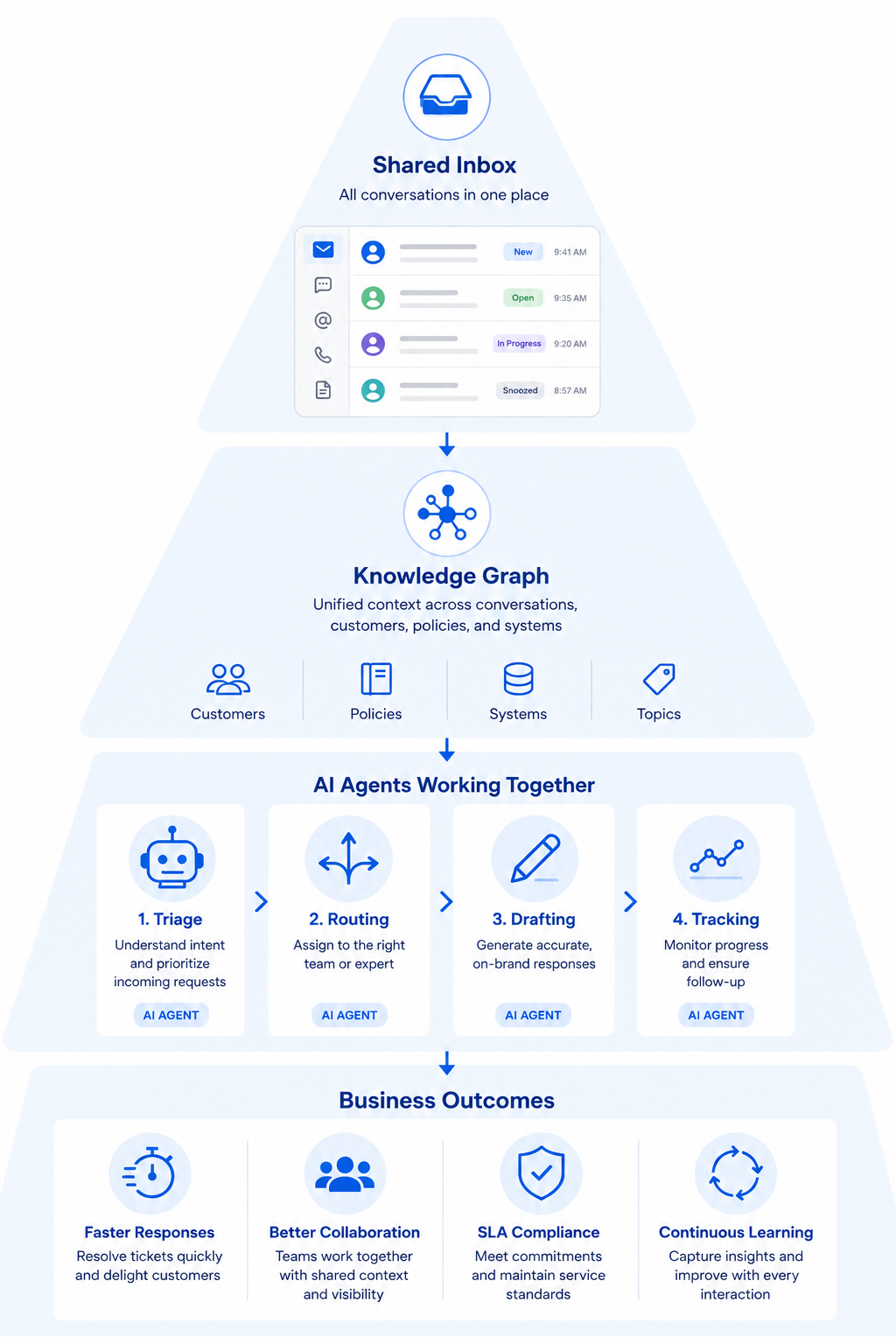
The Four Agents Behind Every Ops Workflow
Every multi-party workflow, whether it is vendor coordination, a deal desk, or client services, breaks down into the same four jobs:
- Triage reads an incoming request, classifies it, and pulls relevant history, contracts, and ownership before anyone touches it manually.
- Routing assigns the work to the right internal owner and loops in outside parties like vendors, partners, or brokers.
- Drafting proposes the next action, whether a reply, a quote, a scope change, or an escalation, pre-loaded with the context Triage retrieved.
- Tracking watches the thread over time, flags SLA risk, and rolls up patterns like vendor scorecards and account health.
What makes the system valuable is that the four functions run together on the same shared understanding of the work.
Why Context Is the Real Differentiator, Not the Agents Themselves
Agents are becoming table stakes fast. What is harder to build, and harder to copy, is the layer underneath them: a shared record of who is involved, what already happened, and what depends on what. Without that, an agent is just a chatbot with extra steps.
This is where a knowledge graph earns its place. A system that has watched every thread on a vendor relationship, every exception on an account, and every prior escalation can hand an agent context a solo AI tool has no way to reconstruct, because that AI only ever sees the one thread it was pasted into. A chatbot answers what you type into it. An assistant built on a real knowledge layer already knows the contract terms, the last exceptions on this vendor, and who resolved a nearly identical issue last quarter.
What This Looks Like in Practice
Vendor and supplier coordination. A tracking agent notices a supplier has gone quiet before a delivery deadline and flags the account owner before it becomes a missed shipment.
Deal desk and RFP response. A drafting agent proposes a scoped response pulled from how a similar deal was won or lost previously, instead of starting from a blank page.
Agency account management. A routing agent recognizes an incoming client email touches a legal question and loops in the right internal owner immediately, instead of sitting in a shared inbox until someone happens to see it.
These are the default shape of work for anyone running client services, vendor ops, or partner management through email, and they map directly to how to use AI assistants for real work rather than just faster drafting.
How to Evaluate an AI Business Assistant for Your Team
Before adopting a tool marketed as a business assistant, check it against a short list:
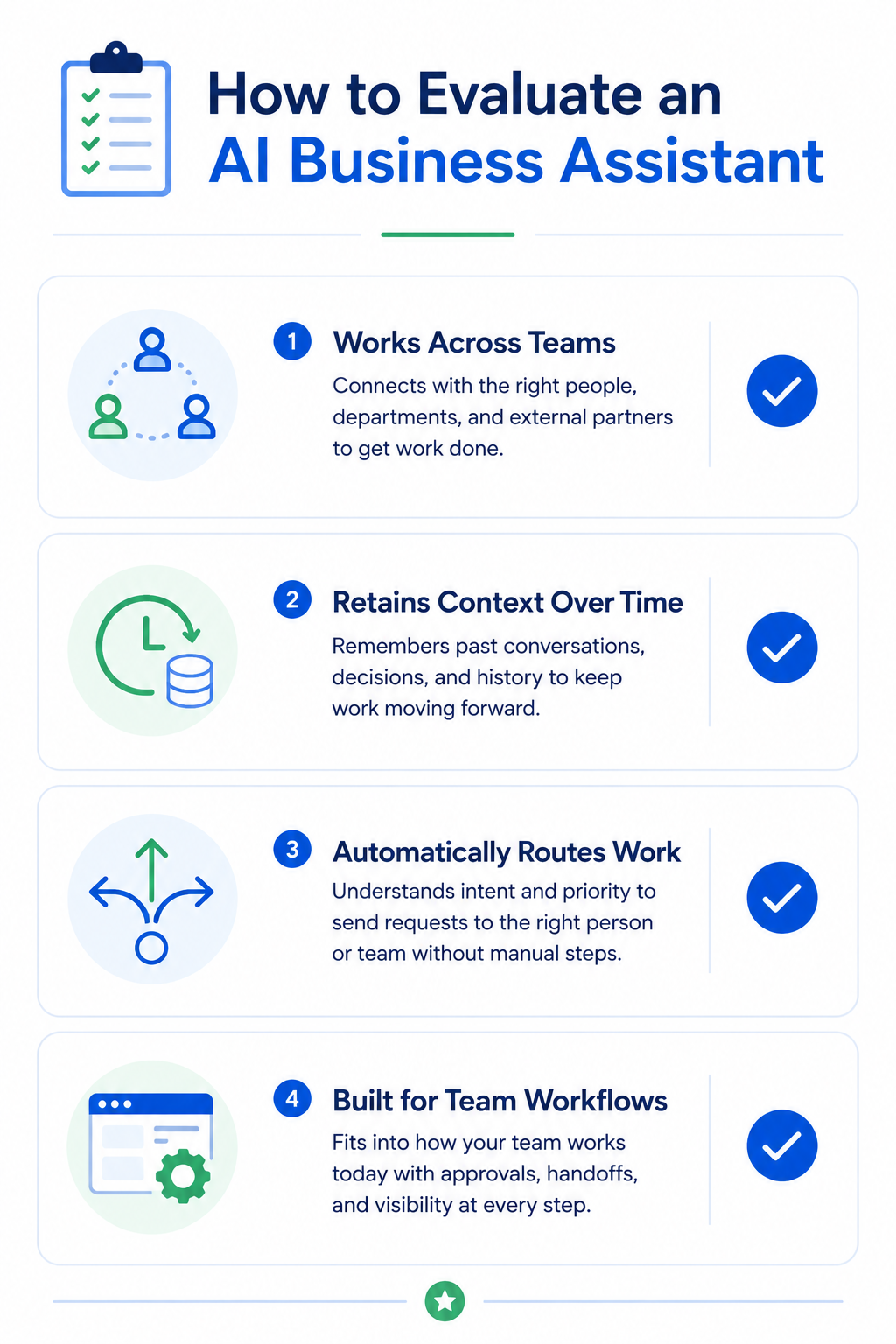
- Does it work across multiple people, or only inside one person's inbox?
- Does it retain context across threads and over time, or reset with every new conversation?
- Can it hand off work to the right person automatically, not just draft a response?
- Is it priced and built for a team's workflow, not a single seat?
The Bottom Line: What an AI Business Assistant Should Actually Do
A real AI business assistant does more than draft your next email. It understands the workflow it sits inside, knows who else is involved, remembers what already happened, and moves work forward across people, not just for one. Solo AI tools are excellent at speed. They were never built to coordinate.
Gmelius brings agent orchestration and a shared knowledge layer to the multi-party email work solo AI tools cannot touch, whether that is vendor coordination, deal desks, or client services.
Try Gmelius free and see what agent orchestration looks like on your own team's inbox.


.avif)
.avif)
.avif)

.avif)
.avif)