%20(1).avif)



A single load touches more people than most shippers realize: a sales rep books it, a coordinator plans it, a dispatcher assigns the carrier, a driver runs it, and a billing clerk closes it out. Every handoff happens over email, and every handoff is a place a load can stall.
The pressure on that process keeps rising. The global digital freight brokerage market was valued near $4.9 billion in 2025 and is projected to reach $8.6 billion by 2035 as shippers push for more automated matching and real-time visibility. Yet shipping data often still lives in silos across carriers, forwarders, and ports, which is exactly the gap a coordination desk has to close on its own.
This guide covers what collaborative workflow management looks like on a freight desk, how to set up team workflow management around loads, and where a work management platform fits alongside the TMS you already run.
What Collaborative Workflow Management Means on a Freight Desk
Collaborative workflow management is the practice of giving a team shared visibility, shared ownership, and shared rules around work that used to live in one person's head or one person's inbox. On a freight desk, that means every load has a status, an owner, and a history that anyone on the team can see, not just the coordinator who booked it.
The handoff chain behind one load, from quote to invoice
A single shipment usually passes through five or six hands before it's closed:
- Quoting and rate negotiation with the shipper
- Carrier sourcing and rate confirmation
- Pickup scheduling and appointment setting
- In-transit tracking and check calls
- Delivery confirmation and proof of delivery collection
- Invoicing and carrier payment
Each handoff is a risk point. If the person receiving the load doesn't get full context, the shipment loses momentum, and someone has to reconstruct what already happened by digging through old emails.
What happens when each coordinator runs their own loads in isolation?
When coordinators each manage their own book of loads without a shared system, a few predictable problems show up. Coverage gaps appear the moment someone is out sick or on vacation, because nobody else knows what that coordinator was tracking. Customers get inconsistent answers depending on who picks up the phone. And managers lose the ability to see problems before a customer calls to complain about a missed pickup.
Isolation also hides the data a desk needs to improve. If check calls, exceptions, and delays all live in individual inboxes, there's no way to spot a pattern, like a lane that consistently runs late or a carrier that consistently ghosts on tracking updates.
The desk gains once everyone can see the status of every shipment
Shared visibility changes the math. A coordinator can step in on a colleague's load without starting from zero. A manager can scan the board and see exactly which shipments are at risk before a customer notices. And because history sits in one place instead of six inboxes, the desk starts building institutional memory instead of losing it every time someone leaves.
How to Set Up Team Workflow Management Around Loads
Getting a coordination desk from ad hoc to organized doesn't require ripping out your existing tools. It requires a set of rules that everyone follows and a system that enforces them.
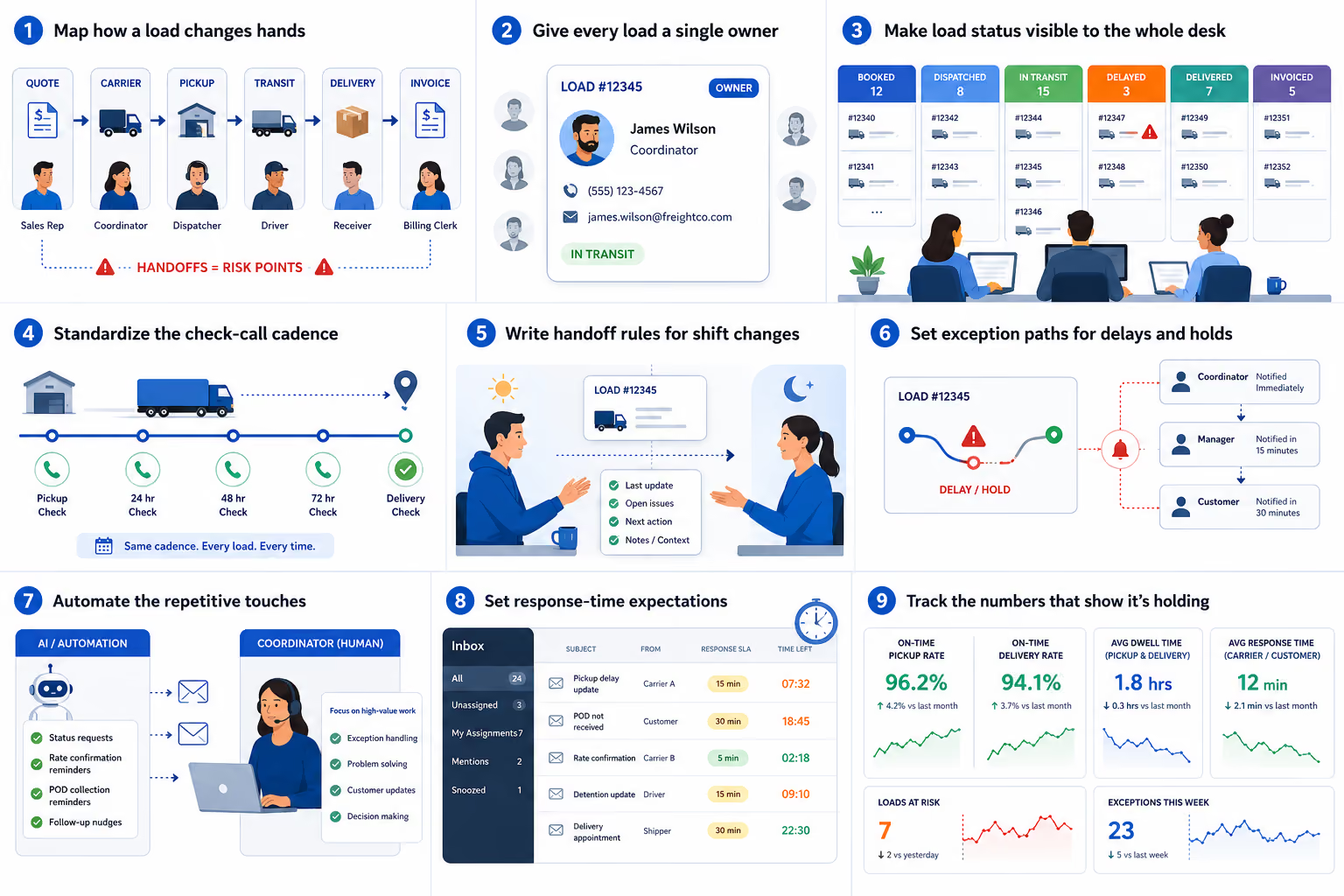
1. Map how a load changes hands
Before adding software, write down the actual path a load takes on your desk today, not the ideal path. Mark every point where responsibility shifts from one person to another. Those are the moments most likely to lose information.
2. Give every load a single owner
Ambiguous ownership is the root cause of most dropped loads. Every active shipment should have exactly one named owner at any given time, even if that ownership changes hands during the load's lifecycle. Carriers and customers should always know who to contact.
3. Make load status visible to the whole desk
Status should live somewhere the whole team can see it: booked, dispatched, in transit, delayed, delivered, invoiced. If that status only exists in one person's personal notes or inbox folders, it isn't really visible at all.
4. Standardize the check-call cadence
Decide as a team how often loads get checked, and build that cadence into your process rather than leaving it to individual habit. A load in transit for three days shouldn't get five check calls from one coordinator and zero from another.
5. Write handoff rules for shift changes
When a load passes from one coordinator to another at shift change, the next person should get more than a name and a load number. They need the last update, any open issues, and what's expected next. A short handoff template solves most of this.
6. Set exception paths for delays and holds
Exceptions are where coordination breaks down fastest. Decide in advance who gets notified when a load sits in detention, hits a customs hold, or needs a reroute, and how quickly. Waiting until the exception happens to figure out the escalation path costs time you don't have.
7. Automate the repetitive touches
Not every touchpoint needs a human. Status requests to carriers, reminders to send a rate confirmation, or nudges to collect a proof of delivery are repetitive enough to hand off to automation agents that trigger based on load status and time elapsed, freeing coordinators for the parts of the job that actually need judgment.
8. Set response-time expectations
Define how quickly an inbound message about an active load needs a response. Without a stated expectation, response time drifts toward whatever each individual coordinator considers acceptable, which is rarely consistent.
9. Track the numbers that show it's holding
A handful of metrics will tell you whether the new process is working: on-time pickup rate, on-time delivery rate, average dwell time at pickup and delivery, and average response time to carrier and customer messages. Review these regularly rather than waiting for a customer complaint to surface a problem.
Where a Work Management Platform Fits Alongside Your TMS
Your transportation management system handles rating, booking, and settlement. It was never built to manage the human coordination happening around those transactions, which is exactly the gap a work management platform fills.
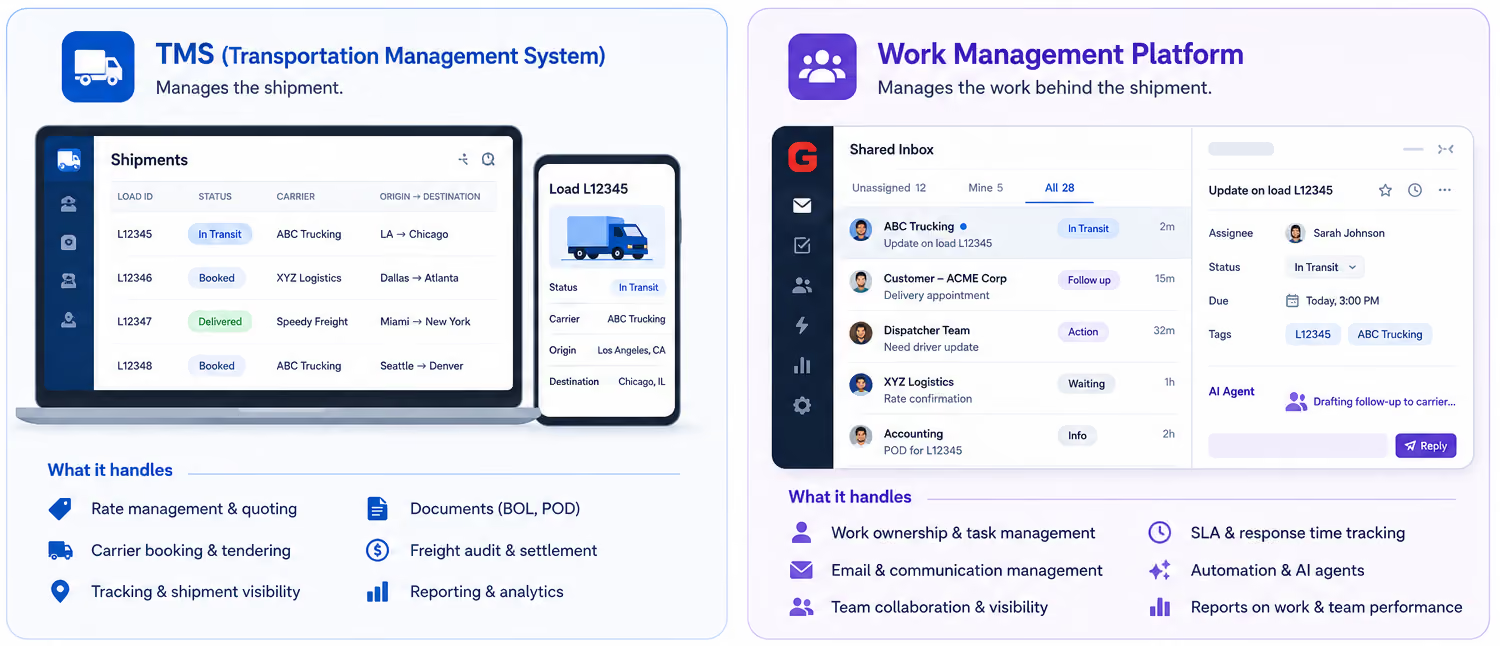
What a work management platform does that your TMS doesn't
A TMS tells you what a load's rate, route, and status are. It doesn't tell you who's supposed to respond to the carrier's email sitting unread for six hours, or which coordinator owns a customer's escalation from yesterday. A collaborative work management platform layers ownership, handoffs, and communication rules on top of the transactional data your TMS already tracks.
System of record vs. system of coordination, and why teams need both
Think of your TMS as the system of record: it stores the facts about a shipment. A work management platform is the system of coordination: it manages who does what, when, and what happens if something is missed. Desks that only invest in the system of record often find that coordination still happens informally, in personal inboxes, which is exactly where visibility breaks down.
Whether to extend your TMS, buy a standalone platform, or run coordination in an email-native tool
Most freight coordination still happens over email, because carriers, customers, and partners rarely all use the same TMS. That makes an email-native approach to coordination worth serious consideration. The foundation of a managed freight email workflow is a structured shared inbox architecture adapted to the needs of an ops team, one where load threads route to the right owner automatically, status lives on the thread itself, and nothing depends on a single person's inbox folder structure.
This is where the shift from single-user AI tools to team-level coordination matters. Reviewing ChatGPT for email review or comparing standalone AI email response generators is useful context, but those tools are built for one person managing their own inbox. A freight desk needs AI agents that operate across a shared inbox, not inside a single mailbox.
What should sync between the two so nobody re-keys a load?
At minimum, load number, status, and key dates should sync between your coordination layer and your TMS. Nobody on a coordination desk should have to manually update two systems every time a load status changes. If your tools require double entry, that's a sign the integration needs work before rollout.
Rolling Out Collaborative Software on a Coordination Desk
The best process on paper fails if coordinators quietly work around it. Rollout matters as much as design.
Why coordinators resist software that adds steps to how they already work
Coordinators are judged on loads moving, not on system adoption. Any tool that adds clicks without visibly saving time will get abandoned the first busy week. The goal isn't to add a new system to check; it's to make the system do work coordinators were already doing manually, like routing, status updates, and check-call reminders.
Piloting on one lane or one team before rolling out to the whole desk
Start with a single lane or a small team rather than flipping the switch for the entire desk at once. A contained pilot surfaces process gaps while the stakes are low, and gives you real numbers to show the rest of the team before asking them to change how they work.
What it takes for a dispatcher to actually switch, and how to earn the first 90 days
Adoption in the first 90 days depends on speed, not features. If the new system is slower than the old habit of forwarding an email and calling it done, dispatchers will revert. Early wins, like eliminating a manual status update they used to do by hand, build the trust needed to expand the pilot.
Sustaining Collaborative Work Management as the Desk Grows
A process built for five coordinators doesn't automatically hold at twenty. As headcount grows, revisit ownership rules, handoff templates, and automation coverage at least twice a year. New lanes, new carrier types, and new customer segments all introduce edge cases the original process didn't anticipate. Building in a regular review, rather than waiting for the process to visibly break, is what separates desks that scale smoothly from ones that rebuild their workflow from scratch every time they add headcount.
It also helps to look at how coordination is evolving more broadly. Understanding how AI agents work and reviewing current agentic AI statistics gives a useful benchmark for how much of this coordination can realistically be automated versus what still needs a human decision.
Bottom Line
Freight coordination breaks down at handoffs, not at any single desk or task. The fix isn't more tools bolted onto a TMS; it's a shared workflow where every load has one owner, status is visible to the whole team, and repetitive touches are automated instead of manually repeated by whoever happens to be covering that load.
Gmelius builds inbox architecture for teams running multi-party operations like freight coordination out of email, with automation agents that handle triage, routing, drafting, and tracking so nothing sits untouched between handoffs. Try Gmelius free and see what a shared, structured inbox does for your coordination desk.



.avif)
.avif)